12
H. Cruise Ctrl (Timer Function): 10, 20, 30 Seconds moving control (roughly 10, 20, 30
yard/meter) Increase 10 seconds (10 yards) each press. 30 seconds (30 yards) max.
Important Notes:
• Change remote control batteries once the indicator LED gets weak or dim
• The remote control uses 2 x 1.5V AAA batteries
• To change batteries, open up the battery compartment cover and place the batteries
according to the diagram in the battery compartment
• The maximum range of the remote control varies between 80-100 yards, depending on the
battery charge, obstacles, atmospheric conditions, power lines and topography of the
course.
• Remote Control Connection: This is used to align the caddy frequency with an out-of-tune
or replacement remote control or new control box.
Step 1 - Make sure power is totally off for at least five (5) seconds
Step 2 - Hold down the STOP button on the remote.
Step 3 - Power up cart. Continue to hold down the stop button.
Step 4 - Continue hold down the stop button until the lights on the LED screen blink.
Step 5 - Cart is now in “sync” test each function to assure all are functioning.
• It is strongly recommended to operate the caddy at a maximum rang within 50 yards in
order to prevent the loss of control of the caddy!
3.3. Additional Function
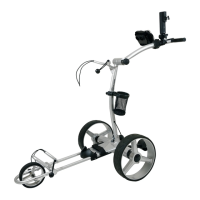
3.3.1. Tracking Adjustment:
You can adjust the tracking of your caddy by loosing the axle and the adjustment bar on the
right side of the front wheel and shifting the axle accordingly. Fasten screws in-reverse order
but do not over tighten after adjustment.
Pic 22


 To Next Page