EasyManua.ls Logo

Novatel T1114 - User Manual

Novatel T1114
3 pages
Print Icon
To Next Page IconTo Next Page
Loading...
TITLE: QSG T1114 VZW
P/N: 90026842
Rev.A 07/25/13 - LZalasky - INITIAL DRAFT RELEASE
Rev.1 08/07/13 - LZalasky - REMOVED SPANISH SECTION
ECO: 13281
Novatel WirelessTechnologies Ltd.
Suite 200, 6715 - 8th St NE
Calgary, AB Canada T2E 7H7
Phone: 403 295 4800
FLAT SIZE: 984.0 mm X 123.0 mm
FINISHED ASSEMBLED SIZE: 123.0 mm X 123.0 mm
COLOR: K + PMS 186C
MATERIAL
105gsm 20-30% post consumer C2S
FONTS
INCLUDED IN FONTS FOLDER
LINKS
INCLUDED IN LINKS FOLDER
NOTES
PROCESS
BLACK
PANTONE
186 C
FILES
90026842 Rev 1 Master QSG T1114 VZW.INDD (InDesign CS5)
90026842 Rev 1 Print QSG T1114 VZW.PDF (PRINT PDF)
90026842 Rev 1 View Only QSG T1114 VZW.PDF (DO NOT PRINT Reference PDF)
ACCORDION FOLD
Question and Answer IconNeed help?

Do you have a question about the Novatel T1114 and is the answer not in the manual?

Summary

Get to Know Your Device

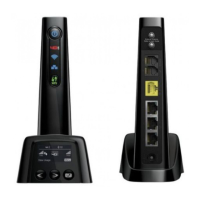
Device Overview

Identification of the device's front and back views, display, and LED status lights.

Initial Setup Steps

Install the Battery

Instructions for correctly inserting the device's battery.

Connect Power

Guidance on plugging the device into a power source.

Connect Telephone

Steps for connecting a telephone to the device for voice service.

Activation and Connectivity

Initial Activation

Steps for activating your device, including transferring or activating a new number.

Connect Network Devices

How to connect devices to the router via Ethernet or Wi-Fi.

Connect to Internet via Wi-Fi

Instructions for connecting wirelessly to the 4G LTE Broadband Router.

Advanced Features and Support

Accessing Advanced Settings

Guidance on customizing Wi-Fi settings and changing the admin password.

Monitoring Data Usage

How to view and manage your data usage through the device or My Verizon.

Setting Up Voice Mail

Instructions for setting up and managing your voice mail.

Restoring Factory Settings

Procedure for resetting the device to its original factory default configuration.

Installing Optional Antenna

Instructions for installing an optional antenna for improved signal reception.

Customer Information and Support

Information on device ownership, third-party services, and where to find more help.

Summary

Get to Know Your Device

Device Overview

Identification of the device's front and back views, display, and LED status lights.

Initial Setup Steps

Install the Battery

Instructions for correctly inserting the device's battery.

Connect Power

Guidance on plugging the device into a power source.

Connect Telephone

Steps for connecting a telephone to the device for voice service.

Activation and Connectivity

Initial Activation

Steps for activating your device, including transferring or activating a new number.

Connect Network Devices

How to connect devices to the router via Ethernet or Wi-Fi.

Connect to Internet via Wi-Fi

Instructions for connecting wirelessly to the 4G LTE Broadband Router.

Advanced Features and Support

Accessing Advanced Settings

Guidance on customizing Wi-Fi settings and changing the admin password.

Monitoring Data Usage

How to view and manage your data usage through the device or My Verizon.

Setting Up Voice Mail

Instructions for setting up and managing your voice mail.

Restoring Factory Settings

Procedure for resetting the device to its original factory default configuration.

Installing Optional Antenna

Instructions for installing an optional antenna for improved signal reception.

Customer Information and Support

Information on device ownership, third-party services, and where to find more help.

Novatel T1114 Specifications

General IconGeneral
Device Type4G LTE Router
Wi-Fi Standards802.11b/g/n
Maximum Wi-Fi Speed150 Mbps
Max Download Speed150 Mbps
Max Upload Speed50 Mbps
Power Supply12V DC
BatteryNo
Number of Connected DevicesUp to 10
Network Standards4G LTE
LTE BandsB2, B4, B5, B13
Ethernet Ports1 x 10/100 Mbps
SecurityWPA2