DI SP LAY
ICON STATU S ICON MENU/CAROUSEL
Voice mail messages Wi-Fi name/password
Connected devices Connected devices
Data signal strength indicator* Voice signal strength indicator*
Network activity indicator Data signal strength indicator*
Internet connectivity indicator Battery charge indicator
Network roaming indicator Software update
Voice signal strength indicator* About
Home
Data usage*
*NOTE:
Voice and Data ava ilability is d ependent u pon the selec ted price plan .
STEP 3: CONNECTING YOUR TELEPHONE
This device pr ovides port s for up to two teleph ones. Both po rts use the sa me
telephone number.
1. Unplug your t elephone’s cord f rom your wall’s telep hone jack.
WARNING! Do not plug this device into your telephone wall jack.
2. Plug th e end of the telepho ne cord that was ju st removed from t he wall jack
into one of th e two phone po rts on the bac k of the device. The o ther end of
the cord mus t remain plugg ed into the back of y our telephone’s b ase unit.
NOTE: The tele phone and tel ephone cord a re sold separ ately. Rotar y, pulse dialing , and Voice over
IP (VoIP) phone s are not supp orted.
IMP ORTA NT !
If the devic e is in active m ode and run ning on the ba ttery al one, only voic e calls are
supported.
If th e Power but ton is presse d and held, th e device will en ter chargi ng mode. Wh en
in chargi ng mode, th e device scree n displays th e batter y charge ind icator (
). To
resume no rmal opera tion, pres s the Power bu tton. To comple tely turn of f the device ,
disconn ect from AC pow er.
Get to Know
Your Device
4G LTE BROADBAND ROUTER WITH VOICE
BEFORE YOU BEGIN
STEP 1: INSTALL THE BATTERY
1. Remove the b attery cove r on the undersid e of the device.
2. Plug in an d insert the ba ttery, keeping t he red cable to the ce nter of the device
and the meta l contacts fac ing up, then repla ce the batter y cover.
STEP 2: PLUG IN THE POWER CORD
1. Plug the po wer cord into the d evice power por t.
2. Plug the p ower adapter int o an AC wall outlet. T he device will power o n and
guide you th rough a welcome p rocess for conne cting via Wi-F i. Once complete ,
verify at le ast one bar of the v oice signal stren gth indicat or (
) is lit. If not,
move device to an a lternative loc ation that provi des a stronger sig nal.
WARNING! Be sure to use the power cord that came with your device to avoid damage that
may void the warranty.
2
1
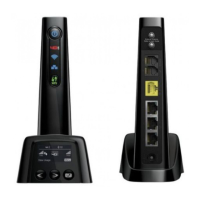
FRONT VIEW
The Verizon 4 G LTE Broadband Router w ith Voice is a wireless dev ice that
delivers Int ernet connec tivity and t elephone ser vice. You can make a phone
call and simul taneously prov ide network a nd Internet con nectivit y for up to 10
devices via W i-Fi and up to 3 device s via Ethernet . Refer to this guid e for setup
and usage tips.
NOTE:
A voice plan is n ot required fo r E911 calls. Emerg ency ser vice is availabl e regardless o f
your service plan.
Power on/off button
Network indicator
Wi-Fi indicator
Local Area Network
(LAN) indicator
WPS butt on
Scroll lef t/right
Select button
BACK VIEW
**NOTE: Future feature
Optional a ntenna p ort 1
Optional a ntenna p ort 2
Phone port 1
Phone port 2
Home Security port**
Ethernet port 1
Ethernet port 2
Ethernet port 3
Power port
Desktop stand
Top co ve r
LE D STAT ES
LED COLOR-STATE DESCRIPTION
Power
button
Blue-solid Normal operation
Blue-blinking Battery is charging
Red-solid No AC power. Dev ice opera ting on bat tery on ly
Internet
indicator
Red-solid Indicates internet connectivity
Unlit Indicates no internet connectivity
Wi-Fi
indicator
Blue-solid
Wi-Fi use r(s) conne cted but n ot trans mittin g or
receiving
Blue-blinking Wi-Fi use r(s) conne cted and t ransmit ting or r eceivin g
Unlit No Wi-Fi user (s) are conn ected
LAN
indicator
Blue-solid User(s) connected but not transmitting or receiving
Blue-blinking User(s) connected and transmitting or receiving
Unlit No user(s) connected
WPS
button
Amber-blinking
Searchi ng for wire less devi cesto con nect via W PS. You
have two m inutes to s tart WP S on your wi reless dev ice
Green-solid WPS connection successful
Red-blinking
Router co uld not find th e wireless dev ice. Try again to
establi sh the WPS c onnec tion
Battery cover
©2013 Verizon W ireless. A ll Rights Re served.
verizonwireless.com P/N: 900268 42 R.1
4G LTE Broadband Router with Voice.


 To Next Page
 Loading...