NOCTURN SOFTWARE (AUTOMAP UNIVERSAL)
The Nocturn software is the communication hub that talks directly to whatever is being
controlled. It shows up on your computer as a semi-transparent window that displays the
currently assigned names and values of each Nocturn control. The software has two main
modes:
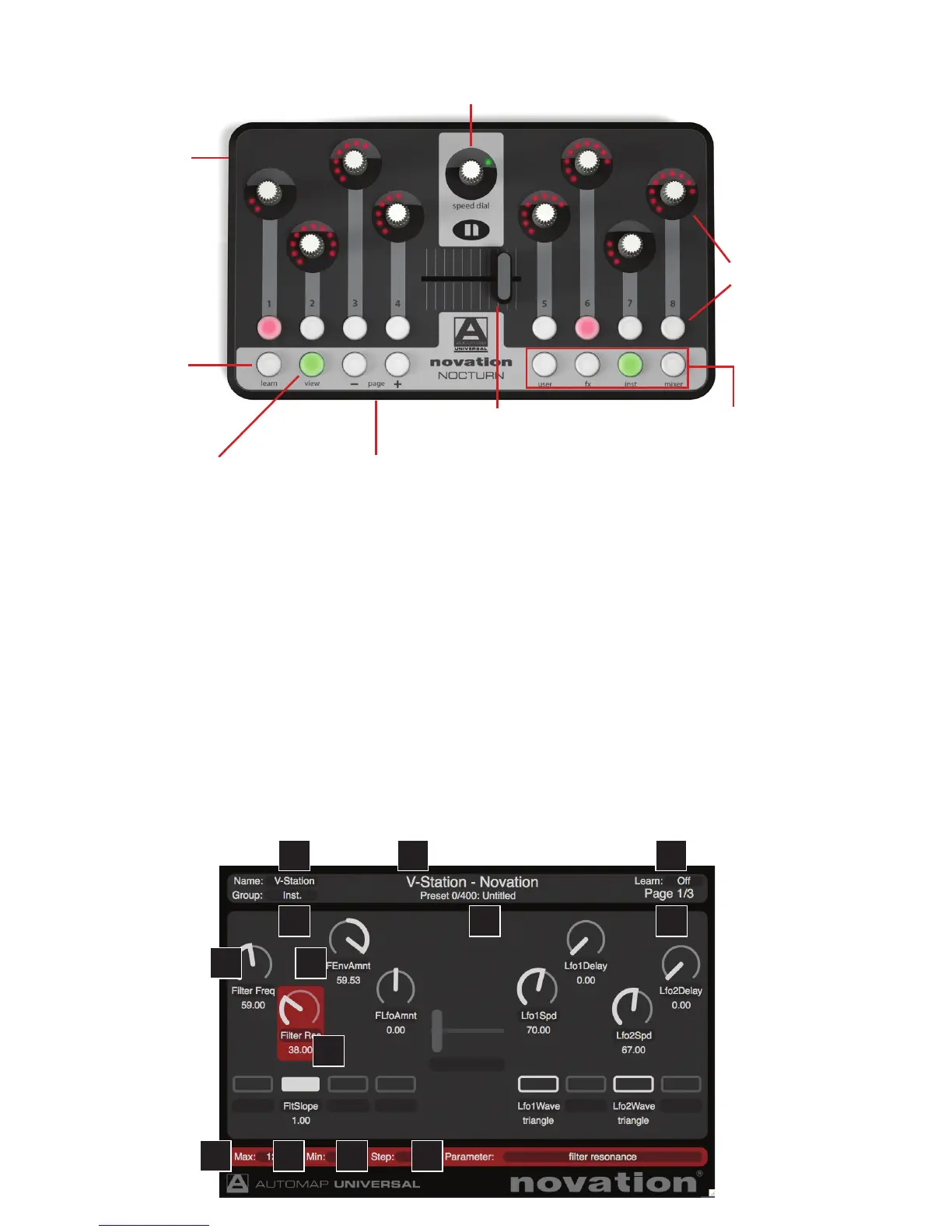
Mapping mode
Displays and allows editing of the currently active mapping:
Assignable
encoders and
buttons (8 of
each)
Speed Dial –
takes instant control of
anything the mouse cursor rests on,
or changes presets on a synthesizer
Assignable crossfader
Learn button –
turns the two
Learn modes
(once and latch)
on and off
View button –
makes the
Nocturn software window
appear and disappear
Page +/- buttons – scroll through
pages of parameter assignments
within a mapping, or scroll through
mappings in browser mode
Group buttons (User/
FX/Inst/Mixer) –
activate browser mode
in the Nocturn (Automap
Universal) software, allowing
all active mappings to be
viewed and selected (see
next section for details)
USB port –
used to connect
Nocturn to a
computer
1
2
3 4
5
6 7 8 9
10
11
12
13
2





 To Next Page