
 Need help?
Do you have a question about the Novero Brooklyn and is the answer not in the manual?
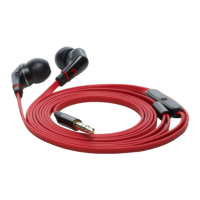
The Brooklyn Wired Stereo Headset, a high-quality audio accessory from novero, is designed to provide an immersive listening experience and convenient hands-free communication. This user guide outlines its functions, usage, and maintenance to ensure you get the most out of your device.
The Brooklyn headset serves as a versatile audio solution, allowing you to enjoy music and manage calls with ease. It connects to your mobile phone or music player via a 3.5mm stereo jack, delivering clear stereo sound directly to your ears. An integrated microphone enables hands-free telephony, making it ideal for on-the-go communication. The headset features a Multi-Function Button (MFB) that provides intuitive control over music playback and call management, enhancing user convenience.
The Brooklyn headset is designed for a wide range of environments, particularly those where ambient noise might be a disturbance, such as airplanes, trains, subways, gyms, or study areas. To ensure optimal comfort and sound quality, it is crucial to properly wear the headset and select the correct ear sleeves.
Before inserting the earplugs, it is recommended to moisten the sleeves for easier and more comfortable insertion. The earplugs are marked with "L" for the left ear and "R" for the right ear; ensure you wear them accordingly. To insert, hold the earplug at the rear and carefully insert the sleeve while gently pulling up and out on the back of your ear. The goal is for the earplug to seal deeply and comfortably within your ear canal, which is essential for both sound quality and noise isolation. After use, remove the earplugs carefully, avoiding pulling the cable to prevent damage. When wearing the headset, make sure the integrated microphone is not covered, as this can negatively impact the quality of your calls.
The audio volume for the Brooklyn headset is controlled directly from your connected music player or mobile phone. To prevent potential hearing damage, always turn the volume down to its lowest level before putting on the headset. Once the headset is on, slowly adjust the volume to a comfortable listening level. It is advised to keep the volume as low as possible, especially in noisy environments where there might be an inclination to increase it. If you need to adjust the volume, do so gradually to avoid sudden, loud sounds. Should you experience any discomfort or ringing in your ears, discontinue use immediately and consult a physician, as prolonged exposure to high volumes can lead to permanent hearing damage.
The Brooklyn headset comes with three sets of exchangeable ear sleeves in sizes small, medium, and large. Selecting the best-fitting ear sleeves is vital for optimizing both comfort and sound quality. Take your time to try each size to find the one that provides the best seal and most comfortable fit. The sleeves can be easily removed by sliding them off the earplug. When replacing them, ensure that the sleeves' rubber notches are securely fastened in the locking groove to prevent them from coming loose during use.
Once connected to your mobile phone or music player, music reproduction typically starts automatically. The Multi-Function Button (MFB) allows for basic control over your music:
The Brooklyn headset enables hands-free telephony when connected to a mobile phone. The MFB provides convenient call control:
The novero Brooklyn headset is compatible with the latest Apple products, including iPhone, iPod, and iPad. Additionally, it works with most other devices that feature a 3.5mm stereo audio jack, such as various smartphones and music players. If you experience poor audio quality, especially if the low-frequency response changes significantly, first check if different sized ear sleeves improve the fit and seal. If the issue persists, your music player or mobile phone might have a different pinning on its 3.5mm audio jack. In such cases, a Brooklyn adapter, available from novero, may be required.
Exercise caution when wearing your headset during activities that demand your full attention. It is advisable to remove or turn off your headset to avoid distractions and potential accidents. Using a stereo headset while operating a motor vehicle, motorcycle, watercraft, or bicycle can be dangerous and is illegal in some jurisdictions; always respect local laws. If you use a hearing aid or other electronic medical device, consult your physician before using the headset. Never attempt to dismantle the product yourself, as internal components are not user-serviceable. Only authorized dealers or service centers should open the product for repairs or replacements. Keep the headset and its small parts out of reach of children, as plastic bags and small components can pose a choking hazard if ingested. Do not use the headset in environments with a risk of ignition of flammable gases.
Proper maintenance and care will extend the lifespan and performance of your novero Brooklyn headset.
At the end of its life, dispose of all product parts in accordance with local regulations. Within the European Union, the crossed-out wheeled bin symbol indicates that the product must be taken to a separate collection point for electrical and electronic equipment, rather than being disposed of as unsorted municipal waste. Consult your local authorities if you are unsure about proper disposal methods.
The Brooklyn headset comes with a limited one-year warranty, covering defects in materials and workmanship from the date of purchase. During this period, novero will repair or replace defective parts at its discretion. If repair or replacement is not commercially practicable or cannot be completed in a timely manner, novero may offer a refund of the purchase price. The warranty does not cover normal wear and tear or defects caused by rough handling. To claim warranty service, contact the novero dealer from whom you purchased the product or visit the novero website for customer service information. You will need to return the product in its original packaging or packaging offering equal protection. You will bear the cost of shipping the product to novero, while novero will cover the return shipping cost if the product is covered by the warranty. Shipping costs for products not covered by the warranty will be charged to you.
 General
| Type | Bluetooth Headset |
|---|---|
| Earpiece Type | In-ear |
| Charging Time | 2 hours |
| Profiles | Headset, Handsfree |
| Range | 10 meters |
| Bluetooth Version | 2.1 + EDR |

 To Next Page