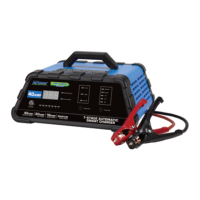
This document describes the NPower 7-Stage Automatic Smart Charger, model number 28507, a device designed for charging and maintaining 12V AGM lead-acid batteries. The charger incorporates a sophisticated 7-stage charging process to ensure safe, efficient, and optimal battery performance, while also extending battery life.
Function Description
The primary function of this smart charger is to charge and maintain 12V lead-acid batteries, including those found in cars, trucks, motorcycles, boats, RVs, and garden tractors. Its 7-stage automatic charging process is designed to optimize battery health and performance.
The charging process begins with Stage One - Desulfation, which uses pulse charges to break down lead sulfate crystals that can accumulate on discharged or unused batteries, thereby restoring performance and extending battery lifetime. Following this, Stage Two - Soft Start initiates a slow, steady build-up of the charging process, limiting power to protect the battery during the initial phase.
Stage Three - Bulk Charge is the main part of the charging process, applying 80% of the charge. During this stage, the charger automatically "tops off" the battery as needed to ensure it becomes fully charged. Stage Four - Absorption then slowly reduces the charge rate, allowing the battery to absorb more power and achieve a full charge.
After absorption, Stage Five - Battery Test automatically assesses the battery's condition. If further charging is required, the Recondition stage is selected; otherwise, the battery transitions to Float status if fully charged. Stage Six - Recondition is an additional charge stage specifically designed to recover deeply discharged batteries. Finally, Stage Seven - Float maintains the battery at a 100% charge without overcharging, allowing the unit to remain connected indefinitely. This mode is particularly beneficial for intermittently used vehicles, such as classic cars, motorcycles, and RVs, ensuring the battery remains at peak charge.
The charger also includes several safety and operational features:
- Automatic Shut Off: The charger automatically turns off once charging is complete to prevent overcharging.
- Maintenance Mode (Float Mode Monitoring): After charging, the unit automatically enters maintenance mode, delivering a small current to keep the battery fully charged.
- Reverse Polarity Protection: If the cables are incorrectly connected to the battery, a Reverse Polarity indicator illuminates, and the charger will not begin charging, preventing damage.
- Battery Repairing Mode: If a sulphated battery is detected (a common issue with deeply discharged batteries), the charger automatically activates a repairing mode, indicated by a blinking yellow LED. This mode attempts to reverse sulphation and restore the battery's ability to accept a charge. The charger will make up to five attempts to desulphate the battery; if unsuccessful, a "F01" fault code will be displayed, indicating the battery should be replaced.
- Aborted Charges: If charging cannot be completed normally, it will be aborted, and a fault code may be displayed. The charger can be reset by disconnecting the battery or unplugging the unit.
- Battery Diagnostics: The charger continuously monitors battery condition and reports charging failures via fault codes, which are detailed in a troubleshooting table.
- Cooling Fan Operation: A high-speed cooling fan operates as needed to ensure efficient operation, starting and stopping during charging.
- Overheat Protection: The charger is designed to shut off if overheating is detected and will automatically resume charging once it cools down.
Usage Features
The NPower Smart Charger offers user-friendly controls and clear indicators:
- Digital Display Mode Selection: A "Display Mode" button allows users to toggle between displaying charging current (A), charging voltage (V), and approximate battery capacity (%). Battery capacity is shown as "LO" for less than 50%, increments of 10% (e.g., "80") for 50-90%, and "FUL" for a full charge.
- Charge Rate Selection: A "Charge Rate" button allows selection of desired charge rates:
- Optimal Automatic Charge: This intelligent mode automatically selects the ideal charge rate for the battery, starting with a low current and gradually increasing it as the battery accepts more power. This ensures safe charging to the battery's utmost capacity and helps extend its life.
- 20 A or 40A Charge Rate: For faster charging of small-to-large capacity automotive, marine, deep cycle, and farm tractor batteries.
- 10A Charge Rate: For slower charging of small-to-large capacity automotive, marine, deep cycle, and farm tractor batteries, as well as garden tractor batteries.
- Maintainer Mode: Used to maintain large capacity batteries.
- LED Indicators:
- 7-Stage LED: A blinking green LED indicates the specific charging stage the battery is in.
- Reverse Polarity LED: A red LED illuminates if clips are connected incorrectly.
- Current Indicator: A green LED illuminates when the display shows the current charging rate.
- Voltage Indicator: A green LED illuminates when the display shows the charging voltage.
- Battery Level Indicator: Illuminates when the display shows the battery level.
- Automatic Charging Indicator: Indicates when the automatic charging rate is selected.
- Maintenance Current Indicator: Indicates when maintenance mode is selected.
- 10A, 20A, 40A Current Indicators: Indicate the selected manual charging rate.
- Connection Method: The charger comes with 6ft. heavy-duty, 8-gauge booster cables.
- Safety Precautions: The manual emphasizes critical safety instructions, including wearing eye and clothing protection, avoiding open sparks or flames near batteries, and ensuring proper ventilation. It also provides detailed steps for connecting and disconnecting the charger safely, both for batteries installed in vehicles and those removed from vehicles, to prevent sparks and explosions.
Maintenance Features
To ensure the longevity and optimal performance of the charger and battery, the manual outlines several maintenance guidelines:
- Cleaning: Cords and clamps should be cleaned after each use to remove battery fluid or debris that could cause corrosion. The charger case can be cleaned with a soft cloth.
- Storage: Power and output cables should be stored neatly to prevent damage. The charger should be unplugged when not in use and stored in a cool, dry, well-ventilated area.
- Battery Preparation: Before charging, users are advised to clean battery terminals, add distilled water to cells with removable vent caps (if needed), and follow the battery manufacturer's specific charging instructions.
- Troubleshooting: A comprehensive troubleshooting table provides fault codes and their possible causes and solutions, enabling users to diagnose and resolve common issues.


 To Next Page
 General