EasyManua.ls Logo

NQD 757-4WD29 - User Manual

NQD 757-4WD29
5 pages
Print Icon
To Next Page IconTo Next Page
Loading...
Short Press
for Auto
Demo, Long
Press for Mute
Programming key (press
for three seconds
to start recording,
tap to start
presentation)
One-click Twist
Twist Up/Down
All-round
Moving
Rotate Left/Right
Indicator Light
Four Azimuth
Side Drifts
1. Fist rises vertically, body twist rises
2. Fist goes down vertically, body twist is reduced
3. Fist leaned forward, the car forward
4. Fist leaned back, the car backed
5. Fist leaned left, the car drifted left / rotated
counterclockwise in place
6. Fist leaned right, the car drifted right / rotated
clockwise in place
7. Short press the finger button to switch modes
(horizontal run / rotate), long press to mute
On/Off
Signal
Light
Finger Button
1.Install the batteries inthe remote control, and the remote control indicator will
start flash. Then install the battery in the rc car and turn on the switch to start
the connection. When the connection is successful, the remote control indicator goes
off. (Please repeat the above operation if the connection fails)
2. Each remote control can only be connected to one rc car. When the connection is
successful, each car will not interfere with each other. (Do not connect multiple cars
at the same time)
3.If the remote control does not detect the 2.4G signal from the remote control car
after one minute, the power indicator flashes, you must restart the power sw
itch to
pair the frequency.
4. When you need to pair with other models of remote control or remote control car,
you need to turn off the power of the remote control and remote control car to re-pair.
The battery charger using this toy must be checked regularly to prevent damage to the
wires and other parts. If it is damaged, it must be used after the damage is repaired
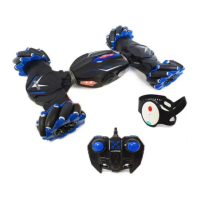
757-4WD29 Gesture Remote Control Car
Product ID
Product Name
Remote Layout
Watch Sensor Control
2.4G automatic pairing frequency
Precautions
Instruction Manual

NQD

Questions and Answers

Summary

Watch Sensor Control

Vertical Fist Movement

Fist rises vertically to increase body twist; fist lowers to reduce body twist.

Forward and Backward Movement

Leaning fist forward moves car forward; leaning fist back moves car backward.

Lateral Drift and Rotation

Leaning fist left causes left drift/counterclockwise rotation; leaning right causes right drift/clockwise rotation.

Mode Switching and Mute

Short press finger button to switch modes; long press to mute.

2.4 G Automatic Pairing Frequency

Pairing Procedure

Install batteries, turn on car and remote. Indicator behavior indicates connection status.

Connection and Interference

Each remote connects to one car; successful connections avoid interference.

Signal Loss Troubleshooting

If signal is lost, restart power switch to re-pair frequency.

Re-pairing with Other Models

Turn off power for both remote and car to re-pair with different models.

Precautions

General Safety and Maintenance

Check battery charger regularly for damage; use only after repair.

Battery Installation

Remote Control Battery Installation

Install two 1.5V 'AA' batteries correctly into the remote control.

Car Battery Pack Connection

Connect the battery pack to the body power socket.

Charging Instructions

Battery Cooling Before Charging

Allow battery pack to cool for a few minutes before recharging.

Charging Indicator and Time

Indicator dims after charging; charging takes approximately 2-3 hours.

Normal Heat Generation

Slight heat generation during charging is normal.

RC Car Operation

Powering On and Control

Turn on car, use remote arrow keys to control direction.

Powering Off

Turn off the remote control car switch after use.

Automatic Deformation

Car automatically deforms when the deformation key is pressed.

Sleep States

Enters semi-sleep after 1 min inactivity, sleep after 1 min no connection.

Battery Precautions

Battery Usage and Safety

Handle batteries correctly, avoid short circuits, and supervise charging.

Battery Handling and Storage

Remove batteries when not in use; inspect USB cable for damage.

General Troubleshooting

Car Not Working

Check remote connection, battery installation, and battery power.

Uncontrolled Car at Short Distance

Check battery levels or interference sources; change site if needed.

Maintenance Matters

Environmental Hazards

Avoid fire, direct sunlight, high temperatures, and humidity.

Storage and Cleaning

Remove batteries for storage; wipe car gently with a damp cloth.

Warranty Information

Warranty Coverage Details

Half-year limited warranty covers manufacturer defects, not misuse or cosmetic damage.

Contact and Agreement

Contact nqd_serviceteam@126.com for questions; sign to acknowledge warranty terms.

NQD 757-4WD29 Specifications

General IconGeneral
BrandNQD
Model757-4WD29
CategoryRemote Control
LanguageEnglish