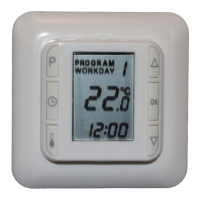
8
L Press [q] or [p] until program Max or Min ashes on the display.
L Press []
The temperature will ash
L Use [q] or [p] to set the temperature.
L Press [OK]
The selected PROGRAM will ash.
L Use [q] or [p] to select the program which you now wish to change.
or
L Exit by pressing [OK] for 2 seconds.
6) Changing from Quickstart to Night and day setback
Change from Quickstart program to Night and day setback program
L Press [P]
PROGRAM will ash
L Press [OK]
HC10B will now operate night and day setback
The previously set times and temperatures in Night and day setback are saved.
7) Changing from Night and day setback to Quickstart
Change from Night and day setback program to Quickstart program
L Press []
FL: - - ashes
L Press [OK]
HC10B will now operate with Quickstart.
The previously set times and temperatures in Night and day setback are not deleted
on changing to Quickstart.
8) Switching between display of actual room temperature and desired
temperature
L Simultaneously press []+[OK]. Hold them in for min. 3 seconds.
This will switch the display between actual or desired room temperature.
Switch back in the same way.
L Simultaneously press []+[OK]. Hold them in for min. 3 seconds.
The display will switch back again.
9) Read out actual floor temperature
Apply only if oor sensor is connected
L Press []
Actual temperature is shown in the display for 10 seconds. I.e. FL :22
10) Turning HC10B on and off
L Press [q] and [p] simultaneously.
HC10B will turn off
L Press any key to turn HC10B on again
11) Resetting HC10B
This procedure will return HC10B to Quickstart. Any changed values in night and
day setback will be lost.
L Press and hold rst [ ] then [q] then [ P ] and nally [p] – hold all 4 buttons for
4 seconds.
The display will go out and then everything will turn on again.
HC10B has now been reset and will be in Quickstart / manual mode.
12) Floor sensor status
Press []
L FL: - -, sensor not connected, disconnected or short-circuited
FL: HI, other errors


 To Next Page
 Loading...