7
The time zone setting on the display will ash
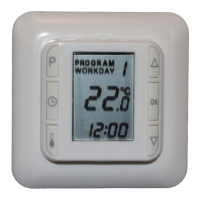
L Use [q] or [p] to view the time zone time and temperature incl. Max. and Min.
settings.
L Exit by pressing [OK] and [OK]
3.4) Changing time settings for night and day setback
L Press [P] followed by [q] or [p] to the program you wish to change; the display
will ash.
L Press []
The hours on the time display will ash
L Use [q] or [p] to set the hour gure.
L Press []
The minutes on the time display will ash
L Use [q] or [p] to set the minute gure.
L Press [OK]
The selected Time zone will ash.
L Use [q] or [p] to select the program you wish to change next.
or
L Exit by pressing [OK] and [OK].
3.5) Changing temperature settings for night and day setback
L Press [P]
PROGRAM will ash
L Press [q] or [p] to the program you wish to change; the display will ash.
L Press []
The temperature will ash
L Use [q] or [p] to set the temperature.
L Press [OK]
The selected Time zone will ash.
L Use [q] or [p] to select the program you wish to change next.
or
L Exit by pressing [OK]
4) Override
4.1) Temporarily override the temperature with “Econ” or “Comf”
If the time zone is in “Leave” or “Sleep” the override will go into “Econ” and lower
the temperature until the next time zone gets active.
If the time zone is in “Wake” or “Home” the override will go into “Comf” and raise
the temperature until the next time zone gets active.
L Press [q] or [p] until you get to the program you wish to activate; the display
will ash.
Comf or Econ will show in the display. Also the temperature will ash
L Press [OK]
4.2) Deactivate “Econ” or “Comf”
If the time zone temperature is overridden by “Econ” or “Comf”, it can be
deactivated like this:
L Press [P]
L Press [p]
Program will ash
L Press [OK] “Econ” or “Comf” is now no longer active and is not displayed
5) Changing max. and min. limits for monitoring floor temperature
This function is only active, if HC10B has been selected to operate with combined
room and oor sensor (CO)
Changing the factory-set values of max. 27°C and min. 15°C
L Press [P]
PROGRAM will ash
L Press [P]
The day(s) on the display will ash
L Press [P]
Time zone will ash


 To Next Page
 Loading...