Need help?
Do you have a question about the Nuga BEST NM-2500HD and is the answer not in the manual?
Explains graphical symbols used for risk levels: Danger, Warning, and Caution.
Manufacturer's liability statement regarding product damage from user fault or operation.
Lists critical safety warnings to prevent severe harm or death, such as avoiding folding or wet hands.
Lists important safety warnings to prevent injury or damage, such as keeping children supervised.
Lists minor safety advisories to prevent small injuries or product damage, such as avoiding direct sunlight.
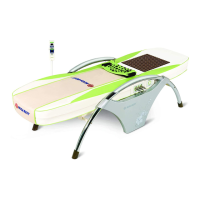
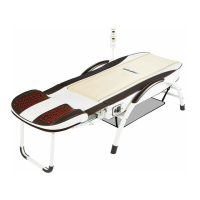
Details the main components of the NM-2500HD and their functions.
Identifies and explains the purpose of each component like power cord, controller, and heater.
Explains the function of each button and indicator on the product's controller.
Pre-use guidelines including voltage check, pacemaker advice, and temperature range.
Step-by-step instructions for operating the heating function and setting temperature/time.
Provides immediate actions to take during emergencies like lightning or smoke detection.
Instructions for storing the product safely and cleaning its components.
Checklists for ensuring product safety and proper function before and after use.
Troubleshooting steps for power supply and heating issues before contacting service.
Explains error codes and indicators displayed on the controller for troubleshooting.
Lists technical details like model name, weight, size, and electrical ratings.
Details warranty period, terms, conditions, and exclusions for repairs.
The NUGA NM-2500HD is a thermal massager designed for home use, featuring a Tourmanium mat for enhanced heating effects. This user manual provides comprehensive information on its function, technical specifications, usage, and maintenance.
The NM-2500HD operates as a thermal massager, primarily utilizing a Tourmanium mat to deliver heating effects. The device allows for independent temperature control on both the right and left sides of the mat, catering to individual user preferences. The main components include a power cord for electrical connection, a connector for signal and power exchange between the controller and the main assembly, a controller for temperature and time settings, and the heater integrated into the Tourmanium mat.
The controller is a compact unit with several indicators and switches. It features heating lamps (left and right) that indicate the on/off status of the heating function. Temperature setting indicator windows (left and right) display the current and set temperatures, while time setting indicator LEDs (left and right) show the current and set heating durations. Temperature setting dials (left and right) allow users to adjust the desired temperature, and time setting selection switches (left and right) enable the selection of heating times. A power indicator lamp displays the on/off status of the controller.
The product's heating function is activated by turning the temperature setting dial clockwise, which also illuminates the heating lamp. The heating function can be turned off by rotating the dial counter-clockwise. The device includes an automatic shut-off feature that activates once the set time has elapsed, regardless of the temperature dial's position. The default setting time is 12 hours, with options to select 3, 6, or 12 hours sequentially by pressing the time setting selection switch. The temperature can be set within a range of 30°C to 70°C, with the setting confirmed after 5 seconds of no change. If the set temperature is higher than the current temperature, the heating lamp will blink.
The NM-2500HD is designed for safe and convenient use. Users are advised to check the applied voltage before use and ensure the power plug is connected to a dedicated socket. The product should not be folded during use or storage to prevent damage. Individuals with cardiac pacemakers should consult a doctor before using the device.
The controller allows for precise temperature and time adjustments. The temperature setting dial enables users to select their desired heat level, indicated on the temperature setting indicator window. The time setting selection switch offers options for 3, 6, or 12 hours of operation, with the default being 12 hours. The device automatically turns off once the set time is complete.
In case of emergencies, users should immediately stop using the product and remove the power plug if lightning occurs, if a burning smell or smoke is detected, or if any abnormality occurs to the human body. If a failure or power failure is observed, the power switch should be turned off, and the company contacted. Similarly, if water is poured onto the product, the power switch must be turned off, the power plug removed, and the company contacted.
Proper storage and cleaning are crucial for maintaining the product's longevity and performance. When not in use for extended periods, the power cord should be disconnected. The product should be stored in a dry place, away from direct sunlight, chemicals, gases, and extreme temperatures or humidity. It should also be protected from vibration, shock, and slopes during transportation.
For cleaning, the power plug must be unplugged to prevent electric shocks. The controller can be wiped with a dry cloth to remove foreign substances. The product top should be wiped softly with a piece of dry cloth. The mat cover can be cleaned with wax for leather seats or a dry cloth.
The manual includes a self-check section to troubleshoot common issues before requesting A/S. This includes verifying power cord connection, heating lamp illumination, temperature indication on the controller, temperature increase, and absence of excessive heat. It also advises checking for any damage to the power cord or cable. If the current temperature is not displayed, users should check the power plug connection, ensure the power button is pressed, and verify the operating voltage. If the temperature is not increasing, users should confirm the power button is pressed and that the temperature is not set too low. In case of error codes displayed on the temperature setting indicator window, such as "E1" (heating temperature sensor abnormality/short-circuit), "E3" (overheating above 85°C), or "--" (disconnection/temperature sensor not detected), users are instructed not to disassemble the product but to contact the supplier or company after removing the power plug and turning off the power switch.

 To Next Page
 General