P
O
W
E
R
P
O
W
E
R
P
O
W
E
R
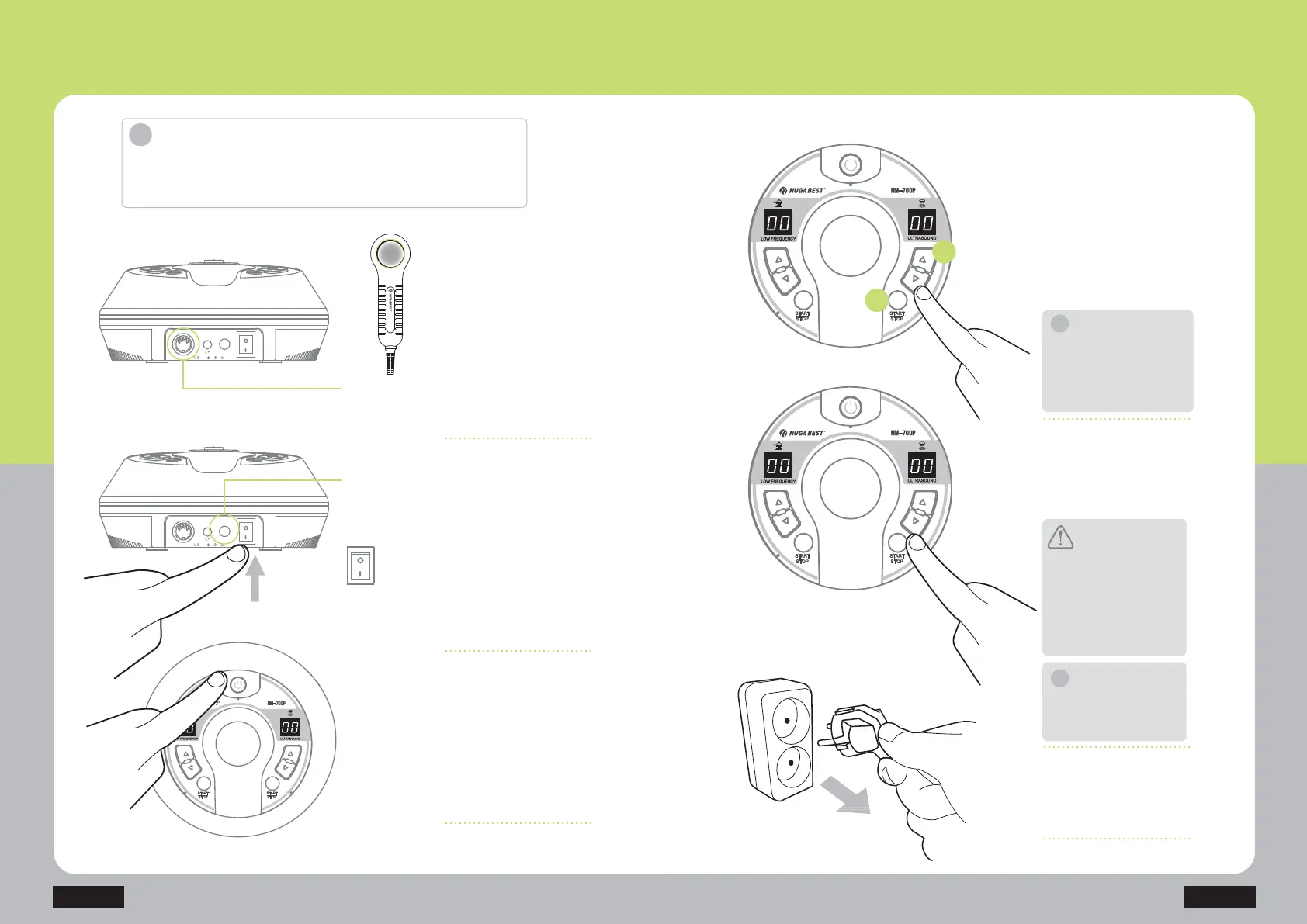
Connect the adaptor and the
power cord to the service
outlet. Connect them to the
main device and turn the
power switch to ‘ON.’
DC IN (DC 24V)
adaptor connector
Connector of the
ultrasound probe
Press the power button to
turn on the main device.
(Power button color: red (lit)
ĺJUHHQIODVKLQJ
Remove the power cord from
the connected outlet after
use.
1) Press the ‘Ultrasound
Start / Stop’ button to switch
to the ultrasound mode.
3RZHUEXWWRQFRORUJUHHQ
IODVKLQJĺJUHHQOLW
2) Press the ultrasound
RXWSXWFRQWUROEXWWRQVµŸ¶RU
µź¶WRVHWWKHRXWSXWEHIRUH
use.
2XWSXWVWUHQJWKOHYHOV
Connect the ultrasound probe
cable to the main device.
:KHQXVLQJWKHXOWUDVRXQG
SUREHDSSO\DQGPDVVDJHWKH
XOWUDVRXQGJHORQWKHVNLQ
/HDYLQJWKHSUREHRQRQH
DUHDIRUWRRORQJZLWKRXW
PDVVDJLQJPD\FDXVHVNLQ
burns.)
step. 1
step. 4
step. 6
step. 2
step. 3
NM-700P
1
2
How to Use the Product
+ow to use ultrasound wave
How to Use the Product
Introduction
'RQRWXVHLWIRURWKHUXVDJHVWKDQWKHGHVFULEHGSXUSRVHV
of uses.
&KHFNRXWWKHDSSOLHGYROWDJHEHIRUHDQ\XVH
When you are finished, press
the ‘Ultrasound Start / Stop’
EXWWRQDJDLQWRWXUQRIIWKH
ultrasound mode.
When the ultrasound
stimulator is not in use,
press the ‘Ultrasound Start
/ Stop’ button to turn it off.
/HDYLQJWKHGHYLFHRQ
when not in use may
cause malfunction/failure.
$IWHUWKHVHWWLPHPLQ
the power will turn off
automatically.
step. 5
Caution
Note
NM-700P
ON
OFF
DC IN
PWR
DC IN
PWR
The output level is established to
EHZKHQWKHSUREHLVSRVLWLRQHG
on the main body of the product.
3LFNXSWKHSUREHWRDGMXVWWKH
RXWSXWOHYHOZKHQXVLQJWKHSURGXFW
i
i
Note
i



 To Next Page