Version 2.0NS022219
5
7. Parameter list and function
In the basic display state, press and hold key 2 seconds, Enter the field parameters,
Parameter
code
Meaning of
parameters
Explain
Setting
range
3 4
AL1 high
limit alarm
value
AL1 low
limit alarm
value
-999~
+32000
“HAL1” is the absolute value alarm or deviation value alarm, by
“ALtd” parameter definition.
When the value set to Max. will disable this function.(3200)
“LAL1” is the absolute value alarm or deviation value alarm, by
“ALtd” parameter definition.
When the value set to Min. will disable this function
.(-999)
AL2 high
limit alarm
value
AL2 low
limit alarm
value
“HAL1” is the absolute value alarm or deviation value alarm, by
“ALtd” parameter definition.
When the value set to Max. will disable this function.(3200)
“LAL1” is the absolute value alarm or deviation value alarm, by
“ALtd” parameter definition.
When the value set to Min. will disable this function
.(-999)
HAL2
LAL2
HAL1
LAL1
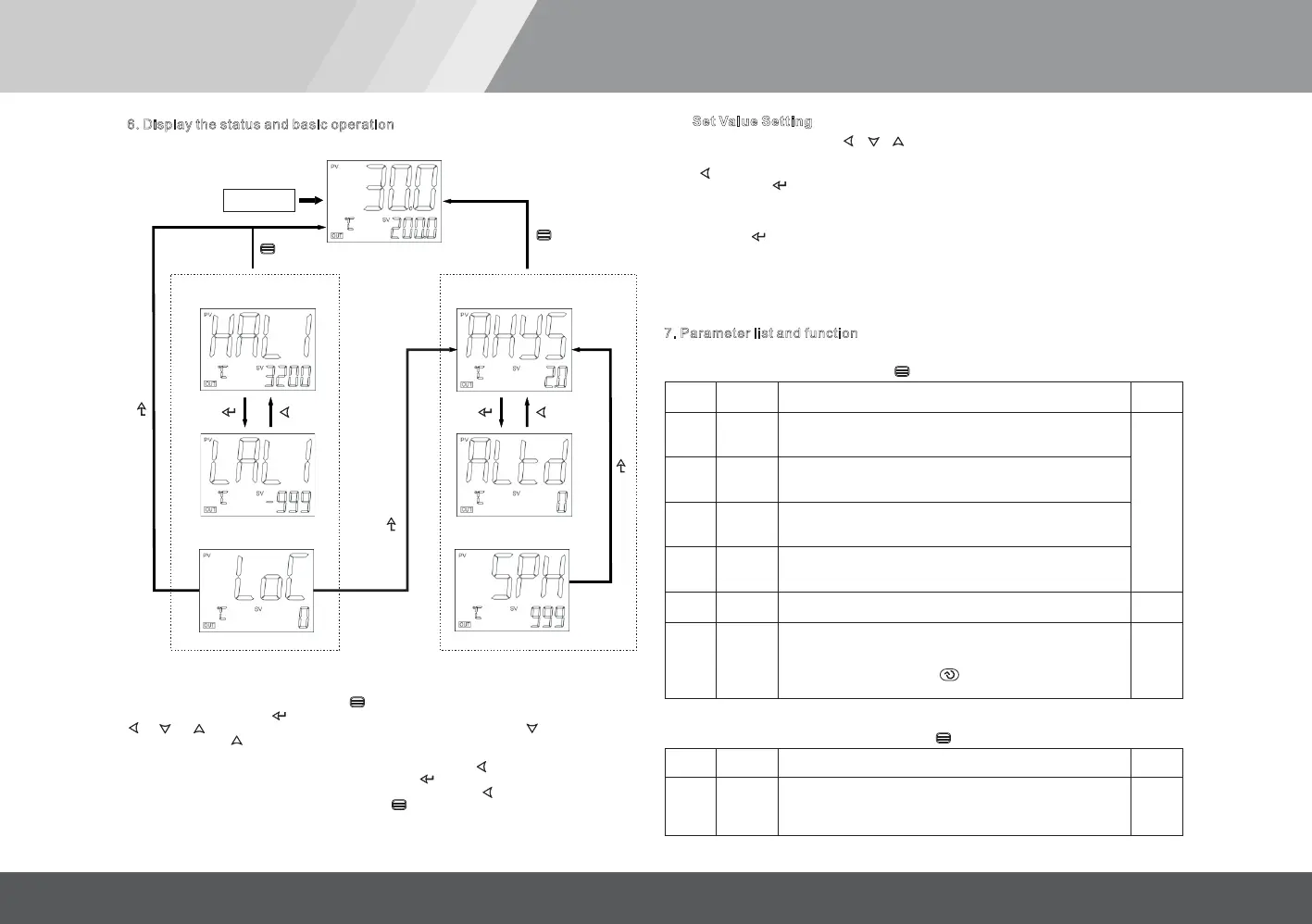
set Loc=800,Then press the key
to enter the system parameters
2 Sec
6 Display the status and basic operation.
The basic display state
.
.
.
.
.
.
Access to the Field
pa ram eter table
.
.
.
.
.
.
Access to the system
parameter setting state
POWER ON
2 Sec
Omit description
2 Sec
2 Sec
Omit description
6.1 System parameter setting
In the basic display state, press and hold key 2 seconds, , set the
LOC = 800,Then press the button to confirm and enter the system parameter setting state.
, , Key can directly modify the parameter values. Press the key to reducing
the data, press the to increase the data,Waiting to modify the value of the decimal
point will flash (like a cursor)
.press key and hold, you can quickly increase / decrease in value,
And the speed will be automatically accelerated. also press the key to move to modify the
data location (cursor), the operation i
s more efficient. Key can be stored to modify
parameter values and display the next parameter,press and hold key 2 seconds,and can
return to the previous parameter; can immediately exit the
parameter setting state.
Enter the field parameters
key
press and hold key 2 seconds
6.2 Set Value Setting
In the basic display state, press , , key can directly modify the given value.
6.3 “At”PID Parameter auto-tuning
Press and hold for 2 seconds, the At parameter appears,"At" parameter "OFF" is set to "ON"
and then press the KEy to confirm instrument can start the implementation of the auto-
tuning Given function,the instrument in the basic display state display will flash the word "At",
the instrument after 2 oscillation cycle ON-OFF control can automatically calculate the PID
parameters.If you want to advance to give up auto-tuning , "At" parameter “ON” is set to “OFF”
and then press key to confirm.
Given tuning parameter values obtained are not ide
ntical, to perform auto-tuning function,
should be first given value set in The most commonly used value or middle value, if the system
is good insulation properties of the furnace, the given value should be set in the system uses
the maximum, and then Execute the start of the operation of auto-tuning function. Reasons to
learn, auto-tuning after the initial use, the effect may not be the best, you need a period of time
(usually the same time auto-tuning control) before they can get the best results.
Srun
running state
run:Run control state
StoP:Stop state, display flashing display "StoP".No.2
run
StoP
LOC
Parameter
lock
LOC<9000, will automatically for 0, allowed to modify the SV Set
Value.
LOC
≥9000, are not allowed to modify the SV Set Value.
Set the LOC = 800, then press key to confirm, can enter the
following system parameters.
0~9999
7.1 Field parameters
In the field parameters,set Loc=800,Then press the key to enter the system parameters.
7.2 system parameter
Alarm
hysteresis
Alarm mode
Avoid frequent alarm on-off action because of the fluctuation of PV
ALtd=0,AL1is the is the
.
deviation value alarm,AL2 absolute
value alarm
ALtd=1,AL1 and AL2 is the absolute value alarm.
ALtd=2,AL1 and AL2 is the deviation value alarm.
0~2000
0~2
AHYS
ALtd


 To Next Page
 Loading...

