4
FEATURES / OPERATIONS
HIGH, MEDIUM AND LOW SPEED SETTINGS
For optimum air filtration, operate your NUK
®
air purifier
continuously on the MEDIUM ( 2 ) setting. Its rugged
motor has been designed to give many years of use. For
quieter operation (such as in a bedroom), select the LOW
( 1 ) setting. When high levels of air pollution are present,
select the HIGH ( 3 ) setting to quickly circulate and filter
the room air. The night light offers an optimal illumination
for night time use. Press the Night Light Button ( ) to
activate and de-activate the night light.
FILTER CHECK INDICATOR
The filter indicator light eliminates guesswork by letting
you know when it is time to clean the filter. To reset the
Filter Check Indicator, press and hold the Filter Reset
Button ( )for 3 seconds while the unit is operating
(in any speed).
BEFORE USE
1. Carefully unpack your Air Purifier. Select a firm level
place where there are no obstructions to the air inlet
or filtered air outlet.
2. Remove the base air inlet grill and check if the filter is
covered by a plastic bag. If it is, remove plastic bag
before use and place filter into unit. Reinstall the base
air inlet grill.
3. DO NOT POSITION AIR PURIFIER DIRECTLY
UNDER FURNITURE OR OBJECTS THAT MAY
OBSTRUCT EXHAUST AIR FLOW.
NOTE: If operating unit on a carpeted floor it is not rec-
ommended to use on carpets with more than a ½
inch pile height.
OPERATING INSTRUCTIONS
1. Plug into a 120V AC electrical outlet.
2. Press the Power Button ( ). The air purifier will turn
onto HIGH ( 3 ), the power light and the HIGH ( 3 )
speed indicator light will illuminate letting you know the
power is on and running at High setting. To turn the air
purifier off at any time, press the Power Button and all
indicator lights will go off.
3. You can then select the desired speed selling. This air
purifier has three speed settings. You can select from
HIGH ( 3 ), MEDIUM ( 2 ), or LOW ( 1 ) by pressing the
desired operating speed control button on the control
panel. The corresponding indicator light will illuminate
to indicate which setting is being selected.
4. To release negative ions into the filtered air, press the
ionizer button ( ) and the indicator light will illuminate
NOTE: The ionizer will not work unless the unit is running.
5. To activate the night light at any speed setting, press
the Night Light Button ( ) to illuminate. Press the
button again, the night light will go off.
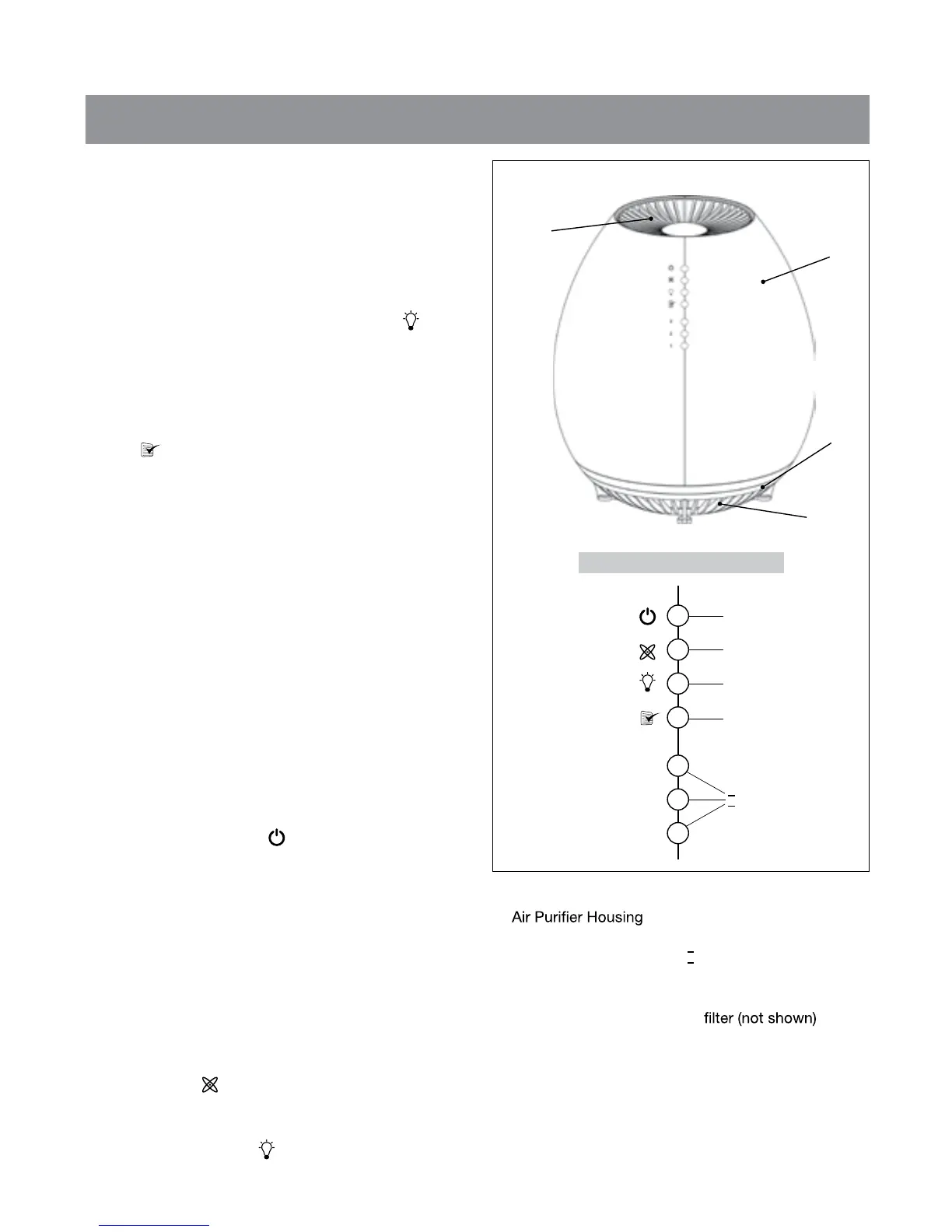
A. Filtered Air Outlet
B.
C. Night Light
D. Base Air Inlet Grill
E. Power Button/Light
F. Ionizer Button/Light
G. Night Light Button
H. Filter Reset Button/Filter
Check Indicator Light
I . Speed Control Buttons
(3-2-1)/Lights
J. Permanent HEPA-Type
Figure 1
C
A
B
D
Control panel (close-up)
E
F
G
H
3
2
1
I
HEPA IB_11-27-13_For_WEB.pdf 1 1/3/2014 9:51:45 AM


 To Next Page