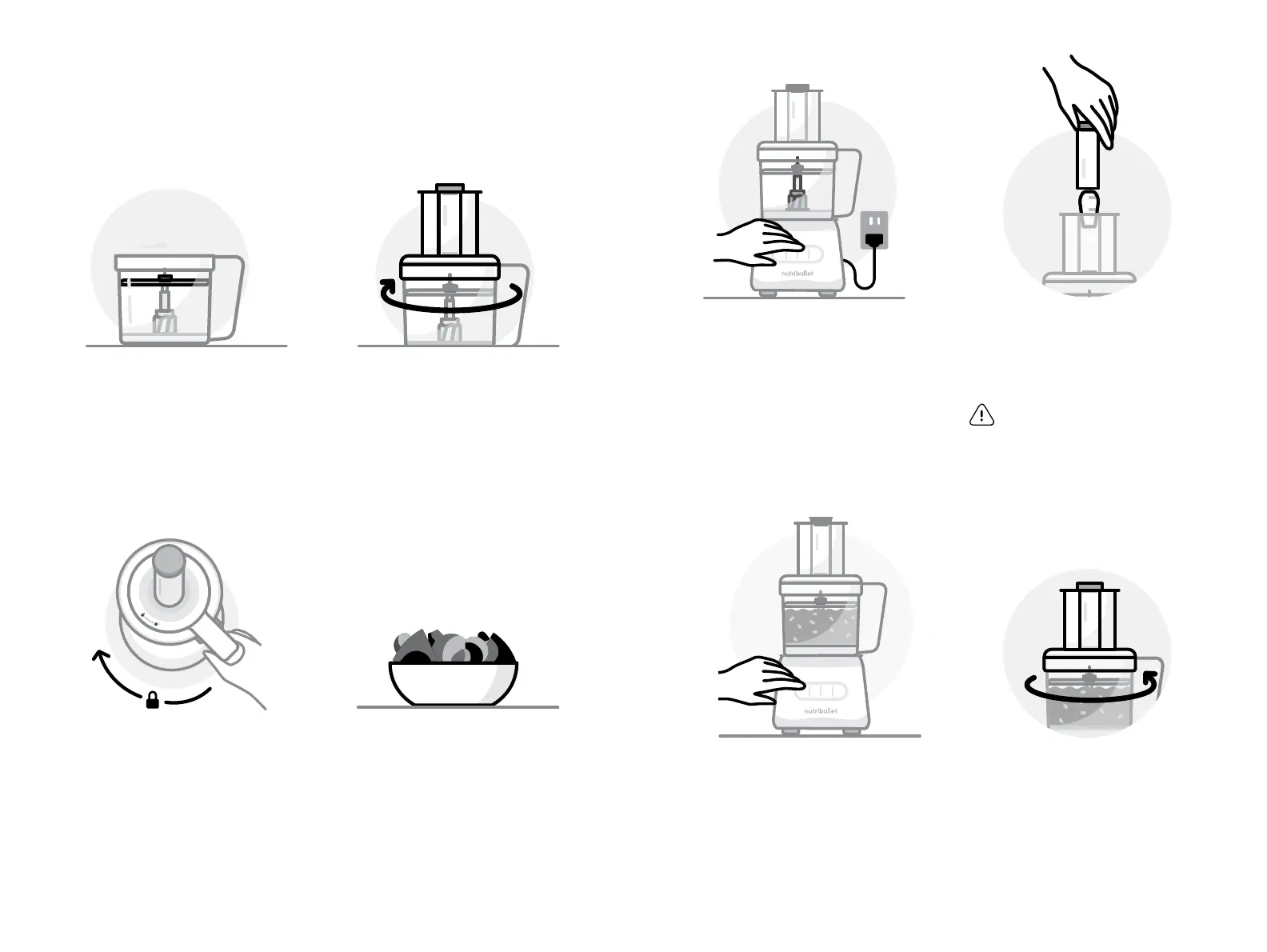
1 Place the Work Bowl, with
disc attached, on a clean,
dry, flat surface like a
countertop. Refer to the
assembly instructions on
page 12 for how to properly
attach a disc for use.
2 Place the Work Bowl Lid on
top of the Work Bowl. Turn
the lid clockwise, lining up
the arrows on the lid and
handle, to lock into place.
NOTE: The motor will not run
unless the lid is locked in place.
Using a disc attachment.
The disc attachments are for slicing, shredding, or spiralizing your
ingredients. The Slice/Shred Discs are reversible and labeled on
either side. Place the side you want to use with its name facing up.
4 Prepare food (cut into
smaller pieces, remove
seeds, etc.) and set aside.
3 Place the Work Bowl, with
lid attached, onto the Motor
Base. Turn the Work Bowl
clockwise to lock in place.
You should hear a click when
the bowl is properly locked
in place.
NOTE: When using the Spiralizer
Disc, cut the produce into pieces
that will easily fit in the chute. We
recommend to cut foods vertically
along the sides creating a 'square'
shape for best spiralizing results.
6 With the motor running,
place food into the Feed
Chute, carefully guiding it
down using the Food Pusher.
7 When you’re done, or when
your processed ingredients
have filled the work bowl,
press the OFF button. Wait
until the blade has come to
a complete stop.
8 Remove the Work Bowl
Lid from the Work Bowl
by turning the lid
counterclockwise to unlock.
Carefully remove the lid
and set it aside.
5 Plug in the unit and press
the HIGH speed button.
HIGH PULSEOFF LOW
OFF LOW HIGH PULSE
WARNING: always use the Food
Pusher, not fingers or utensils,
to push food down chute. Do
not insert too much food at one
time. Never force stuck food
down chute.
1918


 To Next Page