www.NutrichefKitchen.com4
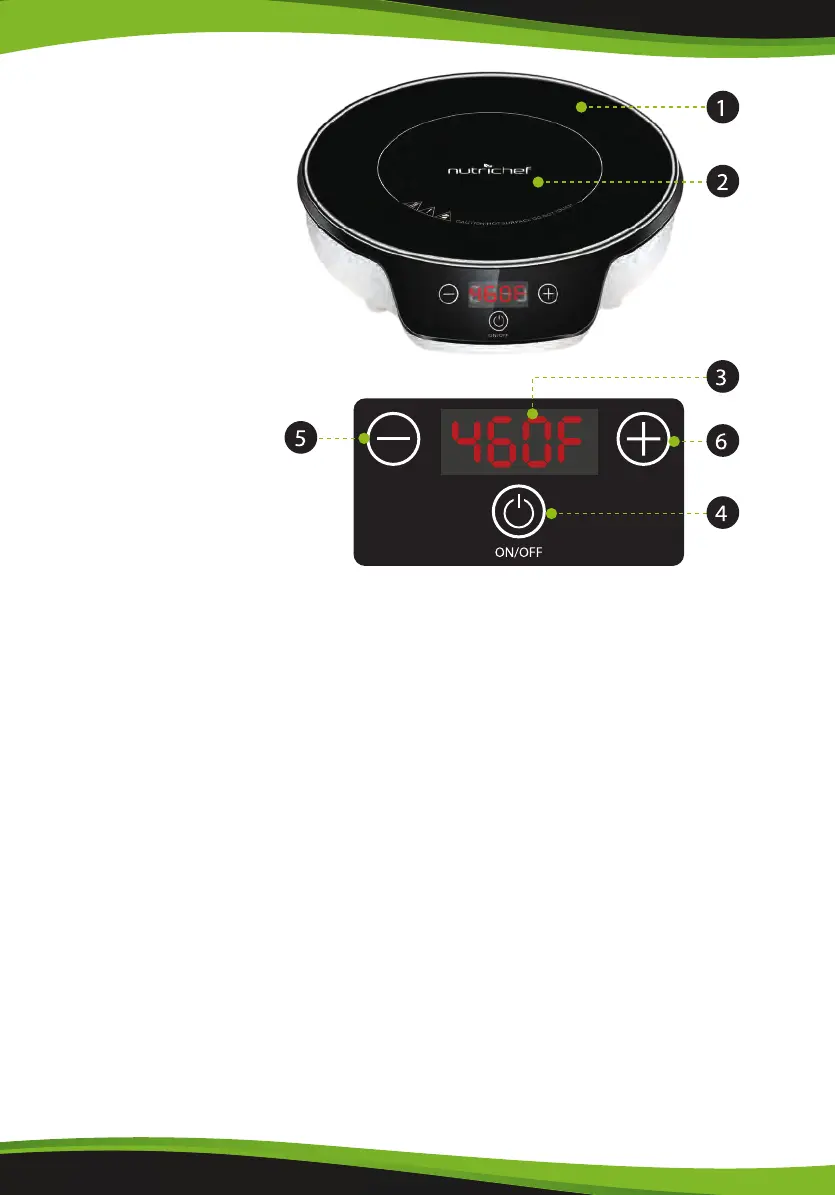
Parts Identication
1. Black Crystal Plate
2. Heating Area
3. LED Screen
4. ON/OFF
5. Decrease Button
6. Increase Button
Operation
1. Basic Operation
•
Insert the plug into AC 120V~, 60Hz Socket
•
Place induction compatible cooking utensils in the center of the cooktop plate.
•
Press ON/OFF button to power the unit on. The LED screen displays “ON”, then
press “+” or “-” . The default temperature 300°F will auto select, dierent Level,
setting and adjustments
•
To power o the unit, press the ON/OFF button again.
•
Remove the plug from the socket if the unit is not going to be used for a long
time.
2. Cooking Mode
Cooking Mode
•
There is 1 cooking mode: Temperature
Temperature
•
Press the [+] or [-] button, the display will show the default temperature of 300°F
•
The temperature can be adjusted by the [+] and [-] buttons through the range
of 140°F, 160°F, 180°F, 200°F, 220°F, 240°F, 260°F, 280°F, 300°F, 320°F, 340°F, 360°F,
380°F, 400°F, 420°F, 440°F, 460°F.


 To Next Page