5
Initial Set-Up – SIM Card, SD Card, & Battery Insertion
When you first get your phone, you will want to install a SIM
Card and SD Card (optional), as well as insert and charge
the battery before starting.
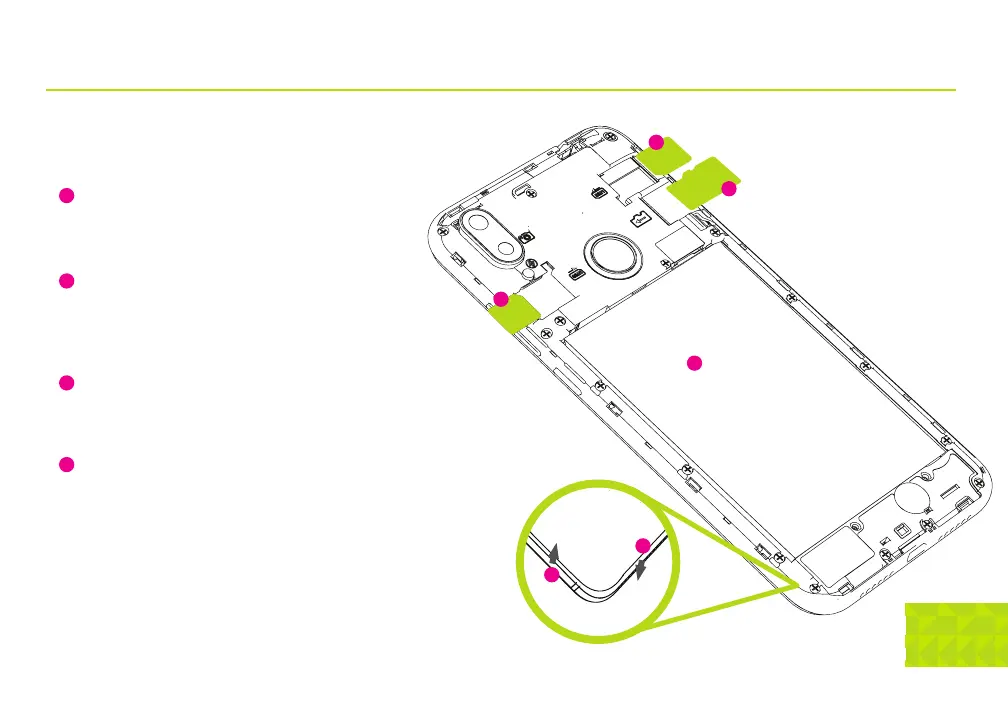
Remove the back cover of the phone by inserting your
fingernail into the slot located on the lower left of the
back cover and carefully lift the cover up and set it
aside.
Insert the SIM Card and SD card into the phone as
shown on the diagram. Both SIM slots will only accept
nano sized SIM Cards.
NOTE: You do not need SIMS in both slots for the
phone to be operational.
Insert the battery into the phone as shown in the
diagram, making sure that the contact points are
lined up with the battery. Be careful not to damage
the contact points when inserting the battery.
Gently snap the back cover back on to the phone.
Power on the phone by holding the wake/sleep
button for about 5 seconds and let go when you see
the start-up screen appear.
1
2
3
4
3
1
4
2
2
2
Battery
microSD
SIM 1
SIM 2


 To Next Page