7
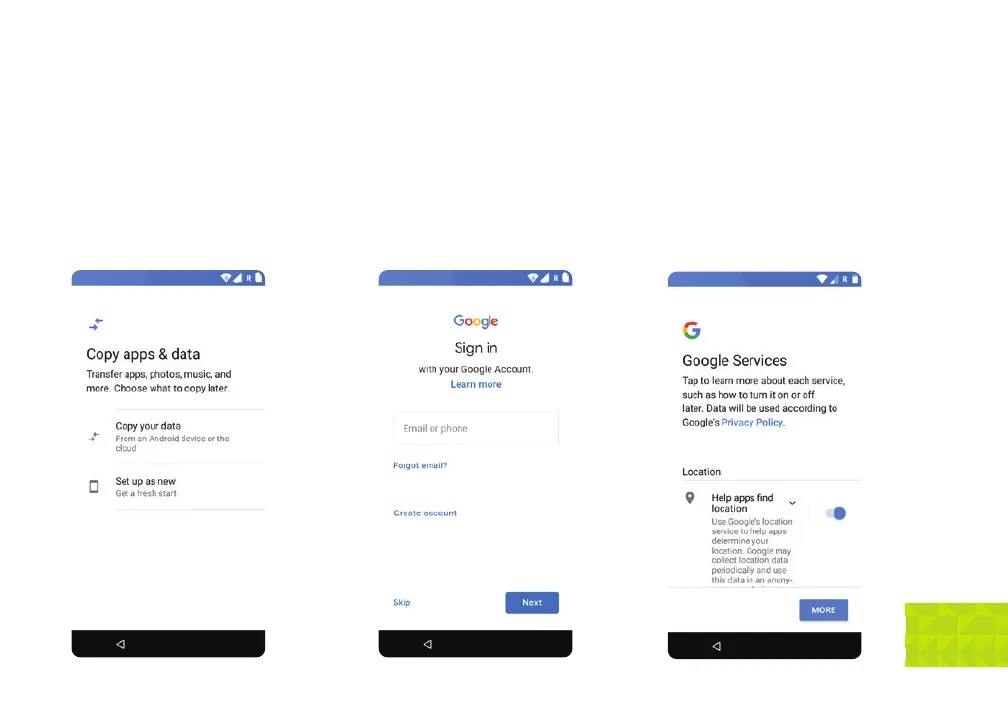
Copy apps & data: You can transfer apps,
photos and music from a previous Android
device or the cloud. If you chose this option you
will be prompted to either use your old phone
to copy data wirelessly, or sign into your Google
account and restore from a cloud backup. You
can also choose to set-up as a new device and
start with a clean slate.
Google account: In these next screens,
you have the option of skipping them entirely or
filling out your Google account credentials, or
even making a new Google account if you’ve
never had one. Regardless you will at some
point need a Google account, as they are
necessary to use the Play Store and get apps
and app updates. You will also need to accept
Google’s Terms of Service during this portion of
the setup.
Protect your phone: Now is the time to
prevent others from using this phone without
your permission by activating device protection
features. You can set up a pattern, PIN, or
password unlock code. You can also skip this
and add protection later. Remember that if you
set-up device protection but later forget your
unlock code, the only way to access the phone
will be by performing a factory reset which will
delete all device data.


 To Next Page