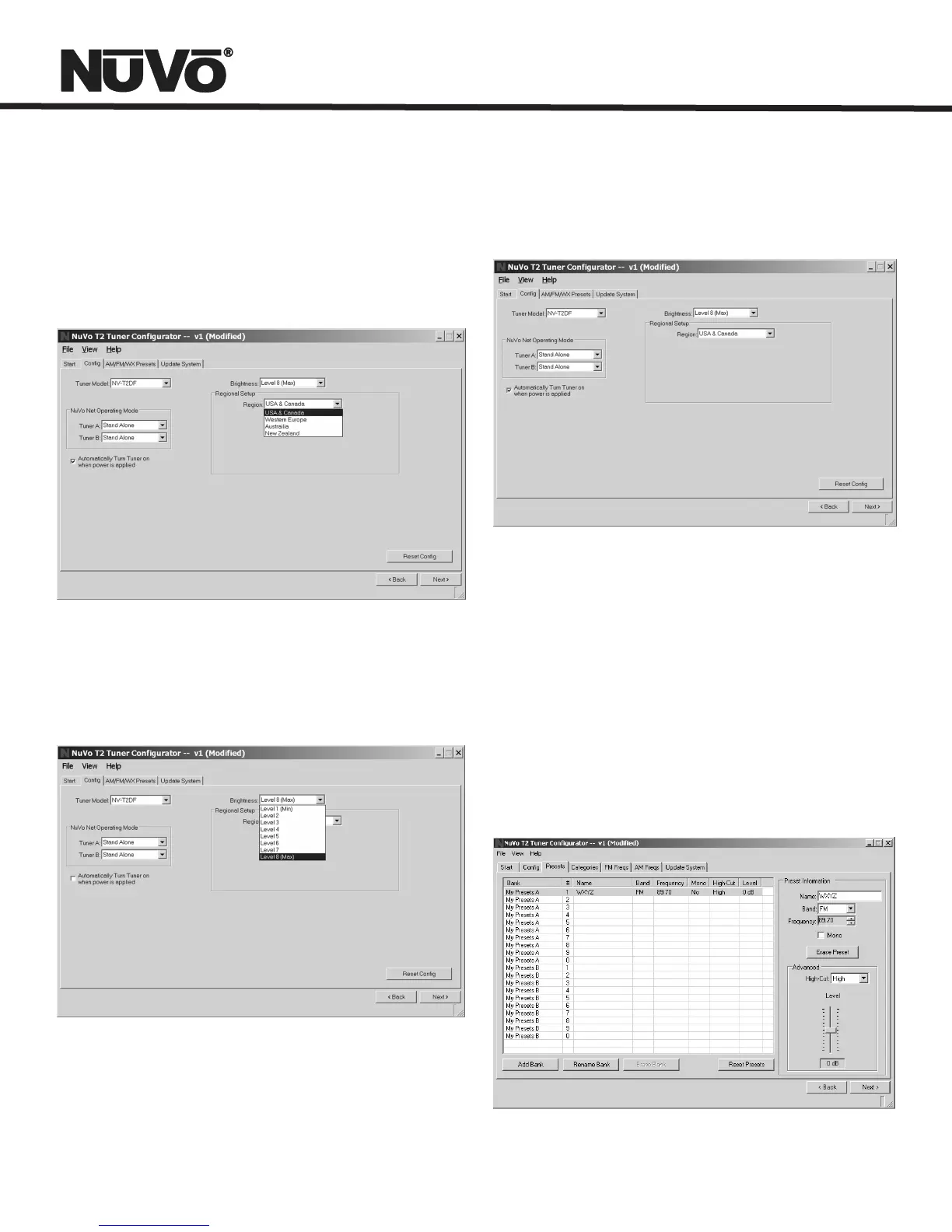
2.2 Regional Setup
2.3 Brightness
2.4 Auto-On
Page 23
2.2 Regional Setup: Depending on your geographic location,
the tuner needs to be set for the proper tuning standard. The
choices are USA and Canada, Western Europe, Australia, and
New Zealand. Countries outside these geographic locations
need the advanced custom setting (see Advanced Settings: 4.1
Custom Regional Setup).
2.3 Brightness: This sets the intensity of the displays for each
tuner. The factory default is the maximum level 8.
2.4 Auto-On: In the event of loss of power, or if the T2 is
unplugged, the tuners can be set with this check box to
automatically turn on when power is returned.
3.0 Presets
3.1 Preset Information: This section provides a display name,
band and tuning frequency for each preset. As the
Preset information fields are populated, the same information
will automatically fill the highlighted fields to the left.
Each bank of presets will hold 10 presets, and up to 10 banks
can be assigned. Three buttons at the bottom of the tab
are designated to assigning preset banks.
3.1 Preset Information


 To Next Page