Hardware Installation
Use the following procedure to install the GeForce RTX 3090 graphics card into
your computer system.
1
2
3
5
Turn off your computer and monitor and disconnect the power cord.
Depending on your computer system, you may need to disconnect the cable
going to the back of your system. Mark the cables so you can make sure you
reconnect them properly.
Open your computer by removing the cover/side panel. Refer to your
computer documentation from the original manufacturer for assistance.
Remove any existing graphics card (if there is one). Save hardware (such as
screws and brackets) to use when installing the NVIDIA graphics card.
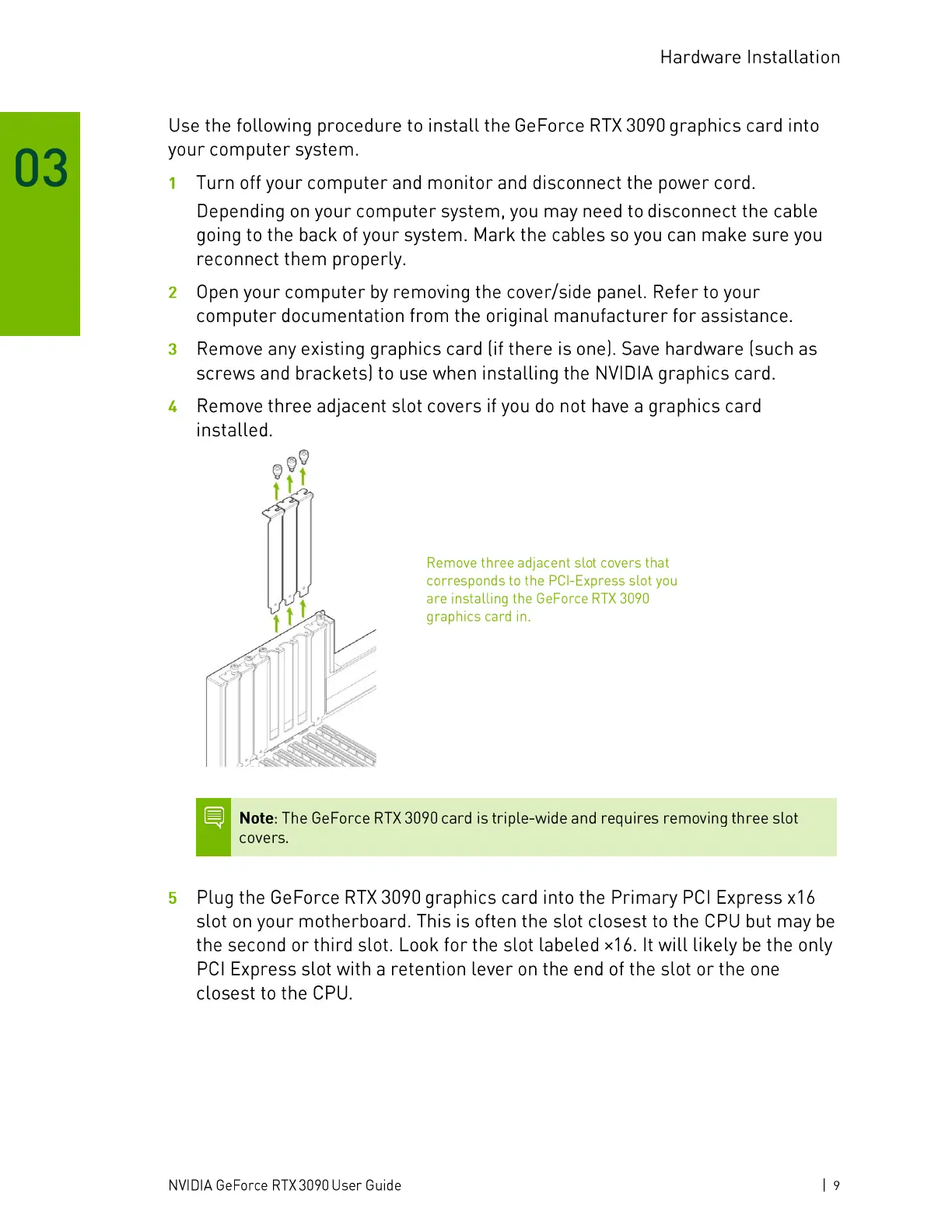
Remove three adjacent slot covers if you do not have a graphics card
installed.
Remove three adjacent slot covers that
corresponds to the PCl-Express slot you
are installing the GeForce RTX 3090
graphics card in.
Note: The GeForce RTX 3090 card is triple-wide and requires removing three slot
covers.
Plug the GeForce RTX 3090 graphics card into the Primary PCl Express x 16
slot on your motherboard. This is often the slot closest to the CPU but may be
the second or third slot. Look for the slot labeled x16. It will likely be the only
PCl Express slot with a retention lever on the end of the slot or the one
closest to the CPU.
NVIDIA GeForce RTX 3090 User Guide
19




 To Next Page