Hardware Installation
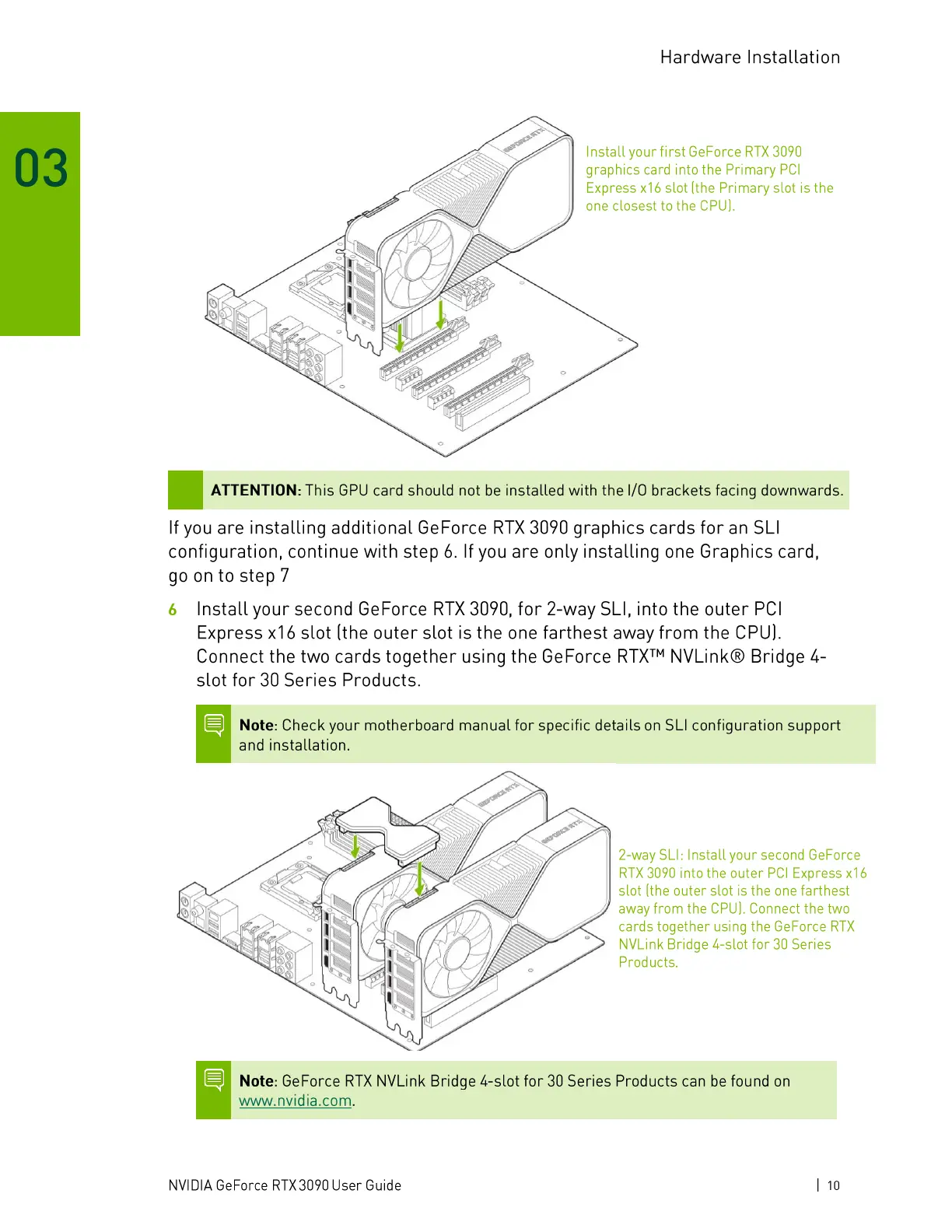
Install your first GeForce RTX 3090
graphics card into the Primary PCl
Express x16 slot (the Primary slot is the
one closest to the CPU).
1
ATTENTION:This GPUcard should not be installed with the 1/0brackets facing downwards.
If you are installing additional GeForce RTX 3090 graphics cards for an SLI
configuration, continue with step 6. If you are only installing one Graphics card,
go on to step 7
Install your second GeForce RTX 3090, for 2-way SLI, into the outer PCl
6
Express x16 slot (the outer slot is the one farthest away from the CPU).
Connect the two cards together using the GeForce RTXTMNVLink@ Bridge 4-
slot for 30 Series Products.
Note: Check your motherboard manual for specific details on SLI configuration support
and installation.
20
2-way SLI: Install your second GeForce
RTX 3090 into the outer PCI Express
slot (the outer slot is the one farthest
away from the CPU). Connect the two
cards together using the GeForce RTX
NVI_ink Bridge 4-slot for 30 Series
Products.
1
1
Note: GeForce RTX NVLink Bridge 4-slot for 30 Series Products can be found on
www.nvidia.com.
NVIDIA GeForce RTX 3090 User Guide
1 10




 To Next Page