7
Static
Static
How to find the Best Static Level for Your Dog ?
Very Important: Always start at the lowest level and choose the level
that is best for your dog.
Have 1 to 99 dierent Stimulation Levels. Follow the steps below to
nd the best Level:
Step 1: Starting at Level 10 on the Digital Display, press the static
button to see dog’s reaction.
Step 2: Move up through the Stimulation levels until your pet
reliably responds to the Stimulation.
Step 3: If your dog continues to show no response at Level 50, check
the t of the Receiver Collar. If your dog has long or thick hair,
change to a longer set of Contact Points, or dog’s hair will need to
be trimmed around the Contact Points.
If all of these steps have been done and dog continues to show no
reaction, see the
“How to Use Test Light Tool”
section.
+
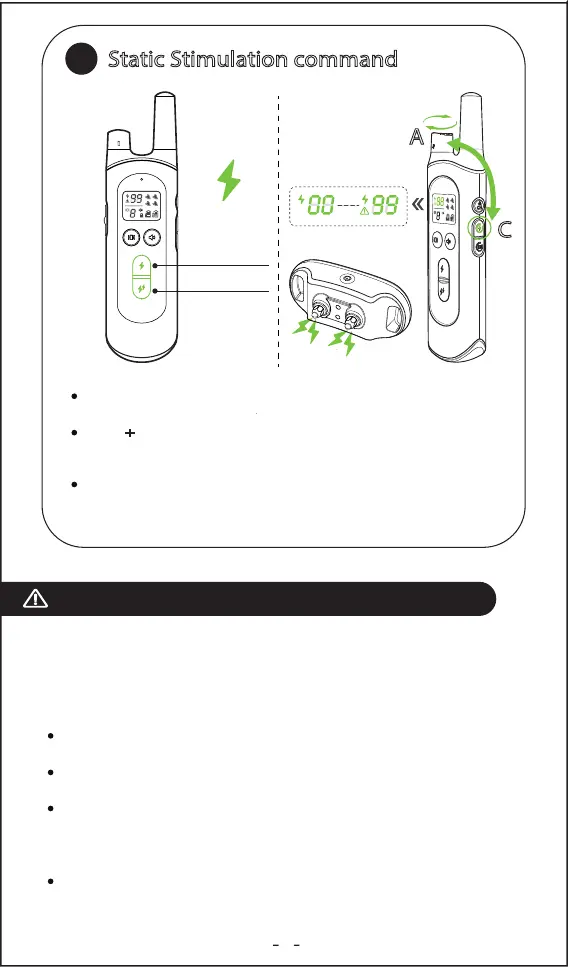
Static button: Delivers currently selected level Static stimulation
to the collar.
Static +
button: That is 10% higher than the currently selected
level. Some consumers would like to instant access to a higher
setting where the dog may not respond to lower levels.
Static Intensity adjustment: Press and hold the static Level
button C, at the same time, rotating the level regulator A of the
remote.
Static Stimulation command
C
A
8


 To Next Page
 Loading...