2
e control circuit board includes a display and three programming keys: “Enter“, “Plus“ (+)
and “Minus“ (-).
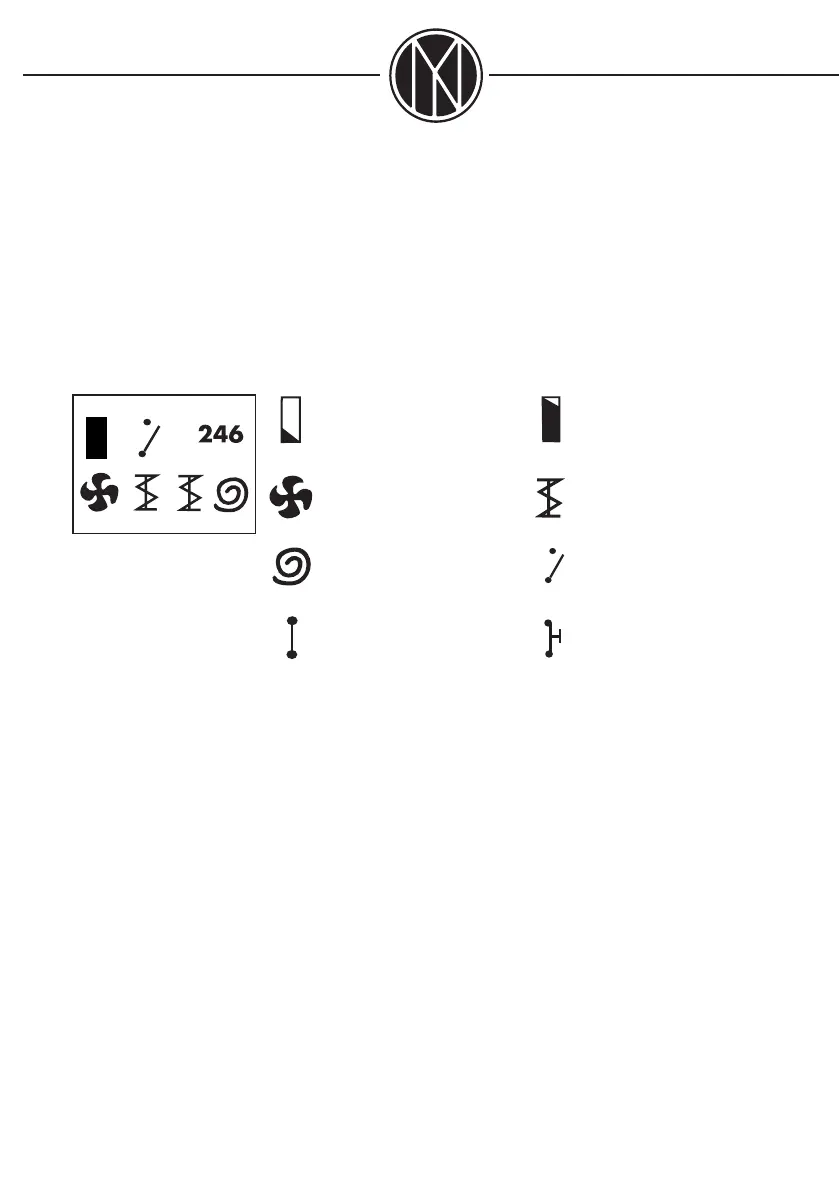
e following symbols can be displayed:
Photocell mode: Light Photocell mode: Dark
Fan(s): Operating Feed auger(s): Operating
Ignition coil: Operating Operating thermostat: Off
Operating thermostat: On ermostat delay
e control system is pre-set for the type of burner delivered.
For changing a function, press ENTER, and the value last entered will be displayed.
Example:
e text „RUNTIME 8 SEC“ is being displayed: is means that the feed auger is set to run 8
seconds at a time. If you want to change this value, press ENTER once again, so that an aste-
risk (*) appears behind the figure 8. Now press the plus (+) or minus (-) key, until you obtain
the feed time you wish, and confirm the new value by pressing ENTER (now the asterisk dis-
appears). After some 5 seconds, the burner status with all its symbols will be displayed again.
If you want to change a different function, press the plus (+) or minus (-) key until the func-
tion you want to change is displayed, and then change the function as described above.


 To Next Page
 Loading...