EasyManua.ls Logo

Nyne NHT5.1RGB - User Manual

Nyne NHT5.1RGB
14 pages
Print Icon
To Next Page IconTo Next Page
Loading...
1
Thank you for purchasing this product.
Please read this manual carefully so you will know how to operate your product
properly.
If there are any technical questions, please contact:
Customer care: (805) 751-4812 & Live chat
Online support: www.nyne.com/support
IMPORTANT
Please enter below the Serial No. which is located on the exterior of the product.
Retain this information for future reference.
Model
Serial No.
Date of Purchase

Questions and Answers

  • M
    michaelgonzalezJul 28, 2025
    Why can't I connect my device to the Nyne Home Theater System through Bluetooth?
    • W
      wendymillerJul 29, 2025
      If your Nyne Home Theater System isn't connecting via Bluetooth, first, consult your device's manual to ensure Bluetooth is enabled. Then, ensure the device is within range of the home theater system. If it's already connected to another device, disconnect the current Bluetooth connection. To remove the currently connected device from the connection memory, press and hold the / SCAN button on the top panel for ten seconds. After that, Bluetooth repairing will be needed.
  • J
    James HuntAug 3, 2025
    Why is there no sound coming from my Nyne Home Theater System?
    • H
      Heidi WellsAug 3, 2025
      If your Nyne Home Theater System has no sound, ensure all speakers are securely connected to the main unit. Check and adjust the volume on each connected speaker. Try pressing the 5.1/2.1 button on the remote to switch to 5.1 audio output. Also, verify that the volume on your connected device isn't too low or muted, and that playback is active. Finally, press the MODE button to switch to the correct input channel, such as 5.1 channel input (“dVd”) or AUX input.
  • P
    Paula FitzgeraldAug 10, 2025
    How to fix no power on my Nyne Home Theater System?
    • S
      Sara SteeleAug 10, 2025
      If your Nyne Home Theater System isn't powering on and there's no LED illumination, make sure the AC power cable is securely connected. Also, check that the power switch on the back of the main unit is in the ON position. Finally, ensure the speaker's power plug is fully inserted into the LED power jack on the back of the main unit.
  • J
    jgutierrezAug 15, 2025
    What to do if Nyne Home Theater System has poor radio reception?
    • R
      Rebecca SmithAug 15, 2025
      If your Nyne Home Theater System is experiencing poor radio reception, ensure the radio antenna is fully inserted and extended. Additionally, try increasing the distance between the unit and potential sources of interference like your TV or other electronic devices.
  • W
    Wendy BurtonAug 22, 2025
    What to do if my Nyne NHT5.1RGB cannot play USB or SD card?
    • T
      Thomas WangAug 22, 2025
      If your Nyne Home Theater System can't play files from a USB drive or SD card, the file formats might not be supported. Consider changing the file formats or trying a different USB or SD device.

Summary

Before Use

Important Safety Precautions

Essential safety guidelines to prevent hazards like short circuits, electric shocks, and damage.

Care for Your Product

Instructions for cleaning and maintaining the product to ensure longevity and proper function.

Care of the Environment

Guidelines for responsible disposal of the product and its batteries to protect the environment.

Your Home Theater

Introduction

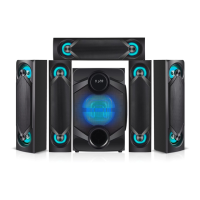
Overview of the 5.1 channel home theater system, its capabilities, and what to expect.

Delivery Content

Lists all the components included in the product package for setup.

Description of the Main Unit

Details the back panel connections and features of the main unit.

Controls on the Remote Control

Main Unit Controls Overview

Details controls and connectors on the main unit's top/front and side panels.

Remote Control Button Functions

Explains the function of each button on the remote control for operating the system.

Get Started

Connect Speakers

Instructions on how to connect the five speakers and subwoofer to the main unit.

Tips for Speakers Placement

Guidance on optimal placement of speakers for the best sound effect.

Mount Speakers on Wall

Steps for securely mounting speakers on a wall using provided brackets.

Connect FM Antenna

How to connect the FM radio antenna for improved reception.

Connect LED Power Cable

Instructions for connecting LED power cables to enable speaker lighting.

Connect AC Power

Steps for connecting the main unit to the power supply.

Prepare the Remote Control

Guidance on inserting batteries into the remote control for operation.

Use Your Home Theater

Power On;Standby

How to turn the system on, put it in standby mode, and fully power off.

Adjust Volume

Instructions for adjusting the overall and individual speaker volumes.

Select LED Light Mode

How to cycle through and select different RGB LED lighting modes.

Select Sound Modes

How to choose from predefined sound modes to enhance audio experience.

Enable 5.1 or 2.1 Channel Output

Switching between 5.1 and 2.1 channel audio output configurations.

Listen to Radio

Steps for tuning into FM radio stations and storing them.

Play Audio Through Bluetooth

Guide to pairing a mobile device and streaming audio via Bluetooth.

Play Audio From USB;SD

How to play audio files from connected USB drives or SD cards.

Play Audio From Other Devices

Connecting and playing audio from external devices like TVs or DVD players.

Troubleshooting

No Power; No LED Illumination

Solutions for issues related to the product not turning on or LEDs not lighting up.

No Sound

Troubleshooting steps for when no audio is produced by the system.

Cannot Play USB or SD Card

Resolving issues with playing media files from USB or SD card storage.

Poor Radio Reception

Tips for improving FM radio signal and reception quality.

Cannot Connect Through Bluetooth

Solutions for problems encountered when trying to connect via Bluetooth.

Product Specifications

Nyne NHT5.1RGB Specifications

Power IconPower
power supplyAC 110V, 60Hz
transmission power≤4 dBm
Audio Specifications IconAudio Specifications
impedance6 Ω
frequency response40 Hz - 20 kHz
signal to noise ratio≥80 dB
Connectivity IconConnectivity
bluetooth versionv3.0
bluetooth transmission frequency2.402 – 2.480 GHz
bluetooth transmission range10 m / 32.8 ft.
Weight and Dimensions IconWeight and Dimensions
main unit dimensions9.3” x 14.6” x 13.3”
main unit weight6.2 kg / 13.7 lbs
speakers dimensions3.9” x 15.7” x 4.1”
speakers weight1.1 kg / 2.4 lbs