
 Need help?
Do you have a question about the Nywint DT-DJ7A and is the answer not in the manual?
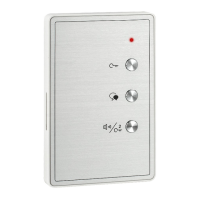
Details the functions of the unlock, talk, volume, and call buttons on the device.
Explains the purpose of L1, L2, SW+, SW- terminals and DIP switches for configuration.
Provides steps for fixing screws, connecting the system, and attaching the audio phone.
Recommends mounting height following ADA compliance standards (48-54 inches).
Details how to release the door, open a second door, and initiate inner calls.
Explains how to set unique User Codes for apartments using DIP switches.
Describes setting Master/Slave modes for multi-monitor setups via DIP switches.
Explains setting extended addresses using DIP switches when Bit-10 is ON.
Details choosing from three groups of ring tunes for different call types.
Illustrates how to cycle through ring tune groups using the Talk button.
Lists key technical details including power, temperature, wiring, and dimensions.
The DT-DJ7A is an audio phone designed for use in a building's intercom system, primarily functioning as an indoor unit for communication with visitors and door release. It features a compact and minimalist design, with essential controls for daily operation. The device is intended to be wall-mounted and connected to a two-wire bus system, simplifying installation.
The primary function of the DT-DJ7A is to facilitate audio communication between an indoor resident and a visitor at an outdoor station. When a visitor initiates a call from the outdoor station, the audio phone rings, alerting the resident. The resident can then press the "Talk" button to establish a hands-free conversation with the visitor. This allows for clear two-way audio communication, enabling the resident to identify the visitor before granting access.
Beyond communication, the DT-DJ7A offers a door release function. After conversing with a visitor, the resident can press the "Unlock" button to remotely open the door, granting access. For systems with multiple locks, the device supports a second door release function, activated by pressing the "Call button/Unlock 2nd button." This provides flexibility for properties with more complex access control needs.
The audio phone also includes an "Inner Call" feature. When the monitor is in standby mode, pressing the "Call button/Unlock 2nd button" activates an inner call, presumably for communication with other indoor units within the same apartment or building, if the system supports such functionality.
The DT-DJ7A is designed for straightforward and intuitive use. Its front panel features several clearly labeled buttons and controls:
The device's operation flow for door release is simple: a visitor calls, the resident talks, and then presses "Unlock." The inner call function is equally direct, requiring only a press of the "Call button/Unlock 2nd button" when the unit is idle.
While the manual primarily focuses on installation and setup, it provides crucial information for initial configuration, which can be considered a form of "maintenance" for optimal system performance.
DIP Switches for User Code Setting: The DT-DJ7A utilizes DIP switches for configuring its "User Code." In a multi-apartment building, each apartment's audio phone must have a unique User Code for proper identification within the DT system. Bits 1-5 of the DIP switch are dedicated to setting this code, allowing for 32 different codes (values from 1 to 32). This ensures that calls are routed to the correct apartment. Bit-11 is also mentioned in relation to video matching, suggesting its role in systems that integrate video intercom functionality.
DIP Switches for Slave Address or Extended Address Setting: For apartments with multiple indoor monitors, the DT-DJ7A supports Master/Slave mode configuration.
Ring Tune Setting: The device offers customization for ring tunes. Users can enter a ring tune setting mode by pressing and holding the "Talk" button in standby. Subsequent presses of the "Talk" button cycle through three different groups of ring tunes (Group1, Group2, Group3), each offering distinct sounds for calls from the door station, intercom calls, and the doorbell. This allows residents to personalize the alert sounds to their preference. The system automatically exits this setting mode after 10 seconds of inactivity or upon pressing any other button.
Mounting: The manual provides clear instructions for unit mounting, which is essential for proper installation and long-term stability. It involves fixing two screws to the wall at an appropriate height, connecting the system correctly, and then attaching the audio phone to its bracket. A note regarding ADA compliance and recommended height (48"-54") is included, emphasizing accessibility considerations.
The DT-DJ7A is a robust and configurable audio phone, designed to be an integral part of a building's access control and communication system, offering essential features for resident convenience and security.
 General
| Brand | NYWINT |
|---|---|
| Model | DT-DJ7A |
| Caller ID | Yes |
| Display | LCD |
| Frequency | DECT 6.0 |
| Standby Time | Up to 100 hours |
| Talk Time | Up to 10 hours |
| Phonebook | 50 entries |
| Keypad | Yes |
| Answering Machine | No |
| Color | Black |
| Type | Cordless Phone |
| Range | Up to 300 meters |

 To Next Page