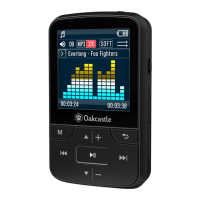
The Oakcastle MP200 is a versatile MP3 player designed for portable audio enjoyment, offering a range of features for music playback, recording, radio listening, and Bluetooth connectivity. It comes with essential accessories including earphones, a USB cable, an instructions guide, and a protective case, ensuring users have everything needed to get started.
Function Description:
The MP200 primarily functions as an MP3 player, allowing users to store and play a variety of audio formats. Beyond music playback, it integrates an FM radio for live broadcasts and a voice recorder for capturing audio. Bluetooth 4.0 connectivity enables wireless audio streaming to compatible speakers or headphones. The device also supports expandable storage via Micro-SD cards, making it suitable for users with extensive music libraries.
Important Technical Specifications:
- Screen: 1.5 inch 128x128 TFT display, providing a clear interface for navigation.
- Flash Memory: Available in 8GB or 16GB options, offering ample internal storage for audio files.
- Bluetooth Version: Bluetooth 4.0, ensuring stable and efficient wireless connections.
- Audio Format Compatibility: Supports a wide range of formats including MP3, WMA, OGG, APE, FLAC, and WAV, catering to various audio preferences.
- Recording Format: Capable of FM/MIC record and WAV, allowing for high-quality audio capture.
- Battery: Li-polymer rechargeable 300mAh battery, providing decent playback time on a single charge.
- FM Frequency: Operates within the 87.5-108MHZ range for radio reception.
- Micro-SD Card Support: Compatible with SD cards up to 128GB, significantly expanding storage capacity.
- Micro-SD Card Format Compatibility: Specifically designed for FAT32 Micro SD cards; not compatible with NTFS or exFAT Micro SD cards.
- Photo Format Compatibility: Supports JPG, BMP, and GIF, although the primary function is audio.
- Charging Time: Approximately 3 hours for a full charge.
- FCC ID: 2AN7W-F3BT.
- Compatible Operating Systems: Windows 7/8/8.1/10/XP/Vista/2001/Mac OS, ensuring broad compatibility for file transfer.
Usage Features:
The MP200 is designed for intuitive use with a clear control layout.
- Power On/Off: Press and hold the power button (Ref.2).
- Charging: Connect the device via the micro USB slot (Ref.12) using the supplied USB cable. It's recommended to charge when the device is off. Users can choose between 'Charge & transfer' or 'Charge & play' when connected to a computer. A full charge takes no more than 4 hours.
- File Transfer (Adding Music): Connect the device to a computer via USB. Select 'Charge & transfer' and transfer files. Safely eject the device from the computer's File Explorer or press the Main Menu button (Ref.4) to disconnect.
- Music Playback: Navigate to 'Music' from the main menu and press the enter button (Ref.7). Options include 'All songs', 'Artists', 'Albums', and 'Genres'.
- Track Navigation: Skip to previous/next tracks using the Previous/Next buttons (Ref. 6, Ref. 9).
- Fast Forward/Rewind: Press and hold the 'Back' button (Ref.6) to rewind or the 'Next' button (Ref.9) to fast forward. Release to resume playback.
- Playlist Creation: Up to 3 playlists can be created.
- Method 1: Select 'Create a playlist', then 'Enter' (Ref.7) on selected songs. While a song is playing, press 'Main Menu' (Ref.4), select 'Add to playlist', and choose the desired playlist.
- Method 2: Play a song, press 'Menu' (Ref.4), select 'Add to playlist', and choose the playlist.
- Music Options:
- Play mode: Change repeat settings (e.g., 'repeat file') or 'Shuffle' all songs by pressing 'Menu' (Ref.4) and selecting 'Play mode'.
- Equalizer: Adjust sound settings (e.g., 'Rock', 'Funk', 'Hip Hop', 'Jazz', 'Classical', 'Techno').
- Add/Remove/Delete: Add or remove songs from playlists, or delete songs from the device.
- Bookmarks: Save a specific point in a song to resume playback later.
- FM Radio: Select 'Radio' from the main menu. Headphones must be connected as they act as the antenna.
- Auto Tune: Press 'Menu' (Ref.4), select 'Auto tune', and confirm 'Yes' to search for stations.
- FM Record: Record FM broadcasts or listen to saved recordings. Press 'Back' (Ref.10) to save or delete.
- Save/Clear Preset: Save or delete FM stations from the presets list.
- FM Bands: Change the FM frequency band.
- Voice Recording: Select 'Recorder' from the main menu.
- Start Recording: Select 'Start voice recording'. The built-in microphone (Ref.11) will begin recording.
- Pause/Stop/Save/Delete: Press 'Enter' (Ref.4) to pause/stop. Press 'Back' to save ('Yes') or delete ('No').
- Recordings Library: View a list of saved recordings.
- Record Format: Choose between MP3 or WAV file formats.
- Record Settings: Adjust bitrate (512, 768, 1024, 1536kbps) and enable VOX-mode (voice-activated recording).
- Bluetooth Connectivity: Select 'Bluetooth' from the main menu.
- Bluetooth On/Off: Toggle Bluetooth on or off.
- BT Status on Power-on: Configure Bluetooth to automatically enable or disable upon device power-on.
- Search for Device: Search for available Bluetooth devices.
- Device List: View previously connected devices.
- Connecting to a Speaker: Select 'Bluetooth On' (Ref.7), ensure the speaker is in pairing mode, then select 'Search for device' and choose your speaker from the list.
- Settings: Access 'Settings' from the main menu.
- Language: Choose from 30 languages.
- Display Settings: Adjust screen brightness and backlight timer.
- Power Off: Set sleep timer and auto turn-off settings.
- Information: View firmware details and remaining disk space.
- Format Device: Format the device and delete all data.
- Factory Settings: Restore the device to its original factory settings.
Maintenance Features:
- Forced Reset: If the MP3 player becomes unresponsive, a forced reset can be performed by inserting a pin or paper clip into the reset hole located at the bottom of the unit, next to the charging port.
- General Care: The manual advises against exposing the device to dripping or splashing liquids, heat sources, or open flames. It also recommends using only manufacturer-specified attachments/accessories and referring all servicing to qualified personnel.
- Disposal: Users are instructed to recycle waste electrical goods and batteries safely according to local authority and regulations, as the device should not be disposed of with normal household waste.
- Warranty: Oakcastle offers a FREE 3-year extended warranty upon product registration within 30 days of purchase, providing access to benefits and lifetime technical support.

 Need help?
 General

 To Next Page