1110
5. Calibration
Temperature calibration using offset adjustment
The temperature sensor included with your meter is factory calibrated. Over time,
the temperature calibration may drift and require recalibration. If you replace the
probe you should recalibrate.
1. Connect your temperature probe to the meter. Turn meter on. Meter enters
measurement mode.
2. Compare displayed value to a NIST certified thermometer or other thermometer
known to be accurate. For best accuracy, place probe and thermometer in a con-
stant temperature bath.
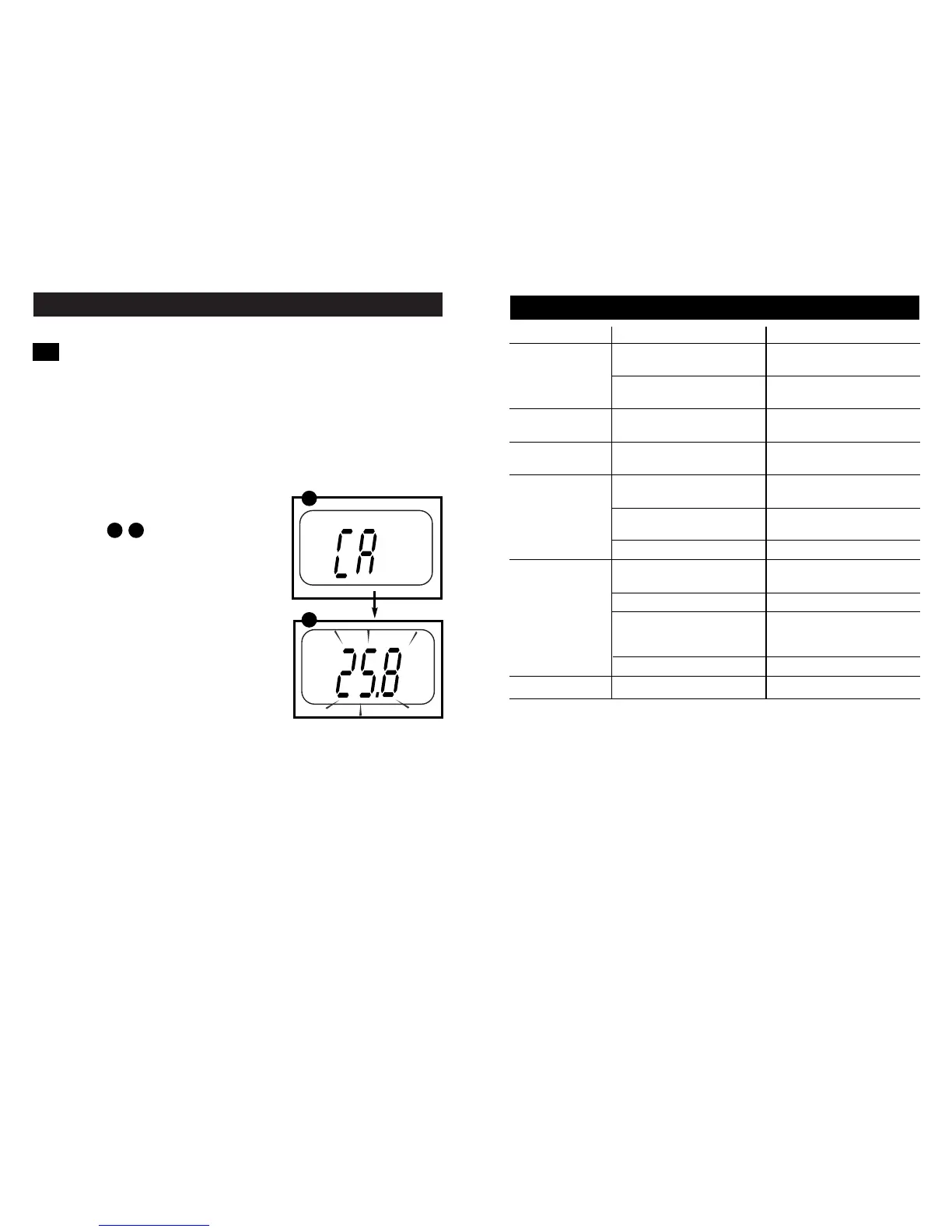
3. Press the CAL key to enter calibration mode.
The LCD shows "CA" and the reading flashes.
See figures
4. Use the ▲ and ▼ keys to adjust the
temperature shown to match the accurate
temperature (maximum adjustment is
±10°C / ±18°F from factory default).
5. Press ENTER key to confirm calibration.
The LCD displays "CO", and the meter
then reverts to measurement mode.
5.1
A B
A
B
6. Troubleshooting
Problem Cause Solution
“Ur” or “Or” Measurement over (Or) or —
on LCD Under (Ur) range.
Bad temperature Change temperature
probe probe
oPEn annunciator Probe not connected Make sure probe
on LCD is firmly connected
LO annunciator Low battery Replace batteries
on LCD with fresh set
Power on but Batteries not Insert batteries
no display in place
Batteries not in Re-insert batteries
correct polarity (+ and -) with correct polarity
Weak batteries Replace batteries
Unstable Probe not deep Place probe
reading enough in sample deeper in sample
Broken probe Replace probe
External “noises” or Remove or switch off
induction caused by interfering motor
by nearby electric motor
Dirty probe Clean probe
Slow response Dirty probe Clean probe


 To Next Page