EasyManua.ls Logo

Oberheim DMX - User Manual

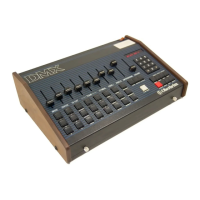
Oberheim DMX
39 pages
Print Icon
To Next Page IconTo Next Page
Loading...

Other manuals for Oberheim DMX

Question and Answer IconNeed help?

Do you have a question about the Oberheim DMX and is the answer not in the manual?

Summary

Hookup and Connections

Power Connections

Details on connecting to a power source and selecting the correct voltage.

DMX Operation Guide

Selecting a Sequence

How to choose and activate one of the 100 available drum sequences.

Playing a Sequence

Instructions for playing a selected sequence continuously or stopping it.

Recording a Sequence

Methods for creating new drum sequences using realtime or single step recording.

Tempo Settings

How to set and adjust the tempo (Beats Per Minute) for sequences.

Quantizing Recordings

Automatically corrects timing to nearest beat increments for recording.

Combining Sequences into Songs

Songs Overview

Overview of creating songs by arranging sequences in a specific order.

Playing a Song

Instructions for selecting and playing back a programmed song.

Recording a Song

Process of editing and creating songs by listing sequences in order.

About the DMX Voices

Cassette Interface Operations

Cassette Interface Connections

Diagram and instructions for connecting a cassette recorder.

Transferring Data to and from Tape

Steps to record programs onto tape and load programs from tape.

Tape Transfer Error Causes

Troubleshooting common issues encountered during tape data transfer.

Interfacing the DMX with Other Devices

Synchronizing DMX and DSX Sequencers

Methods for syncing the DMX with other Oberheim sequencers.

Synchronizing DMX;DSX with Tape

Techniques for synchronizing DMX/DSX units with tape recordings.

Synchronizing with Other Sequencers

Using the DMX metronome output to clock external sequencers.

External Triggers and CV Control

Using external voltage and trigger signals to control drum voices.

Footswitches and Pedals

DMX Factory Sequences

DMX Specifications

Summary

Hookup and Connections

Power Connections

Details on connecting to a power source and selecting the correct voltage.

DMX Operation Guide

Selecting a Sequence

How to choose and activate one of the 100 available drum sequences.

Playing a Sequence

Instructions for playing a selected sequence continuously or stopping it.

Recording a Sequence

Methods for creating new drum sequences using realtime or single step recording.

Tempo Settings

How to set and adjust the tempo (Beats Per Minute) for sequences.

Quantizing Recordings

Automatically corrects timing to nearest beat increments for recording.

Combining Sequences into Songs

Songs Overview

Overview of creating songs by arranging sequences in a specific order.

Playing a Song

Instructions for selecting and playing back a programmed song.

Recording a Song

Process of editing and creating songs by listing sequences in order.

About the DMX Voices

Cassette Interface Operations

Cassette Interface Connections

Diagram and instructions for connecting a cassette recorder.

Transferring Data to and from Tape

Steps to record programs onto tape and load programs from tape.

Tape Transfer Error Causes

Troubleshooting common issues encountered during tape data transfer.

Interfacing the DMX with Other Devices

Synchronizing DMX and DSX Sequencers

Methods for syncing the DMX with other Oberheim sequencers.

Synchronizing DMX;DSX with Tape

Techniques for synchronizing DMX/DSX units with tape recordings.

Synchronizing with Other Sequencers

Using the DMX metronome output to clock external sequencers.

External Triggers and CV Control

Using external voltage and trigger signals to control drum voices.

Footswitches and Pedals

DMX Factory Sequences

DMX Specifications

Oberheim DMX Specifications

General IconGeneral
TypeDrum Machine
SequencerYes
PadsNo
MIDINo
Sample RateUnknown
MemoryUnknown
DimensionsUnknown
WeightUnknown