18
19
06
17
16
14
11
07
08
09 10
13
12
15
01
03
02
05
04
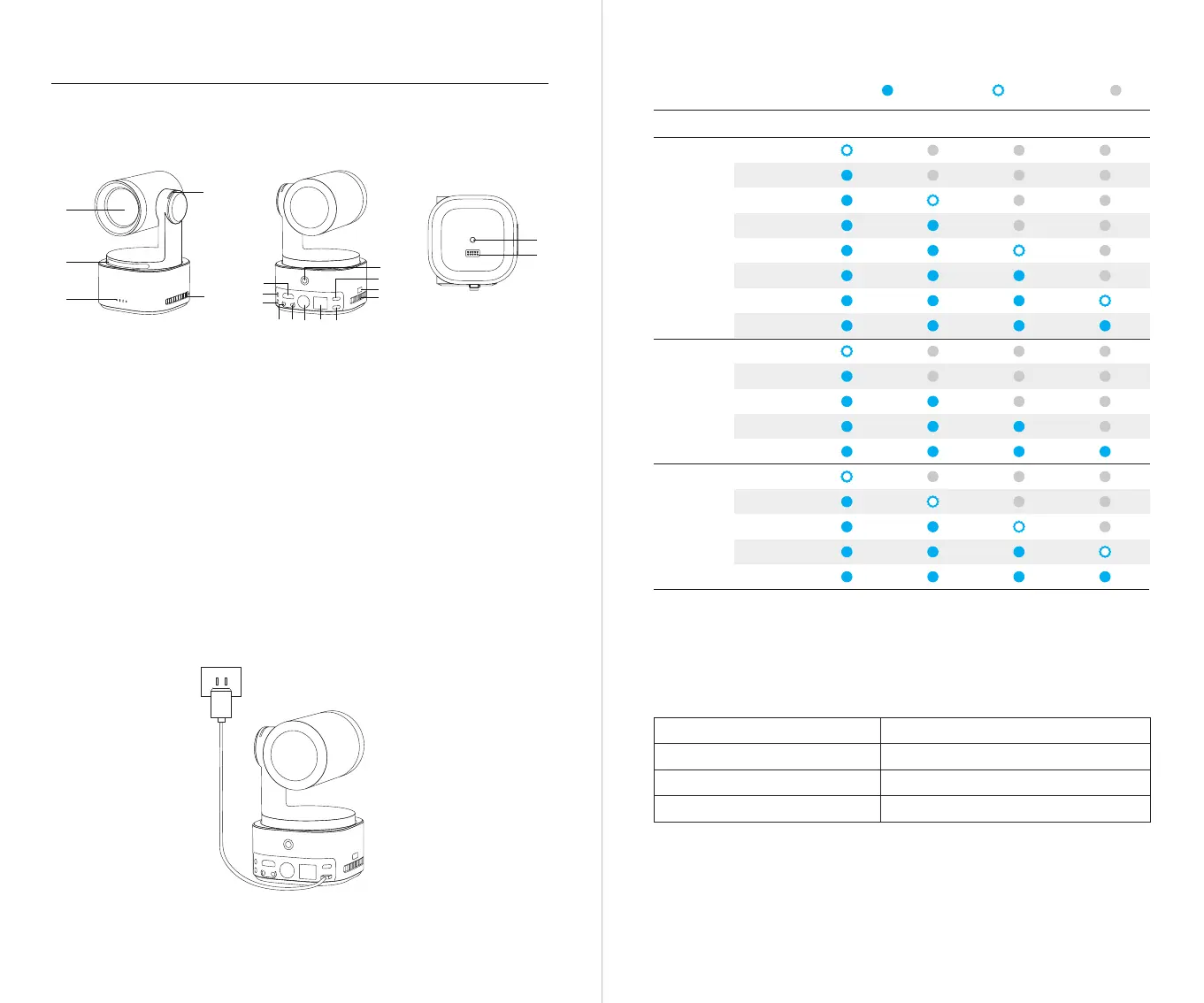
Parts Info
Tally Light
Battery Indicator
Charging Instructions
When using the camera for the first time, please charge it using the included USB-C power
cable to ensure proper functionality.
⚠ It is recommended to use an FCC/CE certified adapter that supports the USB PD3.0 protocol
and has a power output of at least 25W.
Product Overview
01. Camera Lens
02. Tally Light
03. Status Indicator
04. Battery Indicator
05. Cooling Inlet
06. HDMI Port
07. MIC IN Port
08. LINE IN Port
09. RS232 IN Port
10. RS232 OUT Port
11. Power Button
12. 3G-SDI Port
13. LAN/PoE+ Port
14. USB-C Port
15. Power Input Port
16. Micro SD Card Slot
17. Cooling Outlet
18. UNC 1/4-20 Interface
19. Extension Pin Interface
⚠ Charging will stop when the battery temperature exceeds 45°C.
For example, when connected to an external power supply, if the battery temperature exceeds
45°C, the camera will stop charging and will be powered directly from the external power supply.
LED 4LED 1 LED 2 LED 3CapacityType
Steady Blue
OFF
11%-25%
31%-45%
0%-10%
26%-30%
61%-75%
96%-100%
46%-60%
11%-25%
46%-75%
0%-10%
26%-45%
76%-100%
76%-95%
Battery
Detection
Upon
Pressing
the Power
Button
Discharging
Flashing Blue
26%-45%
76%-95%
0%-25%
46%-75%
96%-100%
Charging
NDI Video Stream Status Indicator Statuses
Program
Preview
Not In Use
Solid red light
Solid green light
Light Off


 To Next Page
 Loading...