EasyManua.ls Logo

occiam K23 - Bluetooth Connection with Mobile Phone

occiam K23
14 pages
Print Icon
To Next Page IconTo Next Page
To Previous Page IconTo Previous Page
Loading...
Bluetooth
Connection
with
Mobile
Phone.
Prior
to
first
use
(or
not
in
use
for
long
time),
please
charge
both
earbuds
and
charging
case
with
the
supplied
Type-C
Charging
Cable.
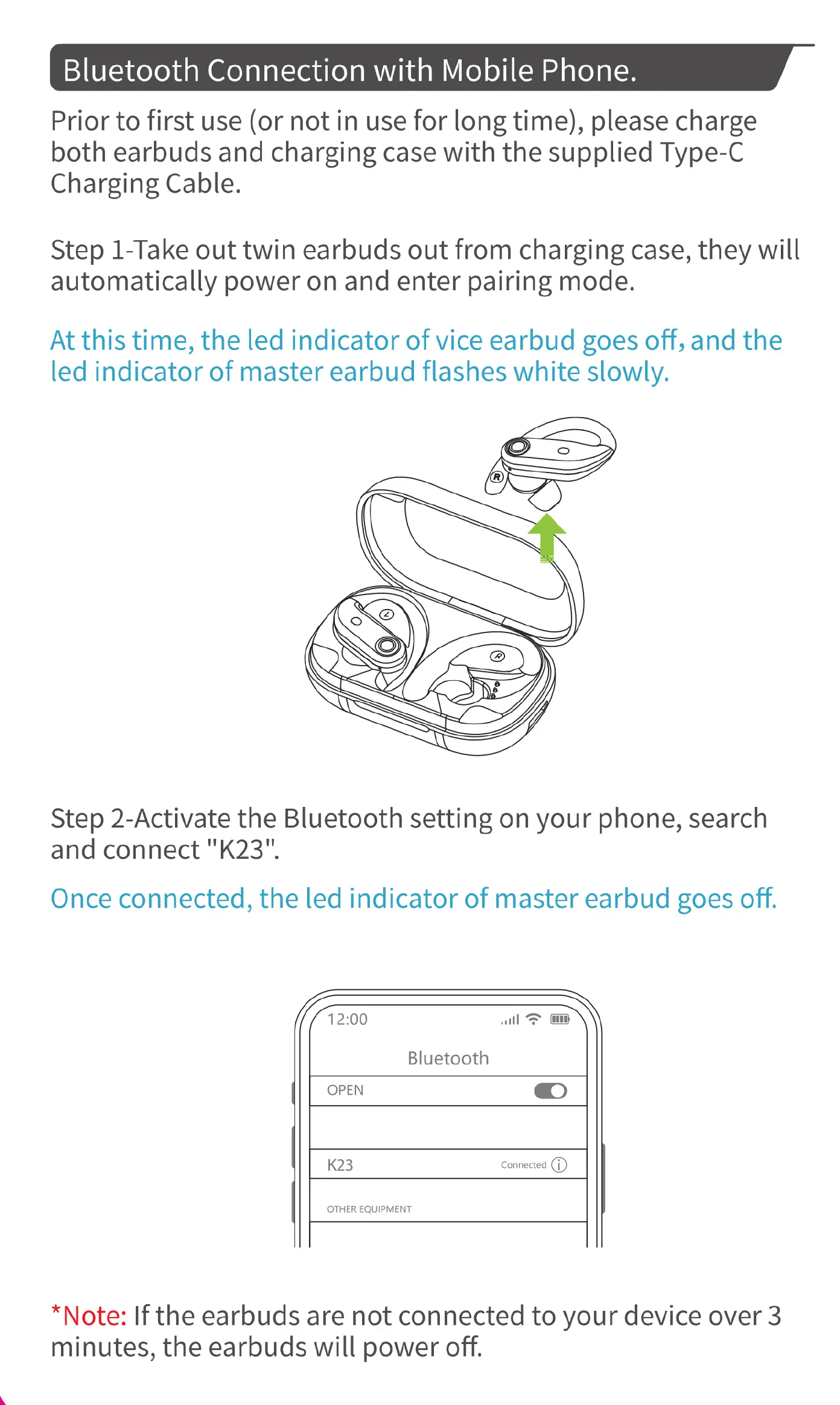
Step
1-Take
out
twin
earbuds
out
from
charging
case,
they
will
automatically
power
on
and
enter
pairing
mode.
At
this
time,
the
led
indicator
of
vice
earbud
goes
off,
and
the
led
indicator
of
master
earbud
flashes
white
slowly.
Step
2-Activate
the
Bluetooth
setting
on
your
phone,
search
and
connect
"K23".
Once
connected,
the
led
indicator
of
master
earbud
goes
off.
fflz;oo
il
=
@\\
Bluetooth
OPEN
@)
K23
Connected
(1)
OTHER
EQUIPMENT
*Note:
If
the
earbuds
are
not
connected
to
your
device
over
3
minutes,
the
earbuds
will
power
off.

Related product manuals