6 TM & © 2014 Oculus VR, LLC. All Rights Reserved. TM & © 2014 Oculus VR, LLC. All Rights Reserved. 7
Oculus Rift Development Kit 2
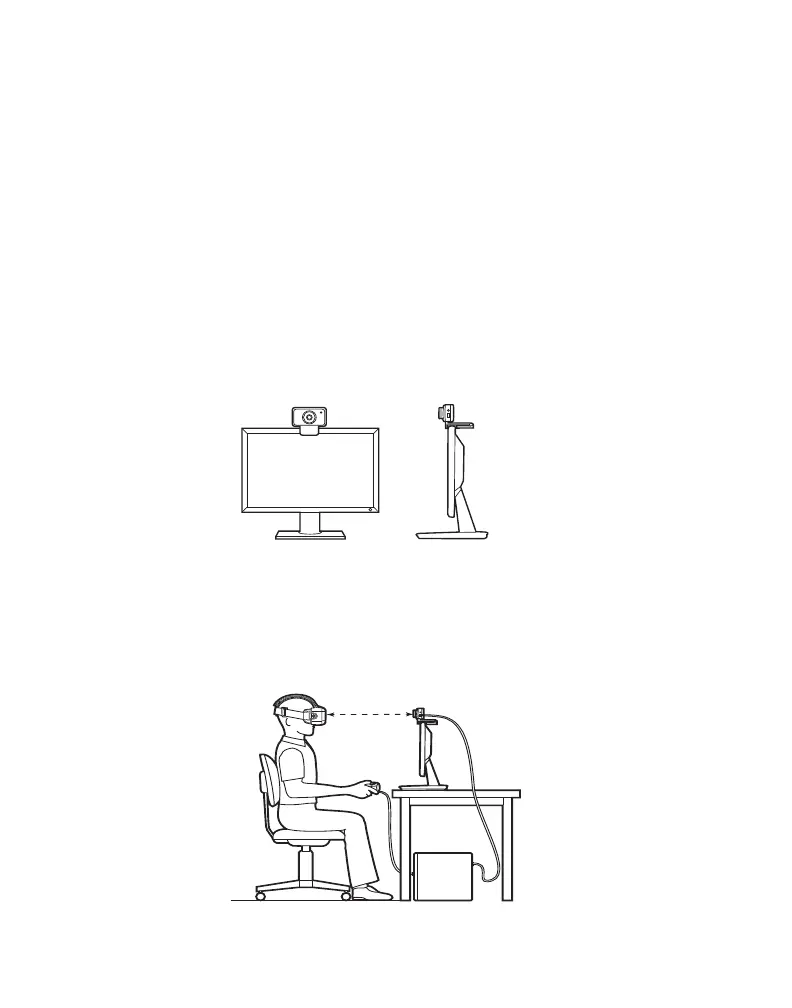
Ensure there is a direct line of sight from the positional
tracker to the headset.
For optimal performance, position yourself about 1.5
meters or 5 feet away from the positional tracker.
The positional tracker is used for tracking the position of
the headset in 3D space.
Attach the positional tracker to a tripod or the top of your
monitor, or rest it on your desk. Make sure the positional
tracker lens is facing you. The positional tracker must be
stable, as shaking the positional tracker can cause the
image rendered on the display panel to shake even if you
are sitting still.
STEP
5
Attach Positional Tracker to
Tripod or Monitor


 To Next Page