1
Oculus Rift Development Kit
TM & © 2013 Oculus VR, Inc. All Rights Reserved.
Seng Up the Headset
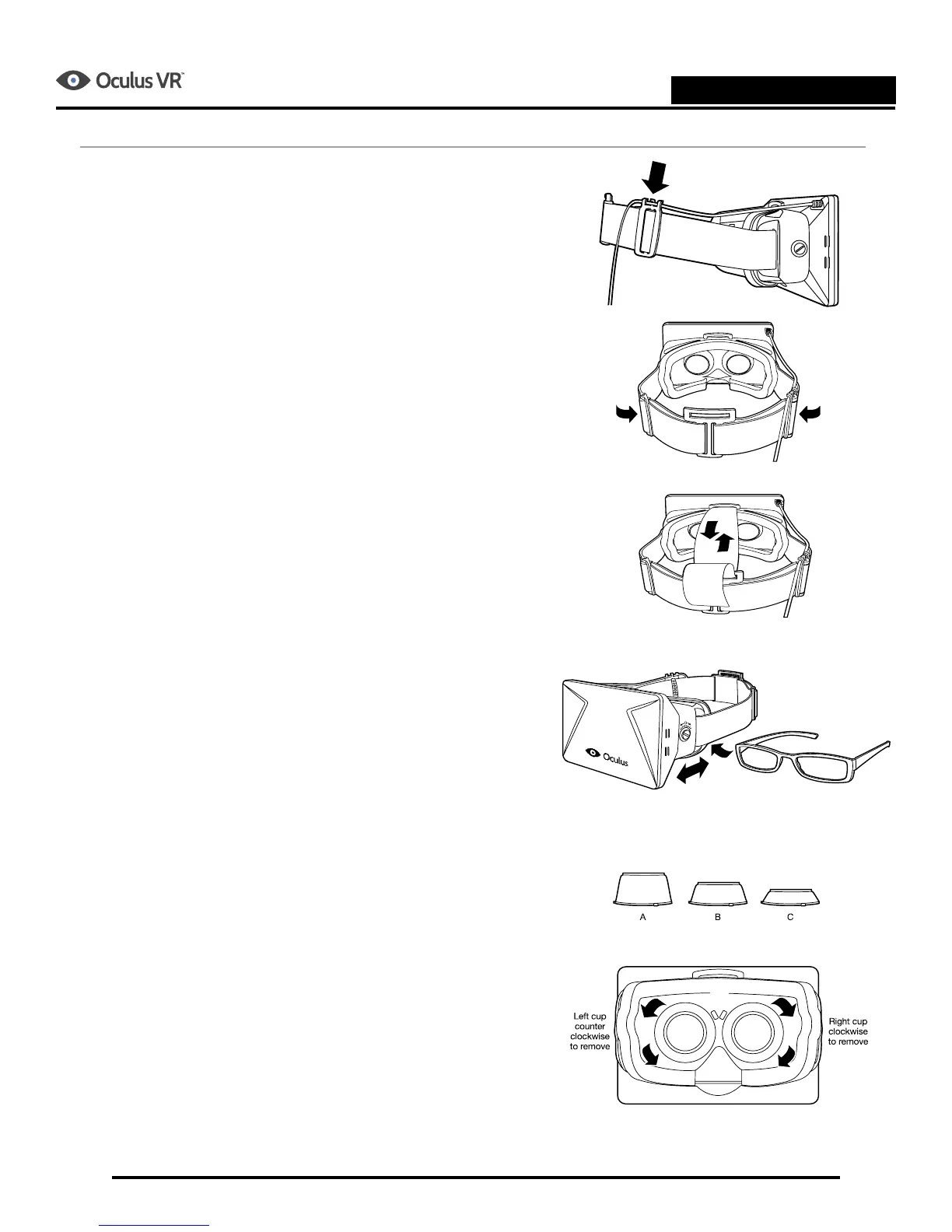
1. Carefully remove the headset and the control box from
the case. The headset cord is permanently aached to
the control box. Avoid having this cord bend sharply.
2. Adjust the head strap so that it ts snugly around your
head.
3. An over-the-head strap is included. If you choose to use
it, loop the strap from the front to the back and adjust
so it ts over your head comfortably. Adjust the over-
the-head strap to t as desired.
4. If you wear glasses, you can adjust the distance of
the lenses and screen by turning the screws on either
side of the headset using a coin. Make sure that the
adjustment sengs on both sides match aer making
changes.
Note: Wearing glasses while using the headset will
reduce your eld of view. You also risk scratching your
lenses. If you are nearsighted, we recommend you use
the included vision eye cups or contact lenses.
5. Three dierent pairs of lenses are included with the
development kit. The tallest set (A) is designed for 20/20
or farsighted vision. The middle set (B) is designed for
moderately nearsighted users. The shortest set (C) is
designed for very nearsighted users. The lenses are
designed to be swapped using an insert-lock-in-place
mechanism. If you wish to wear correcve lenses while
using the Ri, please use lens set A, the tallest lens cups
and use the side screws of the Ri to adjust the headset
to t on your head.
Note: To prevent dust from geng inside the headset,
we recommend you turn the headset face down before
changing lenses.


 To Next Page
 Loading...