EasyManua.ls Logo

OCULUS Touch - User Manual

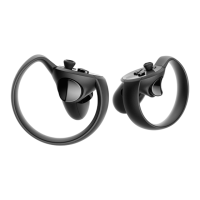
OCULUS Touch
136 pages
Print Icon
To Next Page IconTo Next Page
Loading...
OCULUS TOUCH
HEALTH & SAFETY
AND WARRANTY GUIDE
Question and Answer IconNeed help?

Do you have a question about the OCULUS Touch and is the answer not in the manual?

Summary

Product Description

Product Care and Maintenance

Health and Safety Precautions

General Precautions

Provides general guidance to minimize risks of injury or discomfort during use.

Guardian System

Explains the boundary system designed to keep users within their play area.

Interference with Medical Devices

Warns that magnets and radio waves may affect electronic medical devices.

Battery Safety

Details hazards of battery ingestion, misuse, and risks of fire or leakage.

Electrical Shock Hazard

Advises against modifying components or using damaged cables to prevent electric shock.

Limited Consumer Warranty

Warranty Service Process

Outlines how Oculus will address product defects, offering repair or replacement.

Summary

Product Description

Product Care and Maintenance

Health and Safety Precautions

General Precautions

Provides general guidance to minimize risks of injury or discomfort during use.

Guardian System

Explains the boundary system designed to keep users within their play area.

Interference with Medical Devices

Warns that magnets and radio waves may affect electronic medical devices.

Battery Safety

Details hazards of battery ingestion, misuse, and risks of fire or leakage.

Electrical Shock Hazard

Advises against modifying components or using damaged cables to prevent electric shock.

Limited Consumer Warranty

Warranty Service Process

Outlines how Oculus will address product defects, offering repair or replacement.

OCULUS Touch Specifications

General IconGeneral
Haptic FeedbackYes
CompatibilityOculus Rift, Oculus Rift S
Buttonsmenu button
InputButtons
Battery LifeApproximately 30 hours