
 Need help?
Do you have a question about the OEM VKP80III and is the answer not in the manual?
Outlines the structure of the manual, detailing each chapter's content.
Explains the meaning of NOTE, ATTENTION, and DANGER indicators in the manual.
Instructions for safely removing the printer from its packaging and checking contents.
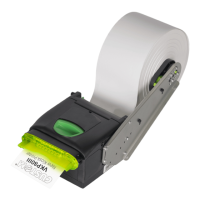
Identifies and labels the external components of the printer.
Explains the functions of the printer's keys based on operating conditions.
Details the meaning of different status LED flash patterns and their corresponding printer states.
Provides instructions and screw length calculations for physically mounting the printer.
Illustrates how to connect power supply, USB, and serial cables to the printer.
Shows the pin configurations for power supply and USB interfaces.
Lists supported operating systems and procedures for installing printer drivers.
Explains how to adjust the paper width using the cursors.
Details how to adjust the mobile sensor for notch detection on the non-thermal side.
Step-by-step guide on how to load a new paper roll into the printer.
Explains different ticket issuance modes like 'EJECT', 'PRESENT', and 'COLLECT'.
Instructions on how to enter the printer's configuration mode.
Shows an example of the printer's setup report and explains its parameters.
Explains how to interpret the printer status information provided in the configuration print-out.
Lists and describes various printer configuration parameters like emulation and baud rate.
Describes the Hexadecimal Dump function for diagnosing communication issues.
Provides a schedule for recommended cleaning operations based on usage.
Detailed guide for cleaning cutter compartment, cutter, sensors, paper path, head, and rollers.
Instructions for updating the printer's firmware via a serial or USB interface.
Details general, interface, memory, and printer hardware specifications.
Lists character densities, columns, and printing speeds for different emulations.
Provides ticket length and presentation specifications for ejector functions.
Shows the physical dimensions (length, height, width, weight) of the printer.
Provides the dimensions of the optional external power supply unit.
Details paper requirements, including alignment notch placement.
Lists PC437, PC850, and other code table characters and their hex/decimal values.
Explains the use of TrueType fonts, their requirements, and available code tables.
Details the adapter cable for connecting the printer to the power supply.
Describes the paper roll holder kit for larger width rolls.
Describes the adjustable paper roll holder for left/right side mounting.
Explains the shutter device that prevents foreign objects from entering the paper outlet.
Explains how to enable alignment by selecting notch type and sensor.
Details the automatic self-calibration process for sensors and paper characterization.
Defines 'alignment point' and 'Notch Distance' parameter for alignment.
Discusses calibration of the printing area relative to inter-notch distance.

 To Next Page
 General