2.
Video Replay
1.
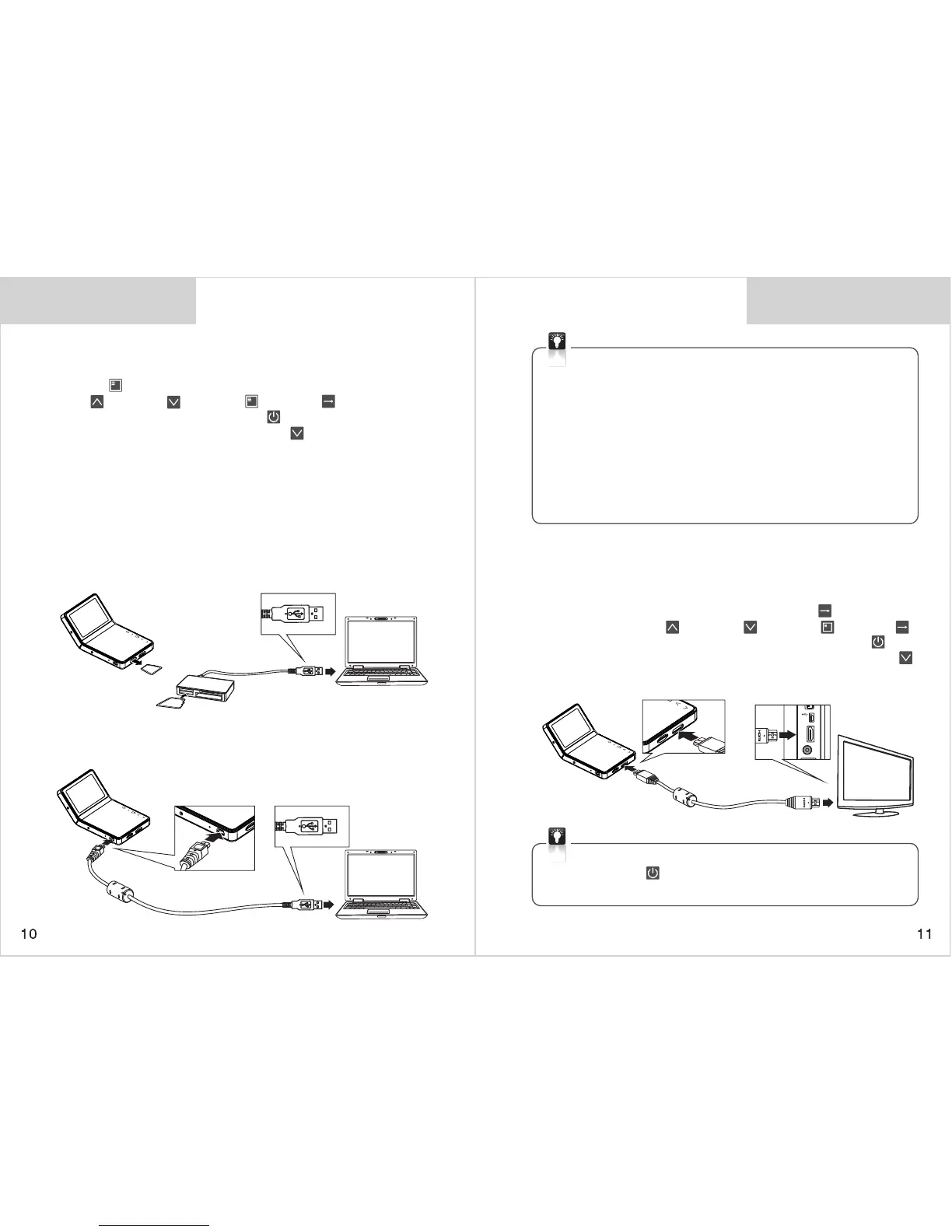
Play the video by HD Mobile-i LCD display
Tur n o n M obile- i a nd stop recor d i ng , d oub l e-p r es s o n
<M ode > key to enter into video preview mode, use the
<Up > <Down > <Mode > <Enter > keys to select
video and press on <Power Switch > to enter into video play
interface, and then press on <Down > key to start video
playing.
Play the video by PC
3.
Play the video by TV
Use HDMI cable to Connect HD Mobile-i to HDTV, then the
real time image will show on HDTV screen which creating the
vision enjoyment for you. Use the <Enter > key to play
video. use the <Up > <Down > <Mode > <Enter >
keys to select video and press on <Power Switch > to
enter into video play interface, and then press on <Down
>
key to start video playing.
Video Replay
a. Remove the Micro SD card from HD Mobile-i, and then insert
the SD card into the card reader and connect it to computer.
Now it can be used as a large removable disk. Play the video
by the supporting media player.
* Remove Micro SD Card: Press on the SD Card slightly till you
hear a sound and it will popup automatically for pulling out.
b. Use an USB cable to connect Mobile-i to computer to play
the video by the supporting media player.
Remark: No USB cable included, please buy it in separately.
* Please stop recording before connecting HD Mobile-i to PC.
* If you want to save the video forever, please copy the video
to your PC.
* If you find the video does not synchronize with sound or has
temporary stop when play back the video in computer,
please check if the computer configuration or the media
player version is too low.
* Suggest PC configuration: 2G CPU or higher, 2G DDR or higher,
256MB RAM or higher, 10G free disk space or higher.


 To Next Page
 Loading...