• Remove the batteries if the scale is not to be used for a long period of time, as battery
leakage may cause damage.
OPERATION
Using the scale without a container
4
Switching on: Press the ON/TARE key.
5
Wait until appears on the display. The scale is now ready for use.
6
Place the foodstu to be weighed directly on the weighing platform. The weight of the
foodstu appears on the display.
Using the scale without a container
7
Put a suitable container (not provided) on the switched-o scale. Press the ON/TARE
key to switch the scale on.
8
Wait until appears on the display . The appliance is now ready for use. Place the
foodstu to be weighed directly on the weighing platform. The weight of the foodstu
appears on the display.
• Switching o (automatically): After about 2 minutes of inactivity.
• Switching o (manually): Press and hold the ON/TARE key for a few seconds until the
display goes o.
Toggling between weight units
9
Press the ON/TARE key. Then, press UNIT key.
10
Press the UNIT key repeatedly to toggle between weight units (grams, ounces, pounds,
millilitres).
Tare function
11
This function is designed to weigh additional items separately without removing
previous ones from the scale.
12
Weigh the rst item as previously stated. Press the ON/TARE key once. The weight
reading changes to .
13
Add a second item and get its weight. Press the ON/TARE key again. Tare appears
on the display and the weight reading changes to again. Repeat the above steps to
weigh further items.
14
Note: When the TARE items are removed from the appliance, the weight reading is
then negative.
15
Attention! The maximum loading weight of the scale is 5 kg. If the appliance is
overloaded, EEEE appears on the display. Remove some items to avoid damaging the
appliance.
12. If batteries should leak, remove them with a cloth from the battery compartment. Dispose
of batteries according to the regulations. If battery acid has leaked avoid contact to skin,
eyes and mucous membranes. Rinse aected areas immediately after contact with the
acid and wash with plenty of clean water. Visit a physician.
13. Swallowed batteries are lethal. Keep batteries out of reach of children and pets.
Immediately ask for medical assistance if a battery is swallowed.
14. Do not allow children to replace batteries without adult supervision.
15. Batteries shall be stored in well-ventilated, dry and cool conditions.
16. Remove the batteries if you will not be using the appliance for an extended period of
time.
17. Exhausted batteries should be immediately removed from equipment and properly
disposed of.
18. Only use the appliance on level and rm surfaces.
19. Do not place the scale in an environment with strong electromagnetic disturbances.
INTENDED USE
This kitchen scale is designed for weighing foodstu up to 5 kg only.
COMPONENTS
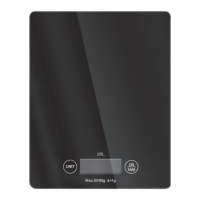
Fold out front and rear page for product illustrations.
A. Weighing platform
B. Battery compartment
C. UNIT key
D. Display
E. ON/TARE key
The product may be available in dierent colours.
BEFORE FIRST TIME USE
• Remove all packaging materials.
• Check for completeness and transport damage. In case of damages or incomplete
delivery please contact your dealer.
• Clean the appliance (
Cleaning and care).
INSTALLATION
1
Open the battery compartment cover underneath the scale.
2
Insert 1x CR2025
battery (provided) with the + polarity facing upwards into the
battery compartment.
3
Close the battery compartment cover. Place the appliance on an even and rm surface.
Note:
• If the battery level is low,
will appear on the display. Replace with a new battery of the
same type.


 To Next Page
 Loading...