
 Need help?
Do you have a question about the OK. ORD 110 and is the answer not in the manual?
Warning about excessive sound pressure from earphones causing hearing loss. Set to moderate volume.
Keep packaging material away from children to prevent suffocation.
Do not expose the product to rain or moisture to reduce fire or electric shock risk.
Product is for audio playback via DAB/FM radio or headphones, for household use only.
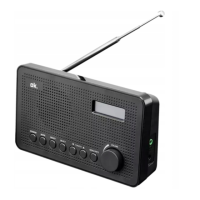
Identifies and lists all parts of the radio, such as antenna, display, buttons, and jacks.
Lists the included accessories with the product, such as an AC/DC adapter and user manual.
Instructions for unpacking, inspecting, and preparing the product before initial operation.
Details on operating the radio via mains power or batteries.
Guidance on extending and adjusting the antenna for optimal reception.
Procedure for powering the radio on using the STANDBY button.
How to control the audio volume using the dedicated volume knob.
Instructions on navigating and selecting available DAB/DAB+ radio stations.
Procedure for performing a full scan to find all available DAB/DAB+ stations.
How to view various details about the currently playing DAB station.
Steps to save up to 10 favorite DAB/DAB+ stations for quick access.
How to recall and play previously stored DAB/DAB+ stations.
Navigating menu options like Full scan, Manual tune, Prune, and System.
Process to remove invalid or unwanted stations from the list using the Prune function.
Instructions for choosing FM stations, either by scanning or direct selection.
Methods for tuning to specific FM frequencies manually or automatically.
Steps to save up to 10 favorite FM stations for easy recall.
How to access and play previously stored FM radio stations.
Accessing and navigating FM mode menus for settings like Scan, Audio, and System.
Configuring scan behavior to find strong signals or all available FM stations.
Adjusting audio playback mode between mono and stereo.
Accessing system settings including Time, Software version, and Factory Reset.
Options for setting time format, manual time/date, auto-update, and date format.
Instructions for resetting the device to its original factory default settings.
How to display the current software version of the radio unit.
Guidelines for safely cleaning the radio unit using a damp cloth and avoiding harsh chemicals.
Table listing common problems, their possible causes, and suggested solutions.
Provides detailed specifications for the adaptor and DAB radio, including input/output and dimensions.
Information on how to properly dispose of the appliance and batteries as WEEE.

 To Next Page
 General