Need help?
Do you have a question about the Okin Refined RF2512 and is the answer not in the manual?
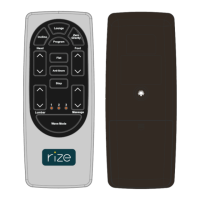
Press and hold HEAD UP button, head actuator moves out, stops when released.
Press and hold HEAD DOWN button, head actuator moves in, stops when released.
Press and hold FOOT UP button, foot actuator moves out, stops when released.
Press and hold FOOTDOWN button, foot actuator moves in, stops when released.
Press and hold LUMBARUP button, lumbar actuator moves out, stops when released.
Press and hold LUMBARDOWN button, lumbar actuator moves in, stops when released.
Click FLAT button, the bed goes flat, stop any button during process.
Click INCLINE button, actuators move to Incline position.
Click AntiSnore button, actuators move to AntiSnore position.
Click ZeroGravity button, move to ZeroGravity position.
Press and hold memory button and program for 2.5s for position recovery.
Click LED button to turn on the Black light.
Modifications may void user authority. Device complies with Part 15 FCC Rules.
Complies with Canada licence-exempt RSS standard. Subject to two conditions.
 General
| Brand | Okin Refined |
|---|---|
| Model | RF2512 |
| Category | Remote Control |
| Language | English |


 To Next Page