Date:
2018-4-10
Made by:
Evan
RF2512 User Manual
Version: 1.1
Page 3 of 5
3/4
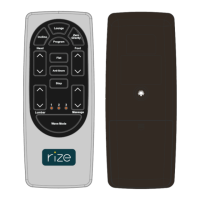
6 Lumbardown
Press and hold LUMBARDOWN button of remote, lumbar actuator moves in, stop
when released;
7 Flat
Click FLAT button, the bed goes flat, stop when click any button during the process of going flat;
8 Incline
Click INCLINE button, Actuators move to Incline position, stop when click any button during the
process of going Incline;
Press and hold
Incline button for 2.5s, the black light on remote will flash, the control box set
thenewposion
asIncline.
PressandholdInclineandprogramfor2.5s,Inclinepositionrecoveryforfactorysettingposition
9 AntiSnore
ClickAntiSnore button,Actuatorsmove to AntiSnoreposition, stop when click any button during
the process of going AntiSnore;
PressandholdAntiSnorebuttonfor2.5s,theblacklightonremotewillflash,thecon trolboxset
thenewposion
asAntiSnore.
Press and hold AntiSnore and program for 2.5s, AntiSnore position recovery for factory setting
position
10 ZeroGravity
ClickZeroGravity button, ZeroGravity move to ZeroGr avity position, stop when click any button
during the process of going ZeroGravity;
Pressandhold ZeroGravity button for 2.5s, the black light on remote will flash, the control box
setthenewposion
asZeroGravity.
PressandholdZeroGravityand program for2.5s, AntiSnorepositionrecoveryforfactorysetting
position



 To Next Page
 Loading...