Installation Instruction
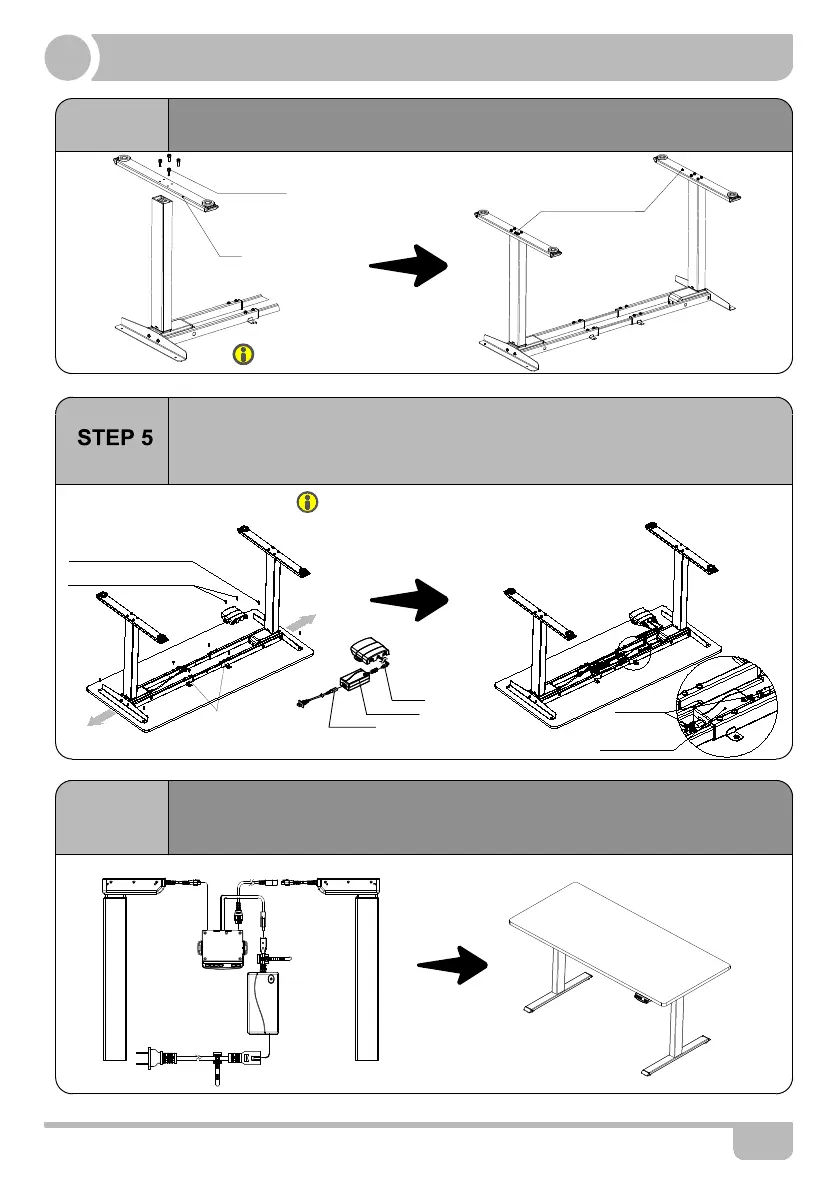
STEP 4
STEP 6
· Install the handset on suitable position of desktop edge to avoid
interference with humans or chairs.
· Tidy up all the power cables, and fasten with cable clip.
▲The frame width is adjustable: 43inch~59inch/1088~1500mm, which is suitable for
different desktop.
4
M6*30 Screw
Foot
Avoid excessive tightening screws
Fasten the screws
· Line up the screw holes on the feet and columns.
· Fasten the screws.
*Board need to be purchased separately.
*If you have bought the board from TOPSKY, you can
use the M6*16 screws and wrench we supplied. Control
Box and Handset still need tapping Screws(Suggest
use electric drive.)
ST4.8x16 Tapping Screw
ST3.5x16 Tapping Screw
Cable Clip
Power Adaper
▲Make sure that at least one wire on column can be
directly connected to the handset.
· Check both side of desktop before placing the base on the bottom side of
the desktop. Fasten the frame and handset to desktop with tapping screw.
· Fasten the frame screws. And connect related parts as shown in below,
including control box,extension cable and power cord.
Fasten the screws
Handset
Power Adapter
Power Cord


 To Next Page