EasyManua.ls Logo

Oliver Hemming Robin - User Manual

Oliver Hemming Robin
9 pages
Print Icon
To Next Page IconTo Next Page
Loading...
Robin
Bl
ue
to
ot
h Speaker
A
larm Cloc
k
Instructions and
W
arranty
Question and Answer IconNeed help?

Do you have a question about the Oliver Hemming Robin and is the answer not in the manual?

Summary

Introduction to the Robin Bluetooth Speaker Alarm Clock

Product Contents Overview

Lists the items included in the Robin Bluetooth Speaker Alarm Clock box.

Device Controls and Functions

Details the buttons and features on the Robin unit for operation.

Getting Started with Your Robin Device

Unpacking and Initial Setup

Instructions for unboxing and powering on the Robin Bluetooth Speaker Alarm Clock.

Bluetooth Audio Connection Guide

Steps to pair your device and stream audio wirelessly via Bluetooth.

Operating the Robin Alarm Clock Features

Alarm, Snooze, and Night Light Usage

How to set and utilize the alarm, snooze, and night light functions.

External Device Charging via USB

Information on using the USB ports to charge smartphones and tablets.

Device Care and Warranty Information

Maintenance and Cleaning Guidelines

Recommendations for cleaning and general care of the Robin unit.

Product Warranty Terms and Conditions

Details the coverage and procedures for product warranty claims.

Robin Speaker Alarm Clock Specifications

Device Controls and Features List

Enumerates the buttons, functions, and features of the Robin device.

Audio Performance Specifications

Details the audio output power, driver size, and sound quality metrics.

Connectivity and Power Sockets

Describes the USB ports and power input for the Robin unit.

Physical Dimensions and Weight

Provides the size (width, height, depth) and weight of the product.

Troubleshooting Common Issues

Resolving Clock Function Problems

Solutions for issues related to the clock's time and alarm settings.

Bluetooth Pairing and Connectivity

Guides for troubleshooting Bluetooth connection and pairing errors.

Speaker and Audio Playback Issues

Diagnosing and fixing problems with sound quality and playback.

Understanding USB Socket Usage

Clarification that USB ports are for charging only, not audio input.

FCC Regulatory Compliance

Overview

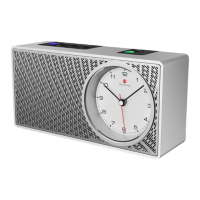
The Oliver Hemming Robin is a versatile Bluetooth speaker with an integrated analogue alarm clock, designed for ease of use and elegant functionality.

Function Description:

The Robin serves as an active Bluetooth speaker, allowing users to stream audio wirelessly from their devices. It also features a traditional analogue alarm clock, providing a familiar and intuitive way to manage time and alarms. The unit is powered by mains electricity for the audio components, while the clock is equipped with an internal rechargeable battery, ensuring continuous operation even during power outages.

Important Technical Specifications:

  • Audio Output: 10W
  • Driver: 65mm full-range driver
  • SNR (Signal to Noise Ratio): ≥ 95dB
  • External Transformer: 110V / 220V compatible
  • Frequency Response: 80Hz - 17,000Hz
  • Grille Material: Stainless steel
  • Digital Amplifier Distortion: ≤ 0.1%
  • Bluetooth Version: v4.2
  • Bluetooth Range: 10M (approximately 33 feet)
  • Volume Limiting Option: 70%
  • USB Charging Ports: Type USB A & C, 5V/2amps (for high power charging only)
  • Clock Movement: Silent sweep action
  • Alarm Tone: 3-step ascending
  • Dimensions (w x h x d): 180 x 55 x 90mm (7" x 2.1/4" x 3.1/2")
  • Weight: 1.2kg (2.6Lbs)

Usage Features:

Unpacking and Getting Started:

  1. Carefully unpack and inspect the contents for good condition.
  2. Verify the power cord has the correct plug for your country.
  3. Connect the 12V transformer plug to the cable at the back of the Robin unit.
  4. Plug the transformer into a mains power socket and ensure power is on.
  5. Switch on the clock power using the small switch on the back and set the time with the time setting knob.

Connecting to Bluetooth and Playing Audio:

  1. Press the blue pairing button on top for 2-3 seconds until it flashes.
  2. Open Bluetooth settings on your phone, search for "Oliver Hemming Robin Speaker Clock," and connect.
  3. Turn up the volume on both your phone and the Robin to maximum initially.
  4. Play audio from your phone, adjusting volume on the Robin or phone as desired.
  5. For optimal audio quality, set your phone's volume to about 70% of its maximum, then fine-tune with the Robin's +/- controls. Low input volume from the phone can result in poor audio playback.
  6. Use the Play/Pause (►||) button on the Robin or your phone controls.
  7. If there's no sound, check phone and Robin volume, power, Bluetooth connection, and ensure media is not paused.
  8. The Robin automatically reconnects to the last paired device within 6-10 feet (2-3 meters).

Using the Alarm Clock, Snooze, and Night Light:

  1. Set the alarm time by turning the alarm set button on the back of the unit, similar to a standard alarm clock.
  2. To activate the alarm, ensure the alarm on/off button on top shows a green LED light.
  3. To deactivate the alarm, press the alarm button until the red LED indicates "off."
  4. The snooze and night light share the same button but operate independently.
  5. To use the night light, press the snooze/light button.
  6. To activate SNOOZE, press the SNOOZE button when the alarm is ringing; the alarm will stop and restart after 5 minutes.

USB Charging:

  1. The Robin features two USB ports (USB A and USB C) on the back for charging devices like smartphones or tablets.
  2. These ports provide 5V/2amps for high-power charging, allowing you to wake up to a fully charged device.
  3. Devices can be charged simultaneously while playing audio, preventing battery drain.

Troubleshooting Problems:

The Clock:

  1. If the clock isn't working, check that the clock on/off switch on the back of the Robin is ON.
  2. If the alarm isn't working, check that the alarm on/off switch shows a green light.
  3. If the snooze isn't working, check that the alarm is on.

The Bluetooth Pairing:

  1. Ensure Bluetooth is on your phone and you are within 3 feet (1 meter) of the Robin.
  2. Confirm no other nearby devices are connected to prevent interference.
  3. Press the blue pairing button on top for 2-3 seconds until it flashes, then search for "Oliver Hemming Robin Speaker Clock" in your phone's Bluetooth settings and connect.
  4. If connection fails, toggle your phone's Bluetooth on/off and retry. Pairing only occurs when the blue light is flashing. No passwords are required.
  5. If issues persist, try with another phone or Bluetooth device to rule out device-specific problems.

The Speaker and Audio:

  1. Audio volume can be controlled from both the Robin and your phone; both levels affect quality.
  2. If there's no sound:
    • Check that the top Bluetooth light is on, indicating connection.
    • Turn up the Robin's volume using the + control until it beeps.
    • Turn your phone's volume to maximum.
    • Verify Bluetooth connection to "Oliver Hemming Robin Speaker Clock" on your phone.
    • Press the Play/Pause (►||) button on both the Robin and your phone to ensure media isn't paused.
  3. If audio quality is poor or muffled, the input signal may be too weak. Set your phone's volume to about 70% of its maximum, then adjust the Robin's volume. Insufficient phone volume can prevent the Robin's amplifier from reproducing music clearly.

The USB Sockets:

  1. The two USB ports are for charging only and are not audio inputs.
  2. They provide 5V/2amp output, suitable for charging smartphones or tablets.

Maintenance Features:

Maintenance and Cleaning and General Use:

  1. Regularly check power cables for damage and avoid using them if any is found.
  2. Clean the Robin's body with a slightly damp cloth; avoid "wet" cloths. The painted finish does not require wax polish.
  3. Clean the clock lens with a damp cloth; avoid abrasive cleaning pads to prevent scratches.
  4. Position the Robin away from direct sunlight to prevent discolouration or overheating.
  5. Keep the Robin dry and in a non-humid room; do not use it outdoors or in bathrooms.
  6. Do not place the Robin near heat sources like cookers.
  7. Avoid playing the Robin at full volume for extended periods, as it is not designed as a party speaker and prolonged high volume use may damage the electronics.

Warranty:

  1. Inspect the product for cosmetic defects upon purchase.
  2. The warranty covers defective workmanship, including clock mechanisms, audio amplifiers, or speaker units.
  3. The warranty does not cover damage due to misuse, such as playing at full volume for prolonged periods.
  4. Damage from dropping, falling, or harmful environments is not covered.
  5. Cosmetic damage like scratches or a broken clock lens is not covered.
  6. The product must be returned to the distributor with the original receipt within the warranty period for any claim.

Oliver Hemming Robin Specifications

General IconGeneral
BrandOliver Hemming
ModelRobin
CategoryAlarm Clock
LanguageEnglish