Date 9/7/2018
File BSR-2114/MAR
Document Number 921211401_09_002
Page 71 από 74
71
The parameters are :
NETWORK STATUS : if the network in enabled or disabled. If the arrow is at this choice and we press «ENTER» we
can change the status.
PANEL ADDRESS : The address can be set from 1 up to 32. If the address is 1 the panel is master else the panel is
subpanel. If the arrow is at this choice and we press «ENTER» we can change the address.
INDICATION OF PANEL : The panel can show only its indication or the indication of the master panel.
If we want to exit this menu we press «ESC» and then we select “YES” so the change are saved.
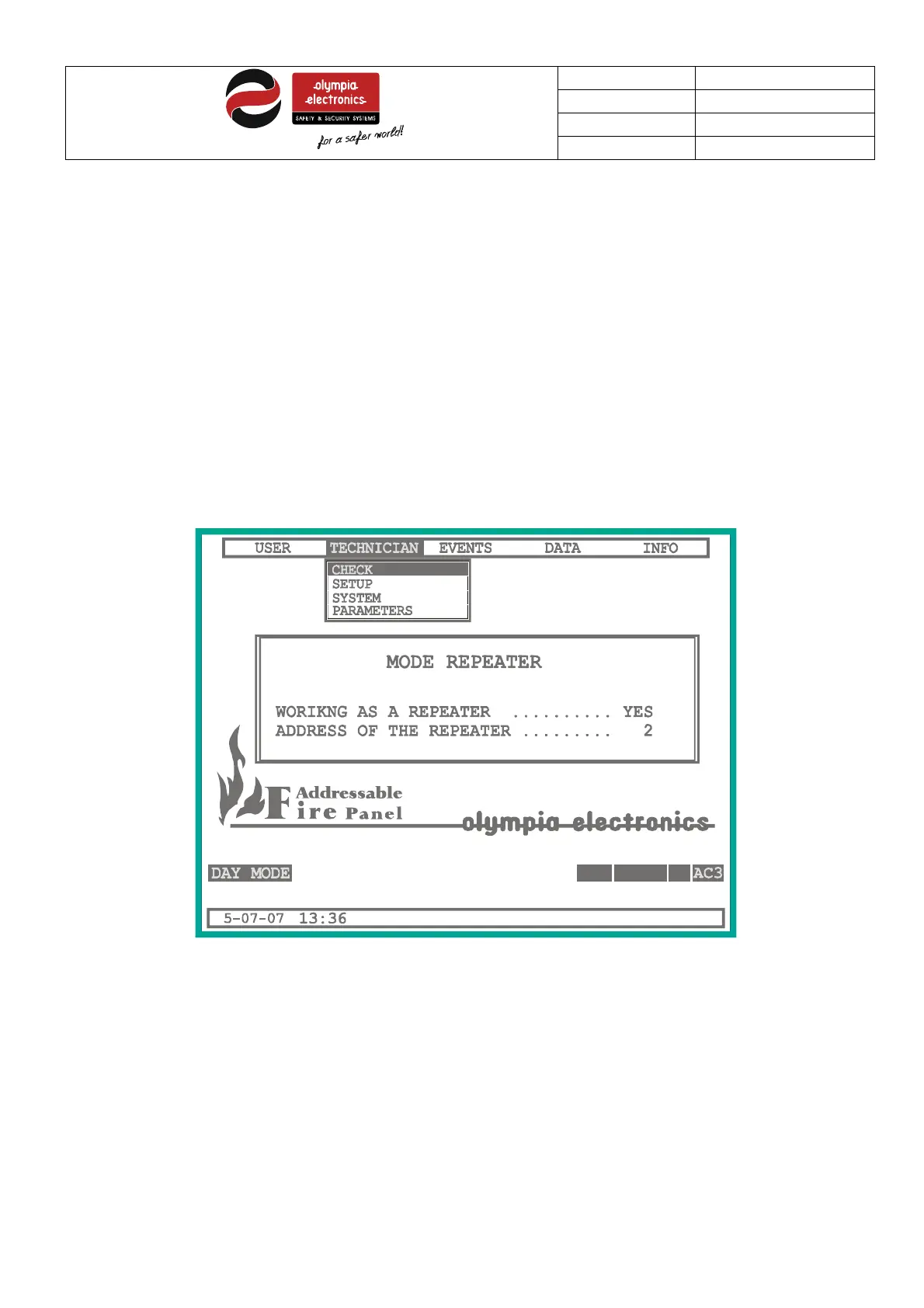
5.6.2 Mode repeater
As the previous paragraph, here we change the parameter of the repeater mode:
IF
SYSTEM READY
Figure 5-21 Repeater mode
The parameters are:
WORKING AS REPEATER : If the “YES” is displayed the panel works as repeater, else if “NO” is displayed the panel
can take repeater panel in the extension.
ADDRESS OF REPEATER : If the panel is repeater we can set its address from 1 to 4.


 To Next Page