Intended Use
Paper Shredder CC 415.4 / 518.4 / 624.4
13
Gi
Please read the following information thoroughly, observe
the information contained and keep the operating manual
for future reference!
Overview
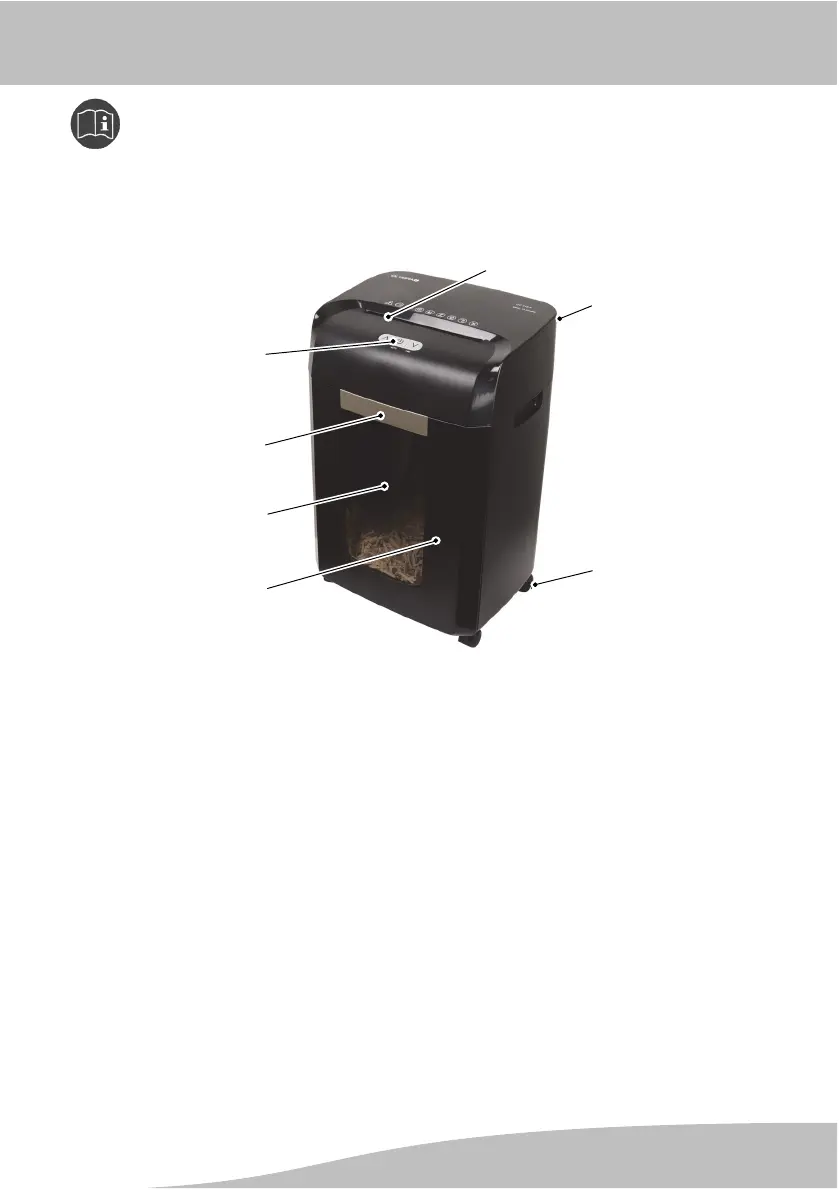
7
1
2
3
4
5
6
1 Paper infeed
2 Main switch, On / Off
(rear side)
3 Rollers (underside)
4 Waste bin
5 Viewing window
6 Handle on waste bin
7 Buttons (AUTO/FWD/REV)
AUTO button Significance
Light blue Device is ready to operate
Flashes blue Waste bin has been removed
Lights up red Device has overheated / overloaded
Flashes red Too much paper fed in / Paper jam
Intended Use
The automatic paper shredder - subsequently referred to as "device" - can be
used to shred paper automatically by inserting it in the paper infeed.
The material to be shred must comply with the requirements stipulated in Techni
cal Data.
Unauthorised modifications or reconstructions to the device are not permitted.





 To Next Page