EasyManua.ls Logo

Olympia SPLENDID 99 - Operating Instructions; Drawing Lines; Touch Adjuster; Erasing

Olympia SPLENDID 99
4 pages
Print Icon
To Next Page IconTo Next Page
To Previous Page IconTo Previous Page
Loading...
i.
9.2:;
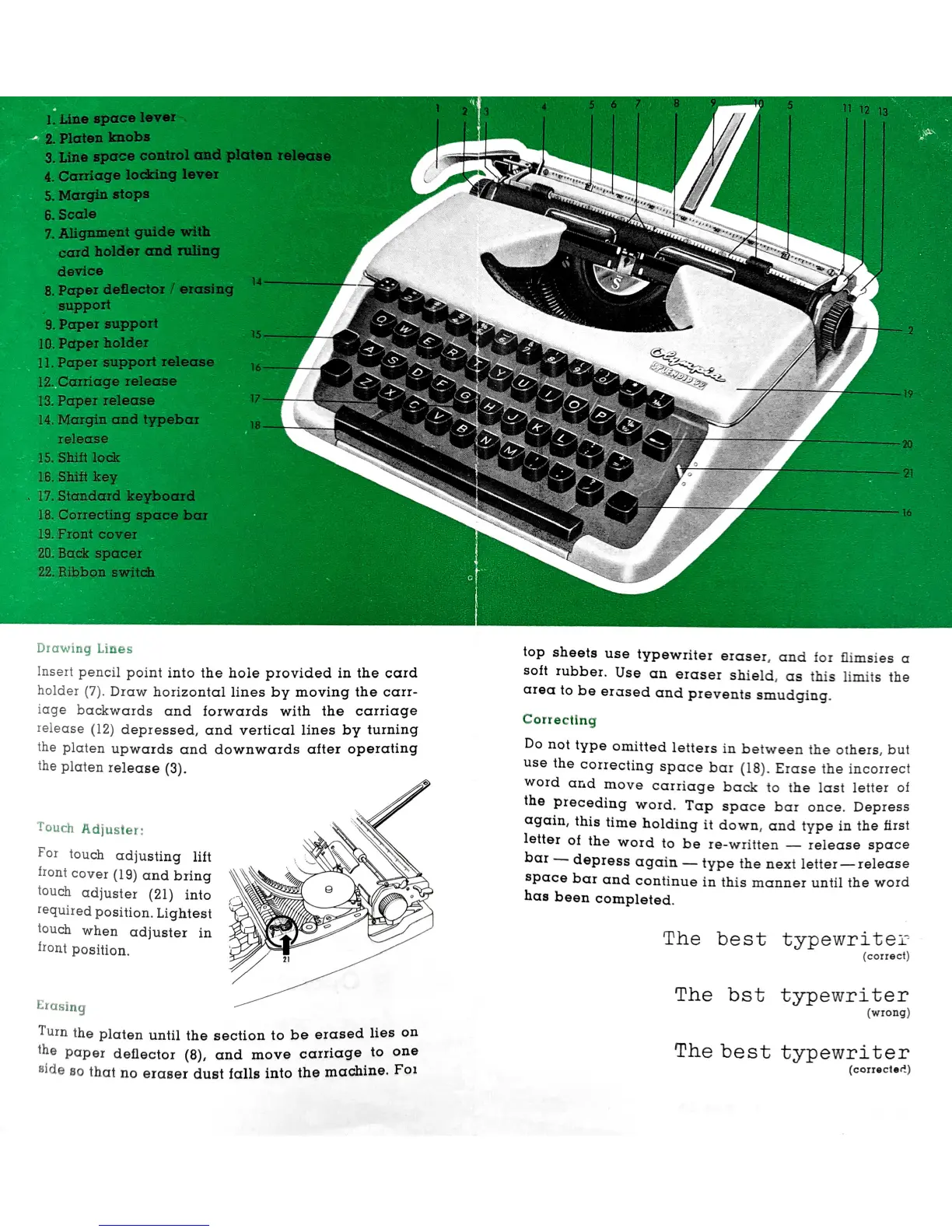
Lines
Insert
pencil
point
into
the
hole
provided
in
the
card
holder
Draw
horizontal
lines
by
moving
the
carr-
iage
backwards
cznd
forwards
with
the
carriage
ielease
(12)
depressed,
and
vertical
lines
by
turning
the
Platen
upwards
and
downwards
after
operating
the
platen
release
For
touch
adjusting
lift
front
cover
(19)
and
bring
touch
adjuster
(21)
into
requiredposition.Lightest
touch
when
adjuster
in
trout
position.
’1'A'::hu
Turn
the
platen
until
the
section
to
be
erased
lies
on
the
paper
detlector
and
move
carriagelto
:ne
Hide
so
that
no
eraser
dust
falls
into
the
machine.
01
top
sheets
use
typewriter
eraser,
and
for
thmsies
c1
soft
rubber.
Use
cm
eraser
shield,
as
this
limits
the
area
to
be
erased
and
prevents
smudging.
Correcting
Do
not
type
omitted
letters
in
between
the
others,
but
use
the
correcting
space
bar
Erase
the
incorrect
word
and
move
carriage
back
to
the
last
letter
of
the
preceding
word.
Tap
space
bar
once.
Depress
again,
this
time
holding
it
down,
and
type
in
the
first
letter
of
the
word
to
be
Ie-written
release
space
bar
depress
cxgcxin
type
the
next
letter—Ielecse
space
bar
and
continue
in
this
manner
until
the
word
has
been
completed.
The
best
typewriter
(correct)
The
bst
typewriter
(wrong)
The
best:
typewriter
(corrected)

Related product manuals