EasyManua.ls Logo

Olympia SPLENDID 99 - Machine Handling and Setup; Taking Machine Out of Case; Ribbon Control; Paper Support

Olympia SPLENDID 99
4 pages
Print Icon
To Previous Page IconTo Previous Page
Loading...
Take
it
easy
.
.
.
Taking
machine
out
0!
case.
Remove
cardboard
packing
from
paper
support
on
carriage,
and
from
keyboard.
Lift
up
line
space
lever
press
buck
carriage
lock
lever
(4)
releasing
carriage,
remove
top
plate
and
take
cardboard
packing
out
of
type
but
segment.
Loosen
tape
band
on
right
platen
knob
(Z)
and
pull
out
of
left
platen
knob
Remove
the
tour
plastic
pins
inserted
(left
and
right)
between
guide
rails,
tor
protection
during
transit.
Press
down
one
of
the
shift
keys
and
take
out
both
plastic
strips
(right
and
left)
below
the
guide
rails.
When
replacing
top
plate,
see
that
the
securing
studs
drop
into
the
two
rubber-lined
holes
in
the
frame.
A
felt
or
rubber
pad
will
assist
in
reducing
noise
While
typing,
although
the
machine
is
already
well
fitted
with
cnti-noise
plastic
insulation.
The
machine
is
now
ready
for
use.
KNOWN
ALREADY?
Ribbon
Control
With
a
two-colour
ribbon
set
the
ribbon
switch
(22)
in
the
upper
position
for
black,
or
the
lower
for
red.
The
centre
position
(white)
is
for
use
when
cutting
dupli—
cating
stencils.
When
the
upper
half
of
single
colour
ribbons
is
wom-out
invert
for
use
of
the
lower
part.
Ribbon
advance
and
return
are
automatic.
Paper
support:
Pull
the
release
lever
(11)
on
the
right
hand
side
of
the
carriage
forward
and
the
paper
support
will
go
automatically
into
its
position.
Inserting
the
Paper
Raise
paper
holder
Insert
paper
between
platen
and
scale
turn
platen
knob
feeding
the
paper
underneath
the
paper
holder
Lower
the
paper
holder
and
turn
paper
to
desired
position.
To
adjust
paper,
or
for
thicker
paper
and
several
carbon
copies,
pull
paper
release
(13)
forward.
Setting
the
Margin
The
beginning
and
ending
oi
the
typing
line
can
be
set
by
adjusting
the
two
margin
stops
(5)
at
the
back
of
the
carriage.
Depress
these
and
slide
them
to
the
required
positions.
The
two
red
pointers
on
the
scale
(6)
indicate
the
setting.
This,
too,
is
necessary
.
.
.
Changing
the
Ribbon
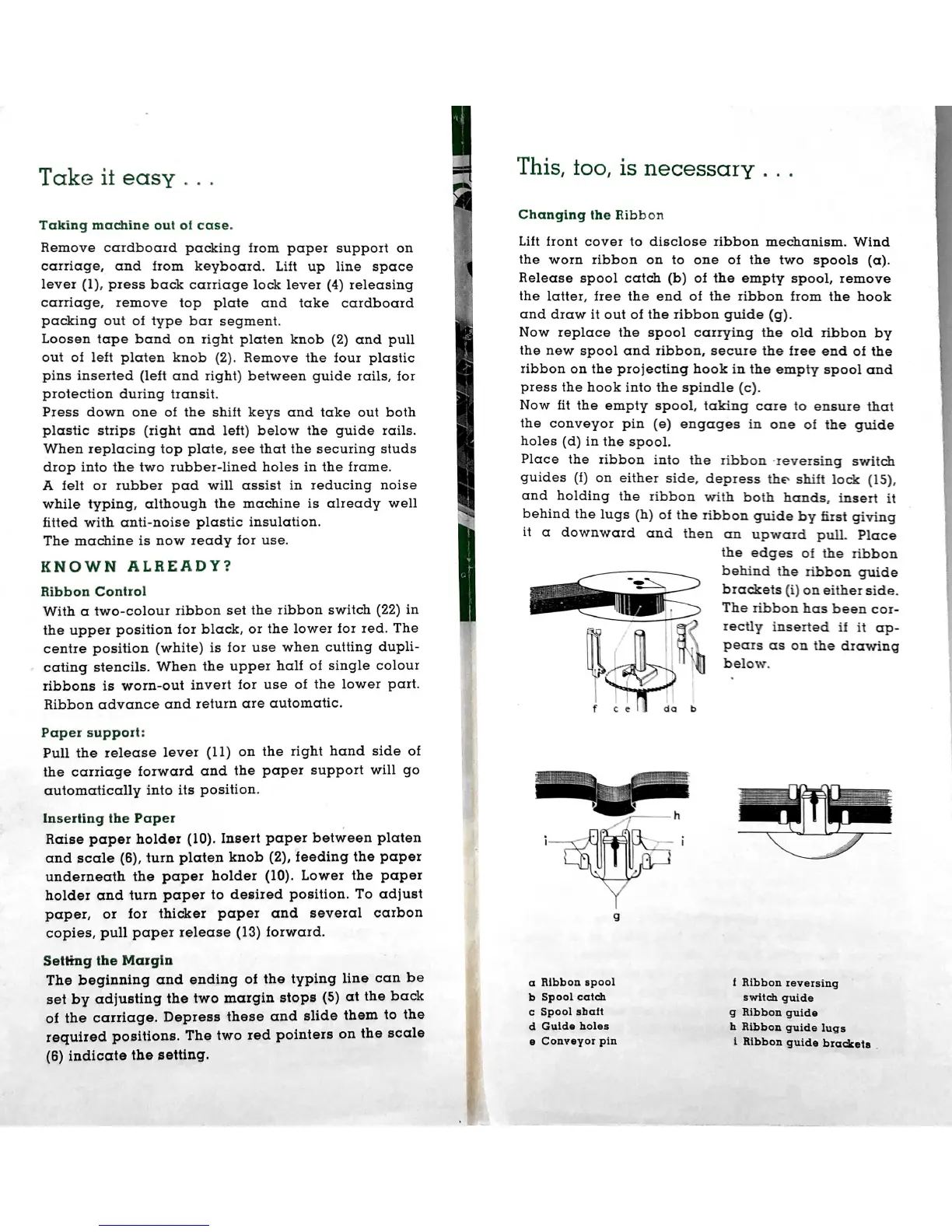
Lift
front
cover
to
disclose
ribbon
mechanism.
Wind
the
worn
ribbon
on
to
one
of
the
two
spools
Release
spool
catch
(b)
of
the
empty
spool,
remove
the
latter,
tree
the
end
of
the
ribbon
from
the
hook
and
draw
it
out
of
the
ribbon
guide
Now
Ieplcxce
the
spool
carrying
the
old
ribbon
by
the
new
spool
and
ribbon,
secure
the
tree
end
of
the
ribbon
on
the
projecting
hook
in
the
empty
spool
and
press
the
hook
into
the
spindle
Now
tit
the
empty
spool,
taking
care
to
ensure
that
the
conveyor
pin
(e)
engages
in
one
of
the
guide
holes
(d)
in
the
spool.
Place
the
ribbon
into
the
ribbon
-xeversing
switch
guides
(t)
on
either
side,
depress
the
shift
lock
and
holding
the
ribbon
with
both
hands,
insert
it
behind
the
lugs
(h)
of
the
ribbon
guide
by
first
giving
it
CI
downward
cmd
then
cm
upward
pull.
Place
the
edges
of
the
ribbon
behind
the
ribbon
guide
brackets
(i)
on
either
side.
The
ribbon
has
been
cor-
rectly
inserted
it
it
ap—
pears
as
on
the
drawing
below.
a
htbbon
spool
to
Spool
catch
switch
guide
I
Bibb
on
reversing
c
Spool
shaft
d
Guide
holes
a
Conveyor
pin
g
Ribbon
guide
h
Ribbon
guide
lugs
i
Ribbon
guide
brackets
A complimentary Copy from Mr & Mrs Vintage Typewriters
For More Visit www.MrMrsVintageTypewriters.com

Related product manuals