21
EN
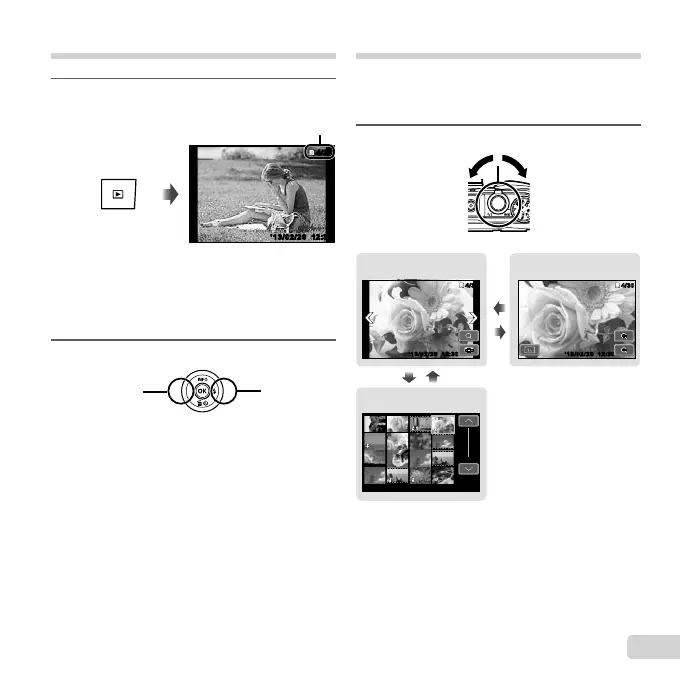
Viewing images
1
Press the q button.
Number of frames/
Total number of images
12:30’13/02/26’13/02/26 12:30
4/30
4/30
Playback image
● Pictures taken using V mode, sequential
shooting function or Photo in Movie are
displayed as a group. Turn the zoom lever to
the T side to play back the image in the group.
2
Use HI to select an image.
Displays
previous
image
Displays
next image
● Hold I to fast forward and hold H to reverse.
● Press the q button again to return to the
shooting screen.
To play sound recordings
To play sound recorded with an image, select the
image and press the A button.
● Press FG to adjust volume.
Index view and close-up view
Index view enables quick selection of a desired
image. Close-up view (up to 10× magnifi cation)
allows checking of image details.
1
Turn the zoom lever.
Single-image view Close-up view
Index view
12:3012:30
4/30
4/30
12:30
12:30
WT
W
T
4/304/30
’13/02/26’13/02/26 ’13/02/26
’13/02/26
12:30
12:30
’13/02/26
12:30’13/02/26
’13/02/26



 To Next Page