5
En
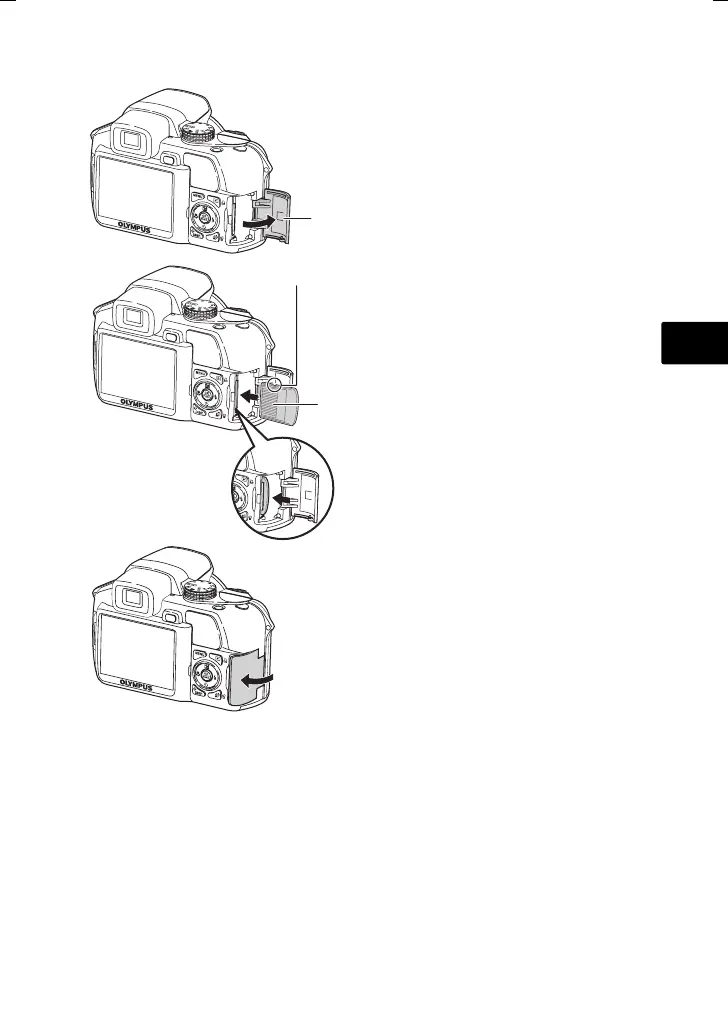
b. Insert xD-Picture Card (optional) into thecamera
This camera allows you to take pictures without using an optional
xD-Picture Card™ (hereinafter called the card). When taking pictures
without the card, pictures will be stored in the internal memory. For
details on the card, please refer to the Advanced Manual.
1
2
3
Card cover
Notch
Contact area
• Insert the card straight in.
• Insert the card until it clicks into place.
• To remove the card, push it all the way
in, release it slowly and remove.
d4355_e_basic_00_bookfile-E.book Page 5 Thursday, July 12, 2007 8:35 PM







 To Next Page