60
Es
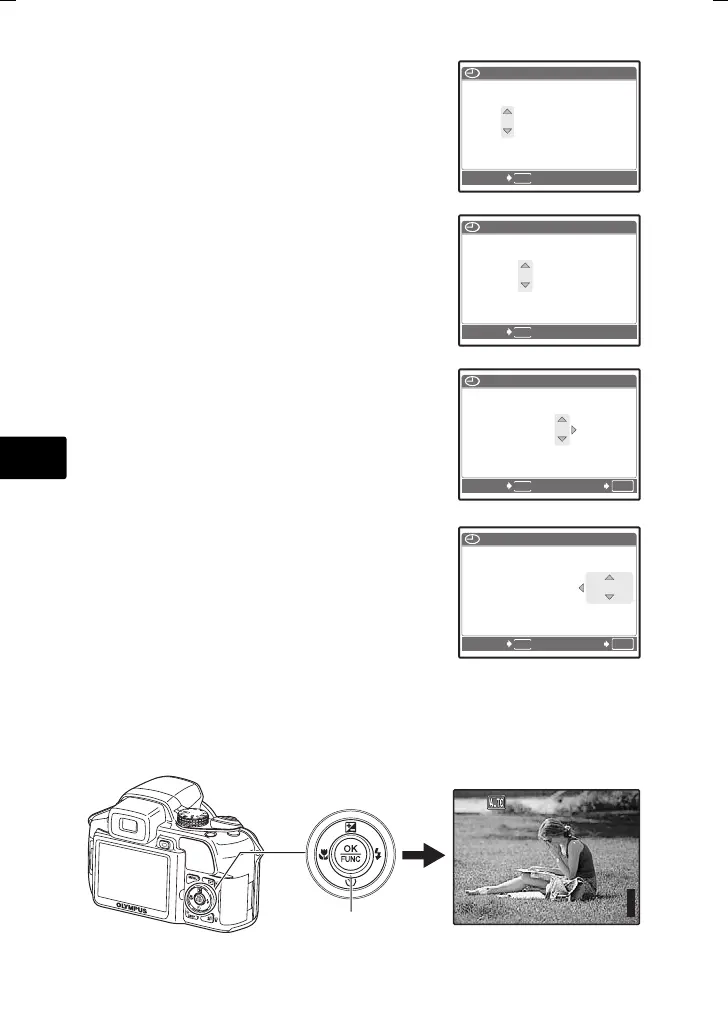
c. Presione el botón 1 F y el
botón 2Y para seleccionar
[M].
d. Presione el botón 3#.
e. Presione el botón 1 F y el
botón 2Y para seleccionar
[D].
f. Presione el botón 3#.
g. Presione el botón 1 F y el
botón 2Y para seleccionar
“hora” y “minuto”.
La hora se muestra en el formato de 24
horas.
h. Presione el botón 3#.
i. Presione el botón 1 F y el
botón 2Y para seleccionar
[A/M/D].
j. Una vez ajustados todos los
elementos, presione el botón o.
Para un ajuste horario preciso, presione el botón o cuando la
señal horaria alcance los 00 segundos.
2007
.
12
.-- --:--
MENU
CANCEL.
A M D HORA
A/M/D
2007
.
12
.
26
--:--
MENU
CANCEL.
A/M/D
A M D HORA
MENU
OK
ACEPT.
2007
.
12
.
26
12
:
30
CANCEL.
A/M/D
A M D HORA
MENU
OK
ACEPT.
2007
.
12
.
26
12
:
30
CANCEL.
A/M/D
A M D HORA
HQ
3264
×
2448
[
IN
]
44
[ ]
Botón o
d4355_s_basic_00_bookfile.book Page 60 Thursday, July 12, 2007 8:38 PM





 To Next Page