4
EN
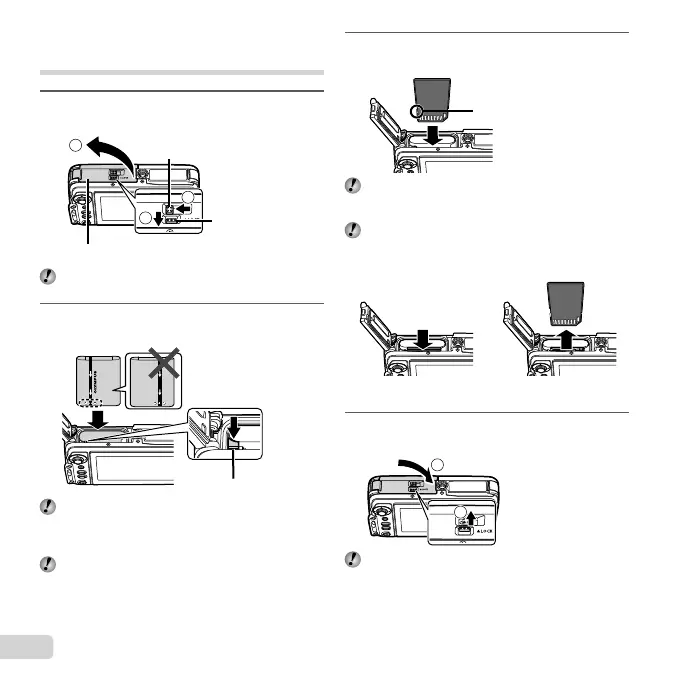
Inserting and removing the battery
and card
1
Follow Steps 1, 2 and 3 to open the
battery/card cover.
3
1
2
Lock knob
Battery/card cover
Battery/card
cover latch
Turn off the camera before opening the battery/card
cover.
2
Insert the battery while sliding the battery
lock knob in the direction of the arrow.
Battery lock knob
Insert the battery as illustrated with the B mark
toward the battery lock knob.
Damage to the battery exterior (scratches, etc.) may
produce heat or an explosion.
Slide the battery lock knob in the direction of the
arrow to unlock, and then remove the battery.
3
Insert the card straight until it clicks into
place.
Write-protect switch
Always use SD/SDHC/SDXC cards or Eye-Fi card
with this camera. Do not insert other types of memory
cards. “Using the card” (p. 58)
Do not touch the metallic parts of the card directly.
To remove the card
12
Press the card in until it clicks and comes out slightly, then
remove the card.
4
Follow Steps 1 and 2 to close the battery/
card cover.
2
1
When using the camera, be sure to close and lock
the battery/card cover.


 To Next Page