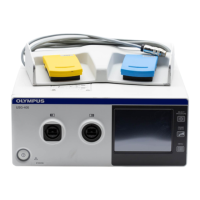
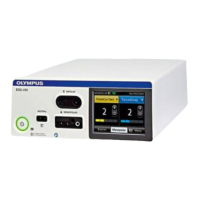
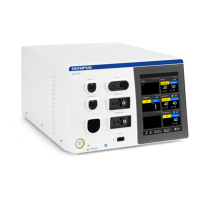
The Olympus USG-410 is an ultrasonic bipolar generator designed for use with THUNDERBEAT and SONICBEAT instruments, facilitating both ultrasonic cutting and bipolar sealing functionalities in surgical procedures. It serves as a versatile energy source for various tissue manipulation tasks, offering precise control over energy delivery.
Function Description:
The USG-410 provides two primary energy outputs: ultrasonic and RF bipolar.
- Ultrasonic Output: This mode is used for cutting and coagulating tissue through high-frequency vibrations. It is available for both THUNDERBEAT and SONICBEAT instruments. For THUNDERBEAT, it is integrated into the SEAL & CUT mode, offering levels 1-3. For SONICBEAT, it has VAR (levels 1-3) and MAX (level 3) modes.
- RF Bipolar Output: This mode is specifically for tissue sealing and coagulation using radiofrequency energy. It is primarily used with THUNDERBEAT instruments in SEAL & CUT and SEAL modes. The SEAL mode, in particular, features an improved SEAL algorithm compared to previous models (ESG-400 & USG-400) for shorter sealing times.
A key feature is the Intelligent Tissue Monitoring (ITM) system. When ITM is active (ON), the device automatically detects when the tissue is cut or sealed and stops the ultrasonic and RF bipolar output, preventing excessive energy delivery and potential tissue damage. If ITM is OFF, the user must manually stop the activation by releasing the hand switch. ITM is available for THUNDERBEAT SEAL & CUT and SONICBEAT MAX modes.
The device is equipped with a transducer socket for connecting THUNDERBEAT or SONICBEAT instruments via a transducer. The USG-410 automatically recognizes the connected instrument and displays the corresponding settings screen.
Important Technical Specifications:
While specific numerical technical specifications like power output in watts are not explicitly detailed in the provided pages, the manual highlights performance characteristics related to cutting speed and sealing capabilities:
- THUNDERBEAT SEAL & CUT (Ultrasonic/RF Bipolar): Offers fastest cutting speed at level 1 and constant sealing performance over all levels (1-3). Vessel sealing capability is up to 7 mm.
- THUNDERBEAT SEAL (RF Bipolar): Provides shorter sealing time due to an improved SEAL algorithm. Vessel sealing capability is up to 7 mm.
- SONICBEAT VAR (Ultrasonic): Offers fastest cutting speed at level 3 (levels 1-3 available). Vessel sealing capability is up to 5 mm (level 1 only).
- SONICBEAT MAX (Ultrasonic): Offers fastest cutting speed (level 3).
The device supports saving up to 40 user-defined procedures, allowing for quick recall of preferred settings.
Usage Features:
- Touch Screen Interface: The USG-410 features a touch screen for intuitive operation. This interface displays the procedure name (if saved), mode name, foot switch indicator, instrument name, output levels for SEAL & CUT and SEAL, ITM status (ON/OFF), and access to settings.
- Output Level Adjustment: Users can adjust the output level by tapping plus/minus icons on the touch screen. The device recalls the last-used output level and ITM status when an instrument is reconnected.
- Pre-Procedure Device Checks:
- Activation Test for Ultrasonic Output: This test must be performed every time a THUNDERBEAT or SONICBEAT instrument is connected. It involves activating the instrument with jaws opened, following on-screen instructions, and confirming the result. This ensures safe and proper ultrasonic function.
- Verification of RF Bipolar Output (THUNDERBEAT only): This test involves submerging the distal half of the THUNDERBEAT instrument jaws in sterile saline and pressing the SEAL button. Users confirm the output screen display and tone. This verifies the RF bipolar sealing function.
- Instrument Recognition: The USG-410 automatically recognizes the connected THUNDERBEAT or SONICBEAT instrument and displays the appropriate settings screen.
- Procedure Management: The "Procedures" setting allows users to save, select, overwrite, or delete up to 40 customized procedures.
- Setup Options: The "Setup" menu provides options to change device settings such as language, hand switch activation preferences, and automatic mist and smoke evacuation.
Maintenance Features:
- Maintenance Menu: The "Maintenance" menu provides access to the error log, data transfer functions, and allows users to set maintenance reminders. This supports proactive device management and troubleshooting.
- Troubleshooting Guide: The manual includes a comprehensive troubleshooting section for common errors (U504/U601 Probe damage, U508/U511 Short circuit, U509 Ultrasonic level error, U510 Ultrasonic frequency error, U512 Open circuit, U514 Seal incomplete). For each error, possible causes and corresponding solutions (e.g., replacing the instrument, connecting plugs firmly, stopping output to cool down, reducing force, removing fluids) are provided, aiding in quick resolution of operational issues.

 Need help?
 General

 To Next Page