EasyManua.ls Logo

Olympus ESG-410 - User Manual

Olympus ESG-410
148 pages
Print Icon
To Next Page IconTo Next Page
Loading...
Caution: Federal (USA) law restricts this device to sale by or on the order of a physician.
INSTRUCTIONS FOR USE
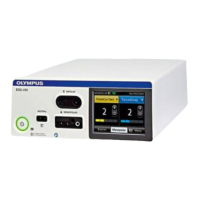
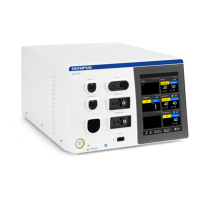
ELECTROSURGICAL GENERATOR
ESG-410
WA91307W
ESG-410
UNIVERSAL 1 BIPOLAR
MONOPOLAR 1
MONOPOLAR 2
NEUTRAL
UNIVERSAL 2
SURGISABER

Table of Contents

Other manuals for Olympus ESG-410

Questions and Answers

  • S
    Susan RichAug 14, 2025
    What to do if Olympus Portable Generator does not respond to foot or hand switch?
    • J
      Jennifer FloresAug 14, 2025
      If the Olympus Portable Generator doesn't respond to the foot or hand switch, check the connection cable of the foot switch and the instrument for correct connection. Inspect the foot switch, the hand switch of the instrument, and their connection cables for damages. If necessary, replace the foot switch, the instrument, or the corresponding connection cable. Ensure you are pressing the correct foot switch pedal or the correct hand switch of the instrument. Also, verify that the electrosurgical generator is switched on with the power switch.
  • L
    Lisa ThomasAug 17, 2025
    Why Olympus ESG-410 Portable Generator won't turn on?
    • J
      Jeff BuckleyAug 17, 2025
      If the Olympus Portable Generator doesn't respond when pressing the power switch, check the power cable at the socket on the back panel and at the mains electricity socket for correct connection. Check the grounded fixed socket outlet or use an alternative grounded fixed socket outlet. Inspect the power cable for damages and, if necessary, replace it. If the issue persists, do not use this electrosurgical generator and contact Olympus.
  • A
    Andrea GreeneAug 21, 2025
    What to do if Olympus ESG-410 output can't be stopped?
    • N
      Nicholas HeathAug 21, 2025
      If it is impossible to stop the output of the Olympus Portable Generator, immediately switch off the electrosurgical generator by pressing the power switch. Replace the foot switch or the instrument with hand switch. If the issue persists, do not use this electrosurgical generator and contact Olympus.
  • R
    robertmartinAug 25, 2025
    What to do if Olympus Portable Generator touchscreen is dark?
    • B
      Brendan ColeAug 25, 2025
      If after switching on the Olympus Portable Generator the touchscreen remains dark but sounds are audible, do not use this electrosurgical generator and contact Olympus, as this indicates a malfunction of the touchscreen.
  • D
    David CastilloAug 27, 2025
    What to do if Olympus ESG-410 Portable Generator has no output but tone sounds?
    • T
      Thomas GuerraAug 27, 2025
      If the foot switch pedal or hand switch of the instrument is pressed and the output tone sounds but no output is delivered, check the plug of the instrument for correct connection. If the issue persists, do not use this electrosurgical generator and contact Olympus.
  • J
    johnsontiffanyAug 31, 2025
    Why is there no output tone during Olympus Portable Generator activation?
    • D
      donna90Aug 31, 2025
      If there is no output tone during activation of the Olympus Portable Generator, increase the volume either on the [Settings] screen or use the volume control on the back panel of the electrosurgical generator. If the issue persists, do not use this electrosurgical generator and contact Olympus.
  • T
    Troy YorkSep 3, 2025
    How to fix Olympus Portable Generator import data transfer failure?
    • S
      Steven JonesSep 3, 2025
      To fix a failed data transfer (Import) from the USB flash drive on the Olympus Portable Generator, check if the required data (user- defined procedures/setting) are available on the USB flash drive. Use an USB flash drive with the following specifications: compatible with USB 1.1, max. 32 GB, FAT or FAT32 formatting (ExFAT, NTFS etc. are not supported).
  • K
    Kelly MckenzieSep 6, 2025
    What to do if Olympus Portable Generator won't switch off?
    • S
      Sharon BaileySep 6, 2025
      If it's impossible to switch off the Olympus Portable Generator, disconnect the power cable plug from the socket on the back panel of the electrosurgical generator and/or from the grounded mains electricity socket. Do not use this electrosurgical generator and contact Olympus.
  • V
    victoriarobertsSep 10, 2025
    How to clear info message i1772 on Olympus Portable Generator?
    • R
      Richard RiceSep 10, 2025
      To clear the info message i1772 “Use of non-split neutral electrodes disabled” on the Olympus Portable Generator, disconnect the neutral electrode from the ESG?410. Change the setting for non-split neutral electrodes to [Enable]. Or: Connect a split-type neutral electrode so that the contact quality of neutral electrode is monitored during use.

Summary

Using this document

User Instructions

Guidance on how to read and use the manual for electrosurgical generator.

Document Conventions

Explains symbols, formatting, and text conventions used throughout the manual.

Safety Information Overview

Introduces the different categories of safety information provided in the document.

Safety Information

Intended Purpose and Indications

Defines the electrosurgical generator's intended use and the medical fields it serves.

Contraindications

Lists absolute and relative contraindications for electrosurgical procedures.

General Safety Notes

Covers essential safety points for general handling, use, and potential hazards.

Product Description

Operating Principles and Features

Explains how the generator works and highlights key features like CQM and HPCS.

Hardware Components

Identifies front and rear panel operating elements and connectors.

Touchscreen Operation

Details how to interact with the touchscreen interface for settings and controls.

Installation

Safety Notes for Installation

Crucial safety instructions to prevent injuries and equipment damage during installation.

Generator Placement and Connections

Guidelines for proper placement, power connection, and peripheral equipment setup.

Connecting Smoke Evacuation Units

Instructions for connecting UHI units for automatic smoke evacuation.

System Settings

Touchscreen Operation and Settings

How to operate the touchscreen and configure basic system settings.

Volume, Brightness, and Tone Adjustments

Controls for activation tone volume, touchscreen brightness, and touch tone feedback.

Procedure and Startup Settings

Configures monopolar modes, startup behavior, and saves user-defined procedures.

Safe Use of Neutral Electrodes

Contact Quality Monitoring (CQM)

Explains CQM for split electrodes and its importance for safety.

Baby Neutral Electrode Safety Feature

Critical safety setting for newborns to prevent burns by monitoring current flow.

Selecting and Connecting Neutral Electrodes

Guidelines for choosing compatible electrodes and connecting them correctly.

Before Use

Safety Notes Before Operation

Essential precautions regarding equipment inspection, power levels, and patient safety.

Mode Descriptions and Tissue Effects

Details on electrosurgical modes and their effects on tissue based on settings.

Use

Safety Notes During Use

Critical warnings regarding instrument connection, hot tips, accessories, and fluids.

Output Socket Descriptions

Details compatible plugs and instruments for BIPOLAR, MONOPOLAR, and UNIVERSAL sockets.

Setting Output Parameters

How to select modes, power levels, and effect levels for procedures.

Activation of HF Output

Warnings and considerations for activating HF output safely and effectively.

Alarm System and Troubleshooting

Alarm System Overview

Explains alarm priorities, tones, and error message display.

Troubleshooting Common Issues

Provides a guide to identify and resolve problems with the generator.

Reprocessing and Maintenance

Reprocessing Procedures

Steps for cleaning and disinfecting the generator after use.

Regular Safety Checks

Importance and procedure for annual safety checks to ensure device performance.

Maintenance Settings and Data Transfer

Accessing maintenance functions and transferring data via USB.

Repair, Storage, and Disposal

Repair and Shipment Information

Procedures for sending the unit for repair, including packaging and defect descriptions.

Storage and Disposal Guidelines

Proper methods for storing the device and environmentally responsible disposal.

Technical Data

ESG-410 Specifications

Detailed technical specifications including size, power, classifications, and output.

Ambient Conditions and Plug Requirements

Environmental requirements and plug/socket compatibility details.

Additional Information

Alarm System Details

Further specifications for alarm system logs, priorities, and tones.

Output Characteristic Diagrams

Graphs illustrating HF output data for various modes and settings.

Electromagnetic Compatibility

EMC Declarations and Guidelines

Manufacturer's declarations regarding emissions and immunity according to EMC standards.

Glossary

Key Term Definitions

Provides definitions for technical terms used in the manual.

Index

Alphabetical Index

An alphabetical listing of topics and their corresponding page numbers for quick reference.

Olympus ESG-410 Specifications

General IconGeneral
BrandOlympus
ModelESG-410
CategoryPortable Generator
LanguageEnglish

Related product manuals